
Business guides
Find a guide that fits the way you work
A plumber fitting in a call-out faces a different scheduling decision from a cleaner covering a regular visit. Choose your industry for examples that use the jobs, crews and billing arrangements you recognise.
Choose the work you recognise
Start with your trade to find examples using familiar jobs. A plumbing repair may depend on a part arriving. A cleaning visit may go ahead with a replacement worker. Those differences matter when you choose a scheduling or handover guide.
Follow the job through the office
Within each trade, look for the next decision: what to quote, who to send, what the worker needs and what the customer should be billed. Use the product page when you want to compare software for the whole business.
Start with the work your team does
For a booked electrical job, start with the job card. The demo shows a circuit addition with a work description and status on the same job.
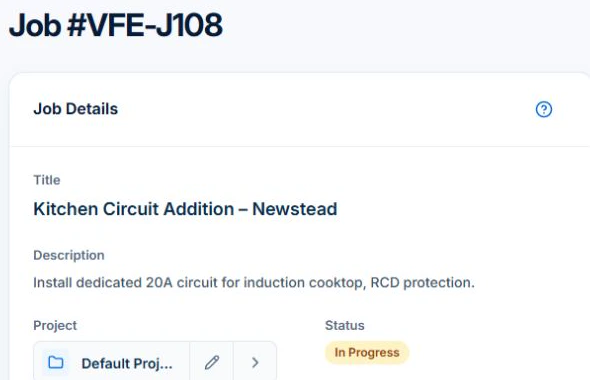
Choose Electrical for work that needs a site and scope handover. For recurring cleaning or mowing, start with your industry’s repeat-visit guides. The complete index also lets you look up a task across industries.
Electrical
- Choose software
- Plan the work
- Invoice the work
- Clients & sites
- Equipment records
Plumbing
- Choose software
- Plan the work
- Invoice the work
- Clients & sites
- Equipment records
HVAC & refrigeration
- Choose software
- Plan the work
- Invoice the work
- Equipment records
- Review profitability
Building & construction
- Choose software
- Plan the work
- Invoice the work
- Clients & sites
- Equipment records
Landscaping
- Choose software
- Plan the work
- Invoice the work
- Clients & sites
- Equipment records
Cleaning
- Choose software
- Plan the work
- Invoice the work
- Clients & sites
- Equipment records
Painting & decorating
- Choose software
- Plan the work
- Invoice the work
- Clients & sites
- Equipment records
Professional services
- Choose software
- Plan the work
- Invoice the work
- Clients & sites
Lawn care
Lawn care is a landscaping service segment. The equipment guide covers the shared mower and grounds-tool handover.
- Choose software
- Plan the work
- Invoice the work
- Clients & sites
- Equipment records
The complete article index
71 business guides and automation walkthroughs, listed by title. Search guides and product instructions →
Show all article titles
- Automatic timesheets with geofencing: review job-site entry and exitBusiness guide
- Automatically create a pending job from an accepted quote in AxiomBlueAutomation walkthrough
- Automatically draft an invoice when a job is completed in AxiomBlueAutomation walkthrough
- Automating job follow-up: start with one process you can verifyBusiness guide
- Best cleaning business apps in AustraliaBusiness guide
- Best lawn care business apps: test the crew’s working dayBusiness guide
- Best lawn care software: compare recurrence, rain changes and billingBusiness guide
- Choosing construction software: test stages, variations and progress claimsBusiness guide
- Choosing electrical business software: test an upgrade and a return visitBusiness guide
- Choosing HVAC software: follow one unit from installation to serviceBusiness guide
- Choosing landscaping software: test a maintenance round and a garden projectBusiness guide
- Choosing painting software: test preparation, colour approval and extra workBusiness guide
- Choosing plumbing business software: test a call-out that needs a second visitBusiness guide
- Choosing professional services software: test a scoped client engagementBusiness guide
- Cleaning client and site records: hand over access, scope and quality checksBusiness guide
- Cleaning client work reports: review the month in AxiomBlueBusiness guide
- Cleaning equipment records: hand over scrubbers, vacuums and service issuesBusiness guide
- Cleaning invoicing: reconcile visits, skipped cleans and agreed extrasBusiness guide
- Cleaning quote software: separate the first clean from repeat visitsBusiness guide
- Cleaning scheduling software: manage repeat visitsBusiness guide
- Compare job management software: build a shortlist for your trade businessBusiness guide
- Construction client and site records: keep authority, scope and handovers clearBusiness guide
- Construction plant records: make hired and owned equipment handovers clearBusiness guide
- Construction progress invoicing: reconcile stages, changes and previous claimsBusiness guide
- Construction scheduling: connect project stages with a workable site dayBusiness guide
- Electrical client and site records: give the next visit a clear starting pointBusiness guide
- Electrical equipment records: identify test instruments and their service historyBusiness guide
- Electrical invoicing: reconcile the quote, parts and approved extrasBusiness guide
- Electrical job scheduling: fit repairs around installation workBusiness guide
- From website enquiry to booked job: a practical process for tradiesBusiness guide
- How to automate an honest Google review request with AxiomBlueAutomation walkthrough
- How to choose job management software: a practical test checklistBusiness guide
- HVAC invoicing software: from service visit to invoiceBusiness guide
- HVAC service scheduling: make maintenance and installations fitBusiness guide
- HVAC site, equipment and service records: prepare for the next visitBusiness guide
- HVAC time tracking: compare estimated and actual job timeBusiness guide
- Job allocation software for tradies: plan, preview and assign workBusiness guide
- Job invoicing software: bill from the job recordBusiness guide
- Job management app for iPhone and AndroidBusiness guide
- Job quoting software for tradies: build, check and hand over a quoteBusiness guide
- Job scheduling software: test a changing dayBusiness guide
- Landscaping and lawn-care equipment records: keep mower and tool maintenance clearBusiness guide
- Landscaping CRM software for clients and sitesBusiness guide
- Landscaping invoicing: separate maintenance visits from project extrasBusiness guide
- Landscaping scheduling: fit garden projects around the maintenance roundBusiness guide
- Lawn care client and property records: make the next mow easier to hand overBusiness guide
- Lawn care scheduling software: manage repeat visitsBusiness guide
- Lawn-care invoicing: per visit, monthly billing and extra workBusiness guide
- On-site invoicing: invoice on the jobBusiness guide
- Overdue invoice reminders: automate and reviewBusiness guide
- Painting client and site records: keep surface, colour and preparation approvals clearBusiness guide
- Painting equipment records: keep spray and preparation-tool service history clearBusiness guide
- Painting invoicing: bill the accepted surfaces and approved additionsBusiness guide
- Painting job scheduling: plan preparation, access and return daysBusiness guide
- Plumbing client and site records: preserve diagnosis, parts and return workBusiness guide
- Plumbing dispatch software: fit a call-out into today’s routeBusiness guide
- Plumbing equipment records: keep jetter, pump and inspection-kit history usableBusiness guide
- Plumbing invoicing software: call-outs, labour and partsBusiness guide
- Plumbing job scheduling: balance call-outs and parts-dependent returnsBusiness guide
- Professional client records: carry the accepted brief through delivery and billingBusiness guide
- Professional services invoicing: reconcile fixed fees, time and extra deliverablesBusiness guide
- Professional services scheduling: plan delivery time around client decisionsBusiness guide
- Record and bill job variations in AxiomBlueBusiness guide
- Recurring job health: find and review lapsed service visitsBusiness guide
- Recurring jobs versus recurring invoices: keep visits and billing alignedBusiness guide
- Review job costs in AxiomBlue: quote against actual workBusiness guide
- Run a job in AxiomBlue: from quote to invoiceBusiness guide
- Set up an SMS reminder for tomorrow’s jobs in AxiomBlueAutomation walkthrough
- Timesheet software for tradies: hours and approvalBusiness guide
- Tradify vs Fergus vs ServiceM8 vs AroFlo vs Axiom Blue: an Australian job management comparisonBusiness guide
- Use a job card in AxiomBlueBusiness guide