
Choose the bookings eligible for a text
Check the evening schedule, time zone and lookup for jobs starting tomorrow. Make sure the customer has a suitable phone number and your business has purchased SMS credits.
Test a changed appointment
Preview a booking still due tomorrow and one that moved. Inspect the recipient, date and wording before activating the Professional reminder.
What we will set up
- Professional access and purchased SMS credits
- 6 pm Australia/Sydney schedule, checked for your business
- Next-day scheduled-start lookup with scheduled status
- One customer phone number and message per job
- A monitored contact route and controlled tests
Workflows → Templates
Check the evening trigger, job lookup and SMS action
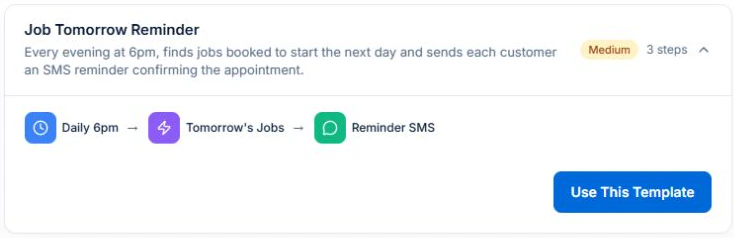
Open Workflows, then Templates, and expand Job Tomorrow Reminder. Check the default 6 pm Sydney trigger and the Tomorrow’s Jobs lookup. The lookup uses the business calendar’s timezone, scheduled start and scheduled status.
Use Test in the workflow editor to preview the recipient and message. If you run an active delivery check, use a number you control and allow for SMS credits. Decide who will check bookings changed after the evening run.
Concept
A preset supplies connected steps and field mappings to review.
Advantage
Starting with the current preset avoids recreating the process from an incomplete blank-canvas recipe.
Daily 6pm schedule
Check the nightly schedule and timezone
The preset runs daily at 18:00 in Australia/Sydney by default. The lookup calculates tomorrow using the business calendar’s timezone. Check both settings before enabling reminders.
Decide who checks late bookings and changes made after the reminder has run. The scheduled workflow alone does not confirm every later change with a customer.
Concept
The schedule determines when the daily lookup runs.
Advantage
Reminder timing follows a setting your business has checked.
Tomorrow’s Jobs lookup
Inspect which jobs count as tomorrow
Check the lookup uses scheduled start, from one day ahead to one day ahead, and scheduled status. The iterate setting runs downstream steps for each returned job.
Confirm sample jobs starting tomorrow are included and completed, cancelled or differently dated work is excluded. Check jobs spanning several days and bookings changed around the run time.
Concept
The selection is based on booked start date and status.
Advantage
The message is tied to the visit you intend to deliver, not an unrelated deadline.
Reminder SMS
Check the message, phone and contact route
The recipient comes from each selected job’s customer phone. Check the rendered customer and business names, and allow for message segments when budgeting purchased SMS credits.
The preset includes “Reply CHANGE”. Use that wording only after verifying where inbound replies arrive and who monitors them. Otherwise replace it with a business phone number or contact route you have tested. Example: “Hi [name], [business] is booked to attend tomorrow. If access or timing has changed, please call [number].”
Concept
The message supplies a reminder and a usable route for changes.
Advantage
A person can handle an access or timing issue before the visit.
Workflow test and execution history
Test the outcome before activating
Preview one included job, one excluded job, a missing phone and a changed booking with Test. For an active delivery check, use a customer number you control. An active run can send a real SMS and use credits.
Review the sample result before enabling the nightly schedule. Check execution history for failures and duplicate messages after a controlled active run. Keep someone responsible for late changes.
Concept
Check the selected records, action results and failures, then assign an owner to review future runs.
Advantage
Resolve test failures before enabling the workflow for customer work.
Monitor customer responses and missed visits to improve your reminder process.
Review the selection and message when your scheduling process changes.
Try it in Axiom Blue
Inspect your day-before reminder
Explore the workflow, then configure it for your business on Professional. Free covers limited core jobs, quotes and invoices.