
Give every app the same clean
Compare AxiomBlue, ServiceM8, ZenMaid and Swept with one regular visit. Put the customer’s billing address and the work site in the trial, add access instructions and assign someone who has never cleaned there.
Change the booking before you choose
Ask the cover cleaner to find the site and services due on their phone. Skip a later visit and ask the office to explain the bill. Record which tasks the app handles, which plan you tested and where the team needed another message or spreadsheet.
Match the app to your cleaning work
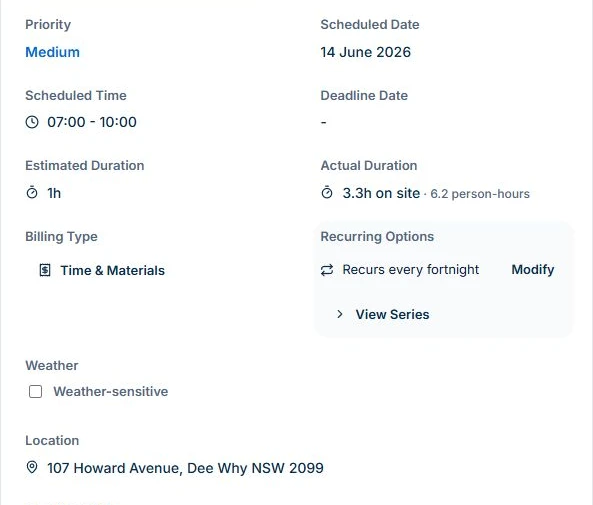
Open a recurring visit in AxiomBlue and check its schedule, site address and recorded time. Professional keeps the repeat pattern alongside the individual job; each visit still needs its own scope, instructions and outcome.
Use that same visit to compare the options below. These are reasons to shortlist a product, not an overall ranking. AxiomBlue publishes this guide; competitor features are based on their linked product pages, checked 1 November 2026, rather than hands-on tests.
| App | Shortlist when you need | What to test before choosing |
|---|---|---|
| AxiomBlue | Quotes, job records, visit time, photos and invoicing in one workflow. | Your quote-to-bill handover, worker access and required plan; recurring series and crews need Professional. |
| ServiceM8 | A cleaning job lifecycle with recurring scheduling, checklists, photos and invoicing. | The workflow on your team’s devices, required features and plan’s job-volume allowance. |
| ZenMaid | A maid-service calendar, booking forms, automated communications and cleaner mobile apps. | Your residential booking rules, reminders and Australian billing/accounting handover. |
| Swept | Commercial-cleaning shifts, checklists, inspections and photo-backed reporting. | Your site inspection and client-report process, plan access and financial-system handover. |
Sources: ServiceM8 cleaning workflow · ZenMaid features · Swept commercial-cleaning features
Try an ordinary visit before moving your work
In the AxiomBlue cleaning example, open DEMO-R7-3-001. Check the fortnightly pattern, individual visit date, work-site address, assigned team and time record. An elapsed visit and the combined hours of two cleaners are different measures.
For your own test, add the agreed rooms, tasks and access instructions to the job. Ask a cleaner to find the correct property and explain what must be done without an extra phone call. Confirm that the office can review the visit afterwards.
For the wider quote-to-bill workflow, explore AxiomBlue’s cleaning business software.
Use the cleaning quote example to test how the agreed scope and price are recorded before the first visit.
Test the replacement cleaner and the evidence handover
Use the replacement cleaner’s normal permissions and actual phone. Put essential visit instructions in job Description or Tasks; Customer Site Notes are a separate web field. Check the instructions, tasks and synchronised records from both the cleaner’s and office’s views.
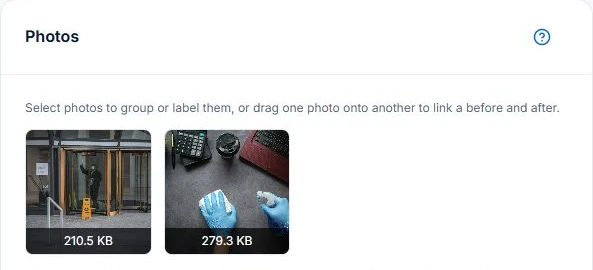
On Basic or Professional, attach relevant photos to the visit and review who can see them. AxiomBlue’s example has two attached cleaning photos. The useful test is whether the reviewer can understand the work or issue; photos alone do not establish that a clean passed inspection.
Check a skipped clean and an agreed extra before billing
Test a visit that could not proceed and an added window clean. Record the visit outcome, then check the service agreement before deciding what to bill. Retain the agreed price and approval for the extra; Professional variations support that record in AxiomBlue.
Inspect the invoice draft against completed work, earlier charges and recorded payments. A recurring schedule is separate from recurring billing or permission to charge a card. Check the relevant setup and customer authorisation before relying on automatic payments.
Follow the recurring cleaning visit procedure for the scheduling and handover steps.
Review invoicing and payment tracking to see what happens after the visit record.
Price the plan your whole team needs
Count office and field users, then check uploads, recurring work, reporting and accounting connections on the required plan. Compare job-volume limits, storage, currency, tax, billing interval, messaging and payment fees as well as the headline subscription.
AxiomBlue’s monthly first-seat prices are $29 AUD for Basic and $59 for Professional, excluding GST. Graduated discounts make three same-plan seats $78.30 on Basic or $159.30 on Professional each month. Paid plans have no job-volume cap; SMS credits and payment-processing fees are separate.
Free has one user, 10 jobs per week, 10 quotes and 10 invoices per month, and 25 customers and 25 leads. It has no time limit, but no file uploads. Use Free for limited core work and the demo to inspect advanced workflows before choosing a plan.
Use the current plan comparison and team-price calculator to check your setup.
Common questions
Cleaning workflow questions
Which is the best app for a cleaning business?
Choose by the work you need to connect. Compare the shortlist above using your own visits, staff devices, evidence and billing. A maid-service booking workflow and a commercial inspection contract can require different tools; no single app is best for every business.
Can I use AxiomBlue for recurring cleans on Free?
Recurring job series and crew management require Professional. Free supports limited single-user core work and individual scheduling. Job photo uploads start on Basic.
Does a photo or completed status prove a clean passed inspection?
No. Define the required standard and review the relevant task and evidence. A photo or status supports the record but does not replace the agreed inspection or acceptance process.
Put it to work
Your practical checklist
- Shortlist apps by your residential, commercial or mixed workflow.
- Run one ordinary clean through the worker and office handover.
- Check replacement-cleaner access, instructions and photo sharing.
- Review a skipped visit and approved extra before billing.
- Price the required plan for your users, workload and accounting setup.
See the records in Axiom Blue
Try the cleaning visit and its handover
Inspect the same visit’s recurrence, time and attached photos. Then test your own core process on Free within its limits, or choose the paid plan needed for uploads, recurring work and your team.