
Make the second visit different from the first
Use a real round with one frequent service and one less frequent service. Inspect individual jobs to see whether the crew gets the right tasks as the round advances.
Move a wet day before making your choice
Preview the changed date and inspect the services due on that stop. Skip a later visit and check the invoice record against the agreement. Compare what each shortlisted app can demonstrate using the same scenario.
Inspect one recurring mowing series before comparing features
Open the four-week garden-maintenance series: mowing is due every visit, hedges every second visit and gutters every thirteenth visit starting on visit four. Use service intervals to keep different tasks on one round.
These are configured service rules, not a completed-work record. A four-week visit pattern is also different from a calendar-month billing period. Compare the series with the customer’s actual scope, frequency and charging agreement before relying on it.
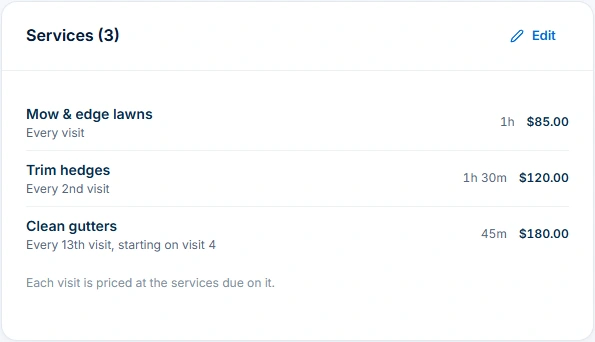
For the available controls and plan requirements behind this test, inspect AxiomBlue recurring job series. Recurrence requires Professional; limited individual job scheduling is available on Free and Basic.
Check the generated visit against those service rules
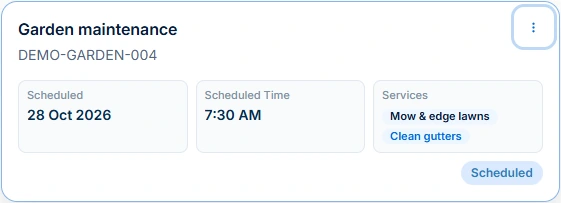
The same series’ DEMO-GARDEN-004 visit is scheduled for 28 October 2026 and lists Mow & edge lawns plus Clean gutters. Trim hedges is not listed on that visit. Compare the series settings with the individual visit instead of assuming every repeat has the same work.
Its status is Scheduled. Open the job to check the customer, property, scope, duration and instructions, then record the work actually delivered. Do not treat a generated visit as proof of completion, an agreed extra or permission to collect payment.
Use the same five tests across your shortlist
Bring one familiar round to each demonstration. Record the evidence below, what you still have to do manually and the plan that provides it. A calendar or spreadsheet may suit a simple round; a connected job system is useful when keeping changes, field instructions and billing consistent becomes the harder task.
Use this AxiomBlue-authored method to compare the same recurring-work scenario across your shortlisted products.
| Test | Evidence to inspect | What makes the result useful |
|---|---|---|
| Repeat visits with different services | Series frequency, service intervals and one generated visit. | The visit lists the work due; you can identify and review an exception. |
| A rain-delayed day | Affected jobs, proposed people/times, warnings and unplaced work. | You can review the proposal before applying it and confirm customer arrangements separately. |
| A skipped visit or extra service | Job outcome, service agreement, billing method and previous charges. | You can explain the intended charge without assuming scheduled means completed or paid. |
| A replacement worker on a phone | The actual visit instructions and records on the device they will use. | The worker can find the correct property, scope and latest outcome; test connectivity separately. |
| The plan and team cost | Required paid features, actual seats, tax basis and separate usage fees. | The quoted subscription covers the workflow you demonstrated, not just the entry-level calendar. |
Preview the affected day before moving it
Use the available Reschedule Entire Day controls for the selected day and destination. Where appropriate, inspect the weather-sensitive filter. Review proposed people, dates, times, travel, warnings and unplaced work before applying.
Review the proposed crews, times and warnings using current skills, leave and job details. After applying, check bookings and confirm revised arrangements with affected customers.
If the revised round depends on a mower or grounds tool, check the mower and landscaping equipment record for its identity, maintenance history and unresolved faults before assigning it to the changed round.
Read next Job allocation software for tradies: plan, preview and assign work →
Reconcile completed and skipped work before billing
Record the reason and outcome of a moved or skipped visit. For a per-visit arrangement, check which completed work is billable. For periodic billing, reconcile the period against the service agreement; do not assume every customer uses the same missed-visit rule.
Price and approve a requested hedge trim or storm clean-up separately. Professional variations can keep that change with the job. Review the billing method, previous charges and invoice before issue.
Read next Lawn-care invoicing: per visit, monthly billing and extra work → · Recurring jobs versus recurring invoices: keep visits and billing aligned →
Treat automatic payment as a configured customer agreement
Professional series payment requires connected Stripe and a customer-authorised payment method. Inspect authorisation, invoice accuracy and the charge history before relying on it. Stripe processing fees apply.
Test a failed payment, a recorded payment by another method and a changed visit. Check charge and retry state before taking another payment. Neither a repeating booking nor an invoice marked issued proves that money was received.
Compare the office system and the field handover together
Use the same normal week and rain change in each shortlisted product. Record the required plan, visit history, billing result and unresolved gaps. A calendar or spreadsheet may cover a simpler round; assess the work needed to keep its changes consistent before replacing it.
Open one changed visit on the worker’s actual phone and confirm the instructions they receive. The field app has its own device and low-signal tests. Axiom Blue is one option to evaluate; there is no universal best lawn care system or guaranteed payment result.
Use the lawn care property handover workflow for that phone test: check the standard visit, access instructions and the outcome of an earlier wet or inaccessible visit.
Read next Best lawn care business apps: test the crew’s working day →
Check the plan and the total for your team
Professional is the relevant plan for recurring series, crew skills/leave, route optimisation, variations and configured automatic series payment. Basic can support one-off jobs and uploads; Free is a limited single-user core test. Allow for Stripe and any SMS usage separately.
Axiom Blue monthly first-seat prices are $29 AUD on Basic and $59 on Professional, excluding GST. Additional seats use graduated discounts: 10% off for seat two, 20% for seat three, through to 50% off from seat six. Paid plans have no job-volume cap. Check your actual team and billing interval on the pricing page; SMS credits and payment-processing fees are separate.
Free is a one-user core-workflow test: 10 jobs per week, 10 quotes and 10 invoices per month, 25 customers and 25 leads, with no file uploads. Use the demo to inspect Professional capabilities before choosing a plan.
Common questions
Round, rain and billing questions
Does rescheduling automatically confirm the new date with customers?
No. Inspect the applied bookings and communicate the revised arrangement. Check whether your configured message process sent the intended update and whether the appointment is agreed.
Can every skipped visit be billed?
Record visit outcomes and bill under the agreed service arrangement, including how moved or skipped work is treated.
Does a recurring series authorise a card charge?
No. Automatic series payment requires Professional, connected Stripe and separate customer authorisation. Review the invoice and actual charge result, including failures and payments by another method.
Put it to work
Your practical checklist
- Series and individual visits match the agreement.
- Rain-day proposal reviewed before applying.
- Actual bookings and customer updates checked.
- Skipped visits and extras reconciled before billing.
- Authorised payment and failures reviewed separately.
See the records in Axiom Blue
Open the series and check its fourth visit
Explore the Professional recurring-series workflow, then test your visit pattern and billing agreement. Free includes limited individual core work and scheduling.
Product instructions
Worked example: AxiomBlue’s public GreenGrove demo, inspected 28 October 2026. Records and displayed prices are sample data. This guide provides a repeatable evaluation method; it does not claim independent hands-on testing of other suppliers.