
Shortlist by the handover that costs you time
Ask the office where it retypes a customer, scope or price. Ask a field worker what they have to phone in to find out. Keep candidates that can show those two handovers using your kind of job.
Compare the plan your team would use
Try the mobile view with a worker account and the billing view with an office account. Mark each need as demonstrated, plan-dependent or still untested before choosing which product to trial further.
Turn the hardest handover into a shortlist requirement
Choose the work pattern closest to your business and one exception that changes the decision. In AxiomBlue, open Job Details and check what the next worker needs to see, including the site, scope and schedule.
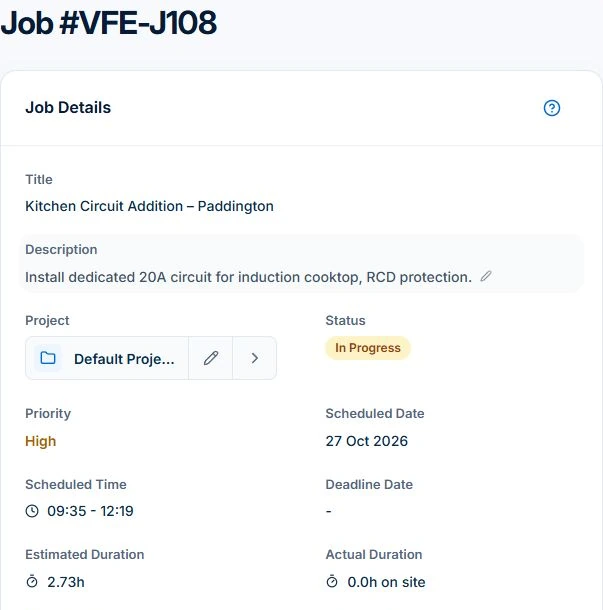
Write down which records the office must get back, such as time, materials or approved changes. Check the required plan before shortlisting a tool. Free supports one user within usage limits. Professional adds Job Series, advanced crew features and variation approvals.
Match the working pattern to a useful shortlist
Choose the row closest to your ordinary work, then add the exception that changes the decision. This is a requirements map, not an independent ranking or evidence that every product in a category has the same capabilities.
| Your working pattern | Requirement to put on the shortlist | AxiomBlue contribution and boundary |
|---|---|---|
| One person, one-off jobs | Accepted scope, site handover and a bill you can inspect | Core quote/job/time/material/invoice workflow; Free has one user and usage caps, Basic adds uploads. |
| Several people, changing days | Assignments that account for people and existing work | Reviewed scheduling proposals; Professional adds crew skills and approved leave. Readiness and customer confirmation remain checks. |
| Regular service visits | Individual visit history and billing that follow the agreement | Professional recurring series; inspect moved or skipped visits before deciding the bill. |
| Quoted projects and extra scope | Approved changes, staged billing and earlier claims | Professional variation approvals, plus web fixed-price claims with invoicing permission; internal overruns are not automatic extra revenue. |
Keep accounting and specialist requirements in the decision
A job system and an accounting or specialist system can perform different parts of the process. Write down the records that must move between them, who reviews the result and which connection or export is available. Do not assume a category label supplies payroll, full financial statements or specialist certification.
For AxiomBlue, verify the required Professional accounting connection and mapping on your actual setup. Specialist compliance, customer obligations and the wider accounting assessment still need the appropriate process.
Use the named comparison for alternatives, then test the shortlist
Use the dated Tradify, Fergus, ServiceM8, AroFlo and AxiomBlue comparison for named options. Recheck the required plan, current features and device coverage against the job you need to manage.
Read next Tradify vs Fergus vs ServiceM8 vs AroFlo vs Axiom Blue: an Australian job management comparison → · How to choose job management software: a practical test checklist →
Price the required team and handover effort
Price the roles, required capabilities and busy-month workload for each shortlisted setup. Keep subscription, optional messaging, payment processing, training and data preparation separate. Ask about the exact history and open balances you need to retain rather than assuming one CSV import performs a complete migration.
In AxiomBlue, Basic adds uploads and paid-plan capacity. Professional is required for the advanced crew, recurring, variation and accounting workflows described here. Use the current pricing page for your actual team and billing interval.
Leave the shortlist with an owner and a next step
Choose a small set of products that can plausibly cover the essential work. Give each unresolved requirement an owner and a demonstration to obtain. Use the evaluation checklist to run the same familiar job and exception through each option; retain the records that support the result.
Common questions
Questions about forming the shortlist
Is there one best job-management system for every trade business?
No. Form the shortlist from the work, roles, devices, billing method and outside systems you need. Test those requirements on the actual plan before deciding.
Is this an independent product ranking?
No. It is an AxiomBlue-authored requirements map with a product example. Use the separately dated vendor comparison for named alternatives and current vendor documentation for their facts.
What should I do after choosing the shortlist?
Run the same ordinary job and one exception with the evaluation checklist. Record the demonstrated output, manual steps and unresolved questions before choosing a pilot.
Put it to work
Your practical checklist
- Name the work and handover that matter.
- Separate essential requirements from optional extras.
- Retain the accounting and specialist systems you need.
- Choose the required plan and price the actual team.
- Use a shared test and record unresolved evidence.
See the records in Axiom Blue
See whether AxiomBlue belongs on your shortlist
Inspect the commercial overview and real demo, then test the capabilities your operation needs on the appropriate plan.