
Electrical · Plumbing · HVAC · Building · Service businesses

Job management software
for your kind of work.

The emergency call-out. The weekly service. The project that keeps growing. Different work, with the same need to keep people, promises and payment connected.

AxiomBlue helps small trade and service teams organise the work they have today, with tools for the work they want to take on next.

Start with how you work

Software makes sense
when it fits a real day.

You may recognise more than one of these. AxiomBlue brings them into the same platform, so a growing mix of work is easier to organise.

01 / Electrical · Plumbing · HVAC

The phone rings.
The plan changes.

A customer needs help, the crew is already out and someone has to keep the rest of the day moving.

  1. Book it. Create the job with the customer and site details.
  2. Place it. Check the calendar and assign the work.
  3. Close the loop. Record time and materials, then prepare the invoice.

The payoff: less chasing around for what happened on site.

See how scheduling works →
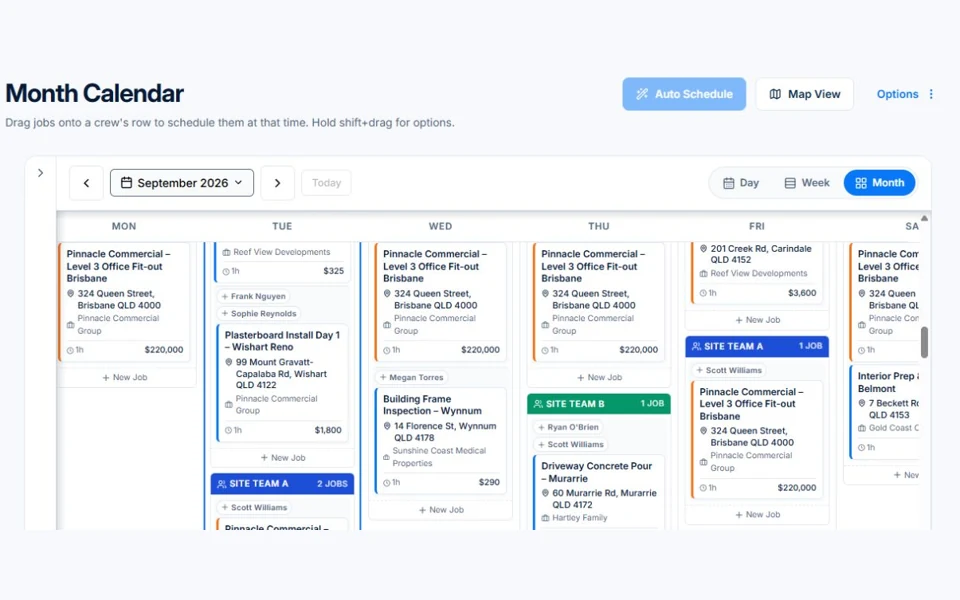
AxiomBlue · Shared crew calendar
A month calendar in the public AxiomBlue demo, showing assigned jobs.
A shared view helps you make the next scheduling decision. Public demo · sample data

02 / Cleaning · Landscaping · Maintenance

Regular work.
Less repeat organising.

The customer expects the next visit. You need a way to plan it without rebuilding the same job every time.

  1. Set the pattern. Create a job series for recurring visits.
  2. Plan the team. Bring those visits into the crew’s schedule.
  3. Keep the record. Track each job’s work and billing.

The payoff: a clearer rhythm for the services customers count on.

Explore recurring work and jobs →
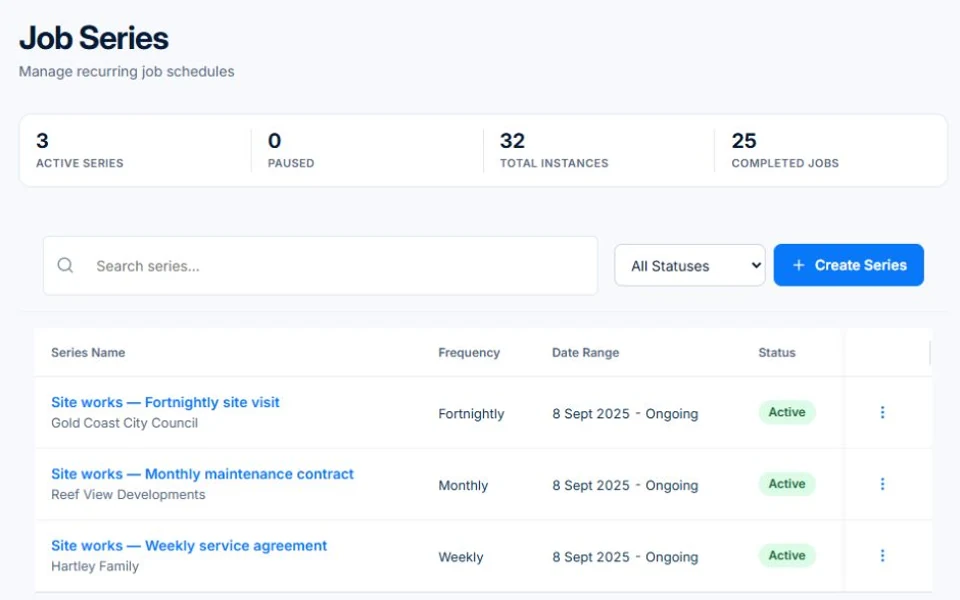
AxiomBlue · Recurring job series
AxiomBlue demo job series for regular service agreements and maintenance.
Give repeat work its own schedule and a record of each visit. Public demo · sample data

03 / Building · Painting · Project services

A bigger job needs
more than a diary entry.

There are stages to deliver, people to coordinate and changes to agree along the way. Professional brings project planning, variation approvals and workflows alongside day-to-day jobs.

Explore project management →
  1. ScopeQuote the agreed work

    Make the starting point clear.

  2. DeliveryPlan stages and track tasks

    Use Gantt and kanban views on Professional.

  3. ChangeRecord variations for approval

    Keep extra work visible.

  4. BillingClaim against the contract

    Follow fixed-price progress and approved changes.

Find the work you recognise

Explore your industry.

Open a trade below for a practical starting point, then explore the features in more detail. Specialist features and plan inclusions vary.

01ElectricalFrom the first inspection to the final fit-off.

Quote a switchboard upgrade, schedule the crew, record the work and prepare the invoice. Explore certificates and test-and-tag records for the jobs that need them.

Quoting · Crew calendar · Job records

Explore electrical software →
02PlumbingKeep call-outs and quoted installs moving.

Book a repair with its site details, record labour and parts, then invoice the job. Use recurring jobs to organise planned maintenance alongside one-off work.

Time & materials · Invoicing · Recurring jobs

Explore plumbing software →
03HVAC & RefrigerationMake room for installs and the next service.

Plan an installation, keep the job details together and organise regular maintenance visits. Explore asset and refrigerant records where they fit your work.

Scheduling · Assets · Service history

Explore HVAC software →
04Builders & ConstructionKeep a changing scope connected to the price.

Start with a quote, coordinate project stages and record variations for approval. Use fixed-price billing to track claims against the agreed contract and approved changes.

Projects · Variations · Fixed-price billing

Explore construction software →
05LandscapingOne place for garden visits and bigger transformations.

Schedule repeat maintenance, quote an outdoor project and record the labour and materials used. Keep one-off work and regular customers in the same view.

Job series · Quoting · Materials

Explore landscaping software →
06Cleaning ServicesGive every regular visit a place in the plan.

Build recurring service jobs, assign your team and keep notes with each visit. Track the work and billing without rebuilding the schedule from scratch.

Recurring visits · Crew calendar · Job notes

Explore cleaning software →
07Painting & DecoratingMake the scope clear before the first coat.

Set out the quote, keep colour specifications with the job and record changes as they are agreed. Follow time and materials through to billing.

Quoting · Colour specifications · Variations

Explore painting software →
08Professional ServicesKeep the proposal, delivery and billable work connected.

Track opportunities, quote an engagement and organise delivery in project views. Record time against the work and bring it through to invoicing.

Sales pipeline · Projects · Time & billing

Explore professional services software →

Records support your processes; you remain responsible for checking the requirements that apply to your work. Check feature inclusions by plan.

A useful fit check

Choose for the way
your business actually works.

AxiomBlue is worth exploring if you quote work, coordinate people, track job details and send invoices—and want those steps closer together.

If your business needs a specialist certification, accounting or industry process, test that requirement in the demo and talk it through with us. Bring a real example of the work you want to manage.

See plans, limits and inclusions →

Considering a switch?

Check the fit before
moving your business.

Use a familiar job to compare the way you work today with the way Axiom Blue handles it.

  1. 1. Follow a job in the demo

    Check the quote, schedule, job record and invoice. Look for the details your team needs.

  2. 2. Check your plan and team cost

    Compare usage limits, paid seats and specialist features. See plans and pricing →

  3. 3. Confirm your move

    Try your own quote on the free plan. Before moving existing records, ask us about your data and setup needs.

Make the next step a small one

Put a familiar job
through its paces.

You know where the friction is in your business. Open the demo and see how AxiomBlue handles it. Then start with your own quote on the free plan.

Free plan has usage limits. No time limit. No credit card.

  1. 01

    Price the work

    Try a quote like one you send every week. Check the detail your customer will see.

  2. 02

    Follow it through the day

    Explore a job, its crew, time and materials. Look for the information you usually chase.

  3. 03

    Check the fit and the price

    Compare the features and limits you need. See plans and inclusions →