
Tools for small trade & service businesses / Protect your margin

Know what the job cost and what you can bill next

Check labour and materials against the quote. If the scope changed, review the approval and earlier billing before preparing the next claim. Professional adds variations and project planning.

How the pieces connect

  1. 01Agree the scope
  2. 02record costs and changes
  3. 03bill with context

Start with the part of your business that needs attention. Add depth as the work grows.

Find the reason the margin changed

Compare actual labour and material costs with what the quote allowed. Check missing rates before treating a low cost or high margin as evidence of a good job.

Get an extra ready for a claim

Record a scope change and its approval in Professional. On a staged job, check the revised agreement and earlier billing before deciding what amount is due next.

Check the cost records before trusting the margin

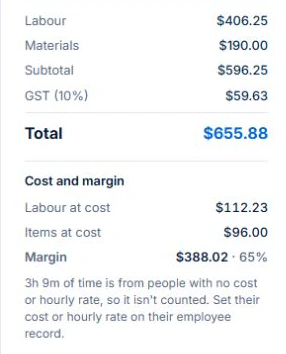
The demo job flags recorded time with no cost or hourly rate. Check the time and employee cost records, then review the materials separately before comparing the job with its agreed price.

AxiomBlue · Missing labour cost warning
The demo Job Summary warns that 3 hours and 9 minutes have no recorded cost or hourly rate.
Resolve missing cost inputs before relying on the displayed margin.

For fixed-price work, keep the agreed value and earlier claims visible. Recording a higher cost does not change the price agreed with the customer.

Explore the tools

Start with the improvement.
Follow it into the detail.

01 / Job management

Job management software for tradies

Keep the quote, site, schedule, time and materials together in AxiomBlue. Give the crew clear job instructions and the office the records needed to prepare the invoice. Professional adds crew planning, variations and recurring visits.

Explore job management →
  • Job status and priorities
  • Site and customer details
  • Time entries
  • Job materials and costs
  • Photos, notes and tasks
  • Job signatures
  • Fixed-price and time-and-materials billing
  • Job duplication and cancellation
  • Colour specifications
  • Job data import
  • Labour billing rules: rounding, minimums and overtime

Free: one user and limited core work. Basic adds uploads and capacity. Professional adds advanced crews, variations and recurring visits.

02 / Variations & progress billing

Record the agreed extra before preparing the next claim.

AxiomBlue Professional records changes to an agreed job as contract variations, with their scope, value and approval state. Review the original contract and approved changes before preparing fixed-price progress claims. Keep the extra room, circuit or deliverable connected to the agreement and earlier billing.

Explore variations & progress billing →
  • Contract variations
  • Variation approvals
  • Revised contract value
  • Progress claims against fixed-price work
  • Retention held and release for configured contracts

Variation tracking and approvals require Professional. Check the job billing method before preparing a progress claim.

03 / Inventory & materials

Follow materials from the price book to the job and stock record.

AxiomBlue connects your products and services catalogue with the materials recorded on jobs. Reuse item descriptions and prices in quotes, record actual usage and review movements for stock-tracked products. Stock adjustments, stocktakes and reorder levels help explain what is available for the next job.

Explore inventory & materials →
  • Products and services catalogue
  • Stock adjustments and movements
  • Stocktakes
  • Reorder levels
  • Material usage on jobs
  • Stock deduction from recorded job materials
  • Supplier records

Products and services are included in Basic. Check stock-control permissions and enabled features for your business; paid-plan and record limits vary.

04 / Project management

Plan project stages, dependencies and the next task.

AxiomBlue Professional gives larger jobs and client engagements a project plan: phases, tasks, dates and dependencies in a Gantt view, with kanban tickets for work in progress. Use sprint planning where it suits your team, and keep the project plan alongside the job records used for delivery and billing.

Explore project management →
  • Project records
  • Gantt planning and dependencies
  • Kanban boards
  • Tickets and task detail
  • Backlogs
  • Epics
  • Sprint planning and boards
  • Project metrics

Project management, kanban tickets and sprint planning are Professional features. Core job scheduling is available on Basic. New Australian construction-policy setup is available only for Australian businesses; general project planning remains separate.

Considering a switch?

Check the fit before
moving your business.

Use a familiar job to compare the way you work today with the way Axiom Blue handles it.

  1. 1. Follow a job in the demo

    Check the quote, schedule, job record and invoice. Look for the details your team needs.

  2. 2. Check your plan and team cost

    Compare usage limits, paid seats and specialist features. See plans and pricing →

  3. 3. Confirm your move

    Try your own quote on the free plan. Before moving existing records, ask us about your data and setup needs.

Make the next step a small one

Put a familiar job
through its paces.

You know where the friction is in your business. Open the demo and see how AxiomBlue handles it. Then start with your own quote on the free plan.

Free forever for one person. No credit card. Usage limits apply.

  1. 01

    Price the work

    Try a quote like one you send every week. Check the detail your customer will see.

  2. 02

    Follow it through the day

    Explore a job, its crew, time and materials. Look for the information you usually chase.

  3. 03

    Check the fit and the price

    Compare the features and limits you need. See plans and inclusions →