
Check what the call-out already includes
If the agreed call-out covers the first hour, charge only the eligible additional time. Compare fittings and quantities with what the plumber installed and check whether the diagnosis was already invoiced.
Read the lines as the customer will
Separate the call-out, extra labour and parts where that reflects the agreement. Review rates, GST and any earlier bill before issuing the invoice.
Key facts
| Call-out terms | Record whether the attendance price includes diagnosis, travel, the first hour or other work. |
|---|---|
| Approval and billing | Keep the person who requested attendance, the person approving work and the invoice recipient clear. |
| Parts used | Distinguish fittings installed on this job from purchases, unused items and materials already included in a fixed price. |
| A return visit | Keep the first visit’s outcome, next approval and previous charges visible. |
Compare each proposed charge with the completed call-out
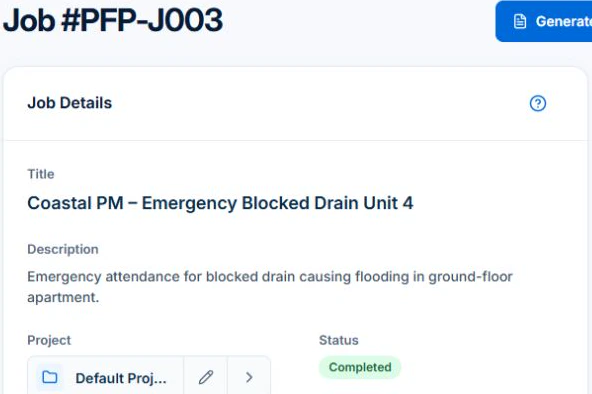
Open the completed job and choose Generate Invoice with invoice creation access and either View Job Financials or View Invoices. The sample blocked-drain preview includes a water heater. Check that line against the recorded work before creating the draft.
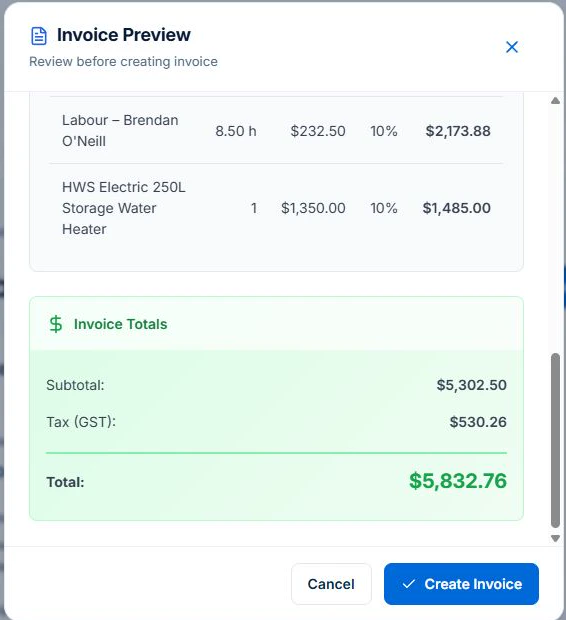
If a job item is wrong, close the read-only preview, correct the job record and preview it again. For a fixed-price repair, use the web Fixed Price card to check agreed value and earlier claims. Variation approvals require Professional.
Confirm the approval and billing contact before the visit
At booking, record the service address, caller and intended billing contact. If a property manager or another representative is arranging access, confirm the purchase-order reference, approval process and where the invoice should go. Do not decide who owes the bill solely from who opened the door.
Write down what the customer agreed to at this stage: attendance and diagnosis, a specified repair, or work at agreed rates within a stated limit. If the job changes, obtain the next decision through your agreed process and keep it with the job. This is an operational handover, not a decision about tenancy or contractual liability.
- Site address and the fault reported.
- Who can approve further work and how to reach them.
- Billing contact and any requested purchase-order reference.
- Agreed call-out terms, rates or repair price.
Read next From website enquiry to booked job: a practical process for tradies →
Separate diagnosis, repair and a return visit
An attendance can identify a failed part without resolving it. Record what was inspected, what remains outstanding and the repair proposed. Before the return visit, confirm the repair approval, parts and billing basis rather than treating the original request as unlimited authorisation.
Give the office a useful handover: “Kitchen tap inspected; replacement part required; repair price awaiting approval” is clearer than “job done”. Keep the first visit’s invoice or agreed included charge visible so the second invoice does not accidentally repeat it.
| Stage | Record before billing |
|---|---|
| Attendance and diagnosis | What the agreed call-out covers, time spent and the inspection outcome. |
| Repair approved | The accepted scope, parts, price or rate basis, and approval reference. |
| Repair completed | Work completed, parts installed, supporting notes and any exceptions. |
| Another visit needed | Outstanding action, approval needed and earlier charges to review. |
Worked example: a call-out that includes the first hour
Illustrative prices only, not plumbing market rates: the customer agrees to a $180 call-out including the first hour, additional time at $120 per hour and two fittings at $17.50 each. The approved repair takes 90 minutes. Assume the agreement permits charging the extra half-hour exactly, with no other minimum or rounding rule. Amounts below exclude any applicable tax.
The subtotal is $275: $180 attendance and first hour, $60 for the additional half-hour and $35 for the fittings. Do not add another charge for all 90 minutes when the first hour is already included. If a draft invoice lists every recorded hour, review the agreed included time and billing rules before issuing it.
For fixed-price repairs, bill the accepted scope and approved changes. Use recorded time and parts to review delivery costs, with tax and earlier payments checked in the billing review.
| Illustrative invoice line | Calculation | Amount before tax |
|---|---|---|
| Call-out including first hour | Agreed inclusive attendance charge | $180 |
| Additional labour | 0.5 hours × $120 | $60 |
| Two installed fittings | 2 × $17.50 | $35 |
| Subtotal | Review against the accepted terms | $275 |
Reconcile installed parts with the bill
Record installed parts with their quantity and agreed price. Reconcile van stock, unused fittings and items already included in a fixed repair price before billing.
Avoid entering the same material once from the job record and again from the supplier receipt. Keep the receipt for cost evidence where appropriate, and review how each customer charge relates to the authorised work. Use a clear description rather than an unexplained supplier code when the customer needs to recognise the item.
Read next Use a job card in AxiomBlue → · Review job costs in AxiomBlue: quote against actual work →
Use plumbing invoice software with a review step
Axiom Blue connects job records with invoice preparation. For time-and-materials work, the invoice preview can use billable time and job materials; eligible approved unbilled variations can also be included. Materials use a recorded sell price or cost plus the recorded markup. Check whether that pricing matches your agreement. Fixed-price work follows its contract billing path.
Review included call-out time, rates, quantities and previous charges, then confirm the invoice recipient under the agreement. Creating and sending the invoice requires internet access.
Free includes one user and 10 invoices per month. Basic is $29 AUD for the first seat monthly, excluding GST, and removes the invoice cap; job photo and document uploads start on Basic. Professional is $59 AUD for the first seat monthly, excluding GST and adds variations, accounting connectors and online card payments through a connected Stripe account. Provider fees apply. PDF invoices and a no-login customer invoice link are available across plans.
Read next Job invoicing software: bill from the job record → · On-site invoicing: invoice on the job →
Check the customer-facing invoice before sending
Make the work identifiable from the service address, visit date, job reference and a clear description. Review the charges, payment instructions and intended recipient. Confirm the correct invoice type and tax treatment for your registration and sale using the current Australian government guidance below.
Suggested description for an illustrative completed repair: “Kitchen tap repair at the recorded service address on 5 October; two fittings installed as authorised.” If further work remains, describe the completed work accurately and keep the next action with the job. Retain any required technical or compliance documents separately rather than presenting the invoice as proof of compliance.
Sources: business.gov.au: how to invoice
Common questions
Questions people ask before they switch
What should a plumbing invoice include?
Identify the customer and service address, visit date, job reference, completed work and agreed charges. Describe call-out inclusions, any additional labour and parts clearly. Review earlier charges, the intended billing contact, payment instructions and the correct tax treatment.
How do I invoice a call-out that includes the first hour?
Show the agreed attendance charge and charge additional time only according to the accepted terms. In the illustrative example here, a $180 call-out includes one hour; a 90-minute repair adds half an hour at $120 per hour. Do not bill the included hour again. Review any minimum or rounding rules before sending.
Can I invoice a second visit separately?
Check the agreement and repair approval. The first visit may cover diagnosis, while a later visit completes an approved repair, or both may be included in one accepted price. Keep the first visit’s charges visible and confirm what the return visit includes before issuing another invoice.
Is there free invoicing software for plumbers?
Axiom Blue Free includes one user and 10 invoices per month. Basic at $29 AUD for the first seat monthly, excluding GST removes the invoice cap and includes job photo and document uploads. Professional at $59 adds variations, accounting connectors and Stripe card payments with a connected account. Invoicing requires an internet connection.
Put it to work
Your practical checklist
- Confirm the approval contact, billing recipient and site.
- Record what the call-out or accepted repair price includes.
- Separate completed work from diagnosis and proposed repairs.
- Reconcile additional time and installed parts against the agreement.
- Check earlier invoices, payments and tax settings.
- Preview the invoice and retain the supporting job record.
See the records in Axiom Blue
Try the workflow with a familiar job.
Features and usage limits vary by plan. Review the tools relevant to your process before choosing your setup.