
Build the billing period from the visit record
Pull together the completed cleans, skipped visits and any additional work for that customer. For each extra, check the scope and approval. Review earlier invoices so an item does not reach the bill twice.
Explain a change in the charge
A missed visit can affect a per-visit customer differently from a monthly customer. Apply the agreement first, then prepare invoice lines the customer can recognise by site, service and period.
Check the visit, the agreement and the previous invoice
Open the visit jobs for the billing period. If Tuesday’s clean moved to Thursday, find the completed job and check whether it was already billed. If a visit was skipped, use the recorded outcome and the agreement to decide how it affects the bill. Confirm approval for any separately charged extra.
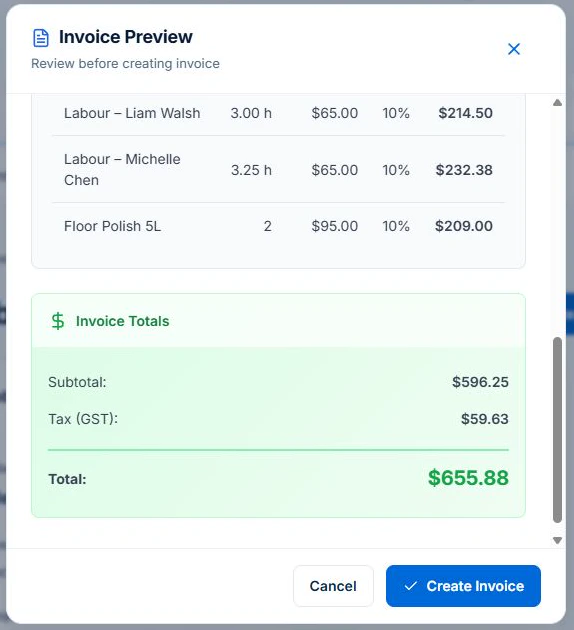
For a completed time-and-materials job, use Generate Invoice and review the billable lines in Invoice Preview. For a fixed-price job, open its Billing card in the web app and review the contract and claim history before starting a draft. Check that your role can view the job, billing details and earlier invoices, and create invoices. Base fixed-price claims are available on all plans within their limits. Job Series and variation approvals need Professional. Check the draft before issuing it with the separate Issue & Send Invoices permission.
Decide what a moved or skipped clean means commercially
A per-visit service and a fixed monthly arrangement can handle cancellations differently. Record the actual visit outcome and refer to the agreement. A skipped visit must not silently become a completed clean, and a changed date must not create another charge for the same visit.
Keep extra tasks outside the standard clean visible
Find the customer approval for an additional appliance, room or specialist task, including its charging basis. Check the scope and completion notes before adding it to the invoice. The time recorded by a cleaner supports the review but does not by itself authorise an extra fixed-price charge.
Reconcile an illustrative per-visit month
Assume four cleans were planned at $120 each, excluding GST, but one was skipped without a charge under this example’s agreement. Three completed cleans total $360. An approved, completed $50 additional task brings the amount to $410 before GST, provided nothing was invoiced earlier.
| Illustrative per-visit bill | Amount excluding GST |
|---|---|
| Three completed cleans at $120 | $360 |
| Skipped clean: no charge under this example | $0 |
| Approved additional task | $50 |
| Total before GST | $410 |
To inspect one customer’s recorded time, materials and job values for the period, prepare a cleaning Customer Work report on Professional. Reconcile its job lines with the agreement and earlier invoices before deciding what to bill.
Review the draft, recipient and balance before sending
Check the agreed price, approved extras, previous invoices, payments and any disputed amount. Verify the payer and required invoice reference. Confirm GST treatment for your registration and supply, and check the ATO requirements for the document. Issuing an invoice and receiving payment are separate events.
AxiomBlue connects quotes, job records and invoicing. Review the job’s billing method and draft rather than assuming every recorded cost is a customer charge. Core invoicing is available on Free within its limits. Professional adds variations and advanced billing processes; online sending and payments need a connection.
To inspect the records feeding that billing review, open the AxiomBlue cleaning software overview and its connected demo visit. Review the schedule, time and attached photos alongside the incomplete-cost warning, then distinguish recorded work and costs from the amount your customer agreed to pay.
Sources: ATO tax invoice requirements
Common questions
Questions about this process
Should a skipped clean always reduce a monthly invoice?
Check the agreement. A per-visit arrangement and a fixed monthly service can have different terms. Record the actual outcome and the commercial decision rather than guessing from the schedule.
Put it to work
Your practical checklist
- Identify the agreed repeat-billing basis.
- Review completed, skipped and moved visits.
- Check approval and completion of extras.
- Prevent duplicate billing after a date change.
- Confirm the customer, payer and invoice reference.
See the records in Axiom Blue
Try the workflow with a familiar job.
Features and usage limits vary by plan. Review the tools relevant to your process before choosing your setup.