Business guide
Compare lawn care apps at the gate, through short visits and after reconnecting. Test Axiom Blue job instructions, recorded time, paid photos and reviewed billing.
Read the guide →
Business guide
Test lawn care software with a normal round, rain delay and skipped visit. See Axiom Blue Professional series, reviewed scheduling and authorised billing.
Read the guide →
Business guide
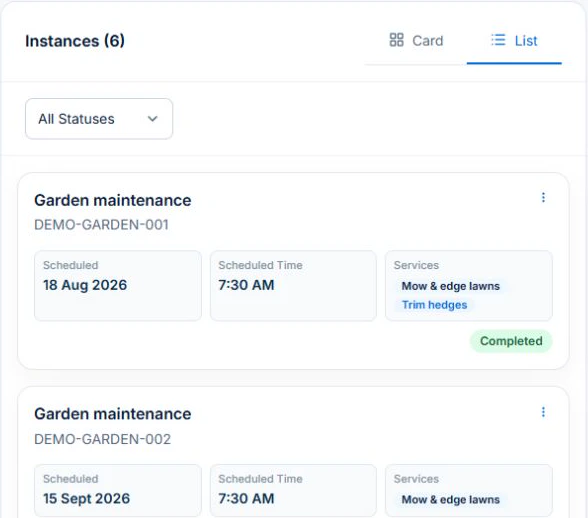
Build the mowing round as Professional Job Series in AxiomBlue, put access and mowing instructions on each visit, then preview assignments and rain-day changes. Review completed and skipped visits against the billing agreement before invoicing.
Read the guide →
Guide + printable resource
Use AxiomBlue Professional Job Series for the repeat clean, write visit instructions in Description or Tasks, then test a replacement cleaner, missed access and billing review. Keep each visit’s actual outcome separate from the recurring pattern.
Read the guide →
Guide + printable resource
Organise landscaping customers, multiple properties and site instructions in Axiom Blue. Test the handover to jobs, approved extras and the correct billing customer.
Read the guide →
Business guide
Use AxiomBlue customer, site and job records to hand over an electrical return visit. Put native-app instructions in job Description or Tasks, review the next worker’s actual view and retain the completed outcome. Uploads need Basic or Professional.
Read the guide →
Business guide
Use AxiomBlue customer, site and job records to hand over a parts-dependent plumbing return. Put native-app instructions in job Description or Tasks, review the next worker’s actual view and retain the completed outcome. Uploads need Basic or Professional.
Read the guide →
Business guide
Record the HVAC unit reference in AxiomBlue job descriptions and retain each service outcome against the relevant customer and site. Asset records on Basic or Professional can hold equipment identity; use service jobs for work performed and unresolved findings.
Read the guide →
Business guide
Use AxiomBlue customer, site and job records to hand over the building-site handover. Put native-app instructions in job Description or Tasks, review the next worker’s actual view and retain the completed outcome. Uploads need Basic or Professional.
Read the guide →
Business guide
Use AxiomBlue customer, site and job records to hand over a replacement cleaner’s visit. Put native-app instructions in job Description or Tasks, review the next worker’s actual view and retain the completed outcome. Uploads need Basic or Professional.
Read the guide →
Business guide
Use AxiomBlue customer, site and job records to hand over the approved room and finish. Put native-app instructions in job Description or Tasks, review the next worker’s actual view and retain the completed outcome. Uploads need Basic or Professional.
Read the guide →
Business guide
Use AxiomBlue customer, site and job records to hand over the accepted client brief. Put native-app instructions in job Description or Tasks, review the next worker’s actual view and retain the completed outcome. Uploads need Basic or Professional.
Read the guide →
Business guide
Use AxiomBlue customer, site and job records to hand over the next property on the mowing run. Put native-app instructions in job Description or Tasks, review the next worker’s actual view and retain the completed outcome. Uploads need Basic or Professional.
Read the guide →
Business guide
Use AxiomBlue’s Professional Recurring Services Health report to review lapsed job series, check visit history and agree the next action before rebooking.
Read the guide →
Business guide
On Professional, use a recurring Job Series for the service pattern and individual jobs for visit outcomes. Match series billing to the agreement and review the invoice drafts.
Read the guide →