Software for Cleaning & property service businesses

Run the cleaning schedule without losing the details at each site

Give the cleaner the agreed scope, access instructions and tasks for the booked visit. If someone covers the shift or a clean is skipped, the office can check the job record before billing. Professional adds recurring visits and crews.

Free: one user and limited core work. Basic: uploads and more capacity. Professional: recurring visits, crews, variations and advanced reports. Compare plans →

AxiomBlue · DEMO-R7-3-001 · one recurring visit
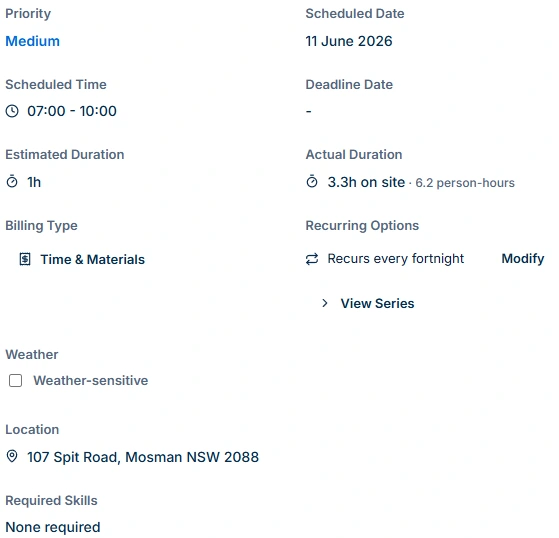
Cleaning demo visit scheduled for 11 June, 07:00 to 10:00, recurs every fortnight and records 3.3 hours on site and 6.2 person-hours.
Track each fortnightly cleaning visit with its own site, schedule and recorded hours.

A regular cleaner calls in sick

Give the replacement the work address, entry instructions and tasks for this visit. Check which additional services are due today. On Basic or Professional the worker can add job photos for the office to review.

At the end of the billing period

Compare completed cleans and agreed extras with the contract. For recurring work, use Professional Job Series to plan the visits, then review any skipped or changed booking before invoicing.

Give the job to a cover cleaner

Try one regular clean with a different worker. Ask them to identify the site, the access instructions and the extra service due that week. Then ask the office whether the evidence is enough to check the bill.

A practical example / Cleaning Services

See how a cleaning visit stays connected from plan to billing.

  1. 01

    Start with the right property and scope

    Open Spotless’s DEMO-R7-3-001 visit. It has a separate work-site address, a fortnightly pattern and a Night Shift assignment with Liam Walsh and Michelle Chen. In your own job, record the agreed rooms, tasks, exclusions and entry arrangements. This analytics-generated sample has a generic description and no populated tasks or notes; it does not demonstrate a finished cleaning checklist.

  2. 02

    Check the individual visit, not only the repeat pattern

    The example is scheduled for 11 June, 07:00–10:00. It records 3.3 hours on site and 6.2 person-hours from two cleaners against a one-hour estimate. Review actual start/end entries and the agreement: elapsed time, summed labour and the customer’s charge are different measures. Displayed hours are rounded.

  3. 03

    Retain the work detail needed for a handover

    Inspect the two existing job photos and check their sharing controls. For your own work, retain completed areas, inaccessible rooms, approved extras and follow-up tasks in the relevant job records. Confirm instructions from the cleaner’s account. The separate customer-site notes field is available in the web app; put native-app work instructions in the job description or tasks.

  4. 04

    Review the bill and resolve incomplete costs

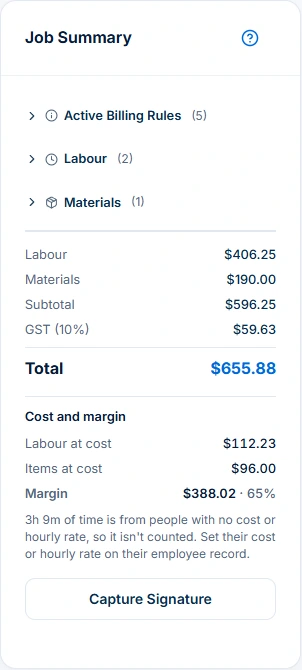
    The sample shows $406.25 labour plus $190 materials, a $596.25 subtotal, $59.63 GST and $655.88 total. Its warning says 3h 9m is missing employee cost or hourly-rate inputs. Complete those inputs before interpreting margin, then check completed work, approved extras, prior charges and the agreement before generating an invoice.

AxiomBlue · Same cleaning visit · attached photos
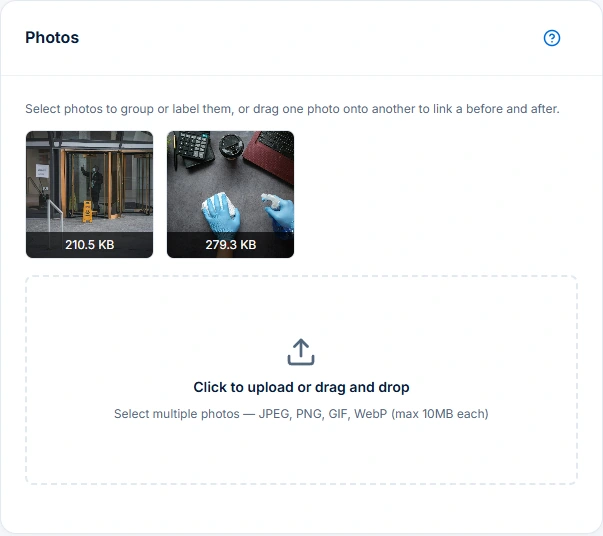
The same cleaning job’s Photos panel contains two sample cleaning images and an upload area.
Keep site photos with the visit to support the handover and work record. Uploads are available on Basic and Professional.

The tools behind the working day

Start with the part
you usually have to chase.

01 / Quotes and agreed scope

Make the cleaning quote useful on the first visit.

Itemise the areas, tasks, frequency, exclusions and price basis in the quote. Keep accepted scope with the job and record access or site restrictions where the worker can use them. A one-off deep clean and a regular office clean may need different durations and billing rules. Professional variations retain agreed changes; recorded time alone does not authorise an extra charge.

Explore quoting →

Free includes limited core quoting. Basic adds uploads and capacity; Professional adds custom PDF templates and automation.

A closer look / Quoting

  • Products and services price book
  • Reusable quote assemblies
  • Quote templates
  • Grouped scope and line items
  • GST, discounts and expiry dates
See how it works →

02 / Cleaning scheduling

Plan one-off cleans beside the regular round.

Use individual scheduling for visit dates, recorded duration and assignments. Professional adds crew planning and recurring job series. Check availability, customer access, warnings and work not placed before applying a plan. When a visit moves or is skipped, review that individual outcome and the agreement before billing; repeating work and recurring invoice templates are separate workflows.

Explore recurring jobs & services →

Recurring job series require Professional at $59 AUD for the first seat per month, excluding GST; additional seats receive graduated discounts. Free and Basic support individual jobs and scheduling; copying an individual job is separate from a recurring series. Recurring invoice templates and automated service reminders also require Professional.

A closer look / Recurring jobs & services

  • Recurring job series
  • Visit frequency and dates
  • Individual service visits
  • Series status and management
See how it works →

03 / Site instructions and job photos

Help a replacement cleaner understand this visit.

Keep the correct property, agreed finish standard, current instructions and unresolved work clear. Use job descriptions or tasks for native-app work instructions, and verify the worker’s access. Job uploads start on Basic. Review what is shared with the customer, restrict sensitive key or alarm information, and describe what a photo supports rather than treating an image or completed label as a quality inspection.

Explore documents & questionnaires →

Basic adds file uploads, with plan storage limits. Professional adds questionnaires and custom PDF/email templates; appropriate permissions apply.

A closer look / Documents & questionnaires

  • Business document records
  • Document editing
  • Questionnaires and shared response forms
  • Job attachments
  • Business CSV backup export
See how it works →

04 / Cleaning invoicing

Connect the visit record to a reviewed bill.

Prepare the invoice from the agreed scope, recorded labour and items, checking earlier charges and tax. Complete missing employee costs before using the margin to review the job.

Explore invoicing →

Core invoicing is available on every plan; Free includes 10 invoices a month. Professional adds automation, accounting connectors and connected Stripe card payments. Setup and processing fees apply.

AxiomBlue · Same cleaning visit · billing review
Cleaning Job Summary shows $655.88 including GST and warns that 3h 9m lacks employee cost or hourly-rate inputs.
Review labour, materials and GST before billing. Complete missing employee costs before relying on the displayed margin.

05 / Commercial cleaning records

Use the report that answers the customer’s question.

Professional’s Customer Work report helps you review work for a customer and period using the recorded jobs and relevant details. Check filters, source records and permitted outputs before sharing. Use the dedicated cleaning Customer Work guide for the report procedure; it is distinct from invoicing and from this product overview. A report is only as complete as the entries behind it.

Explore business reports →

Advanced financial and business reporting requires Professional. Report usefulness depends on current and complete source records.

A closer look / Business reports

  • Aged receivables and payables
  • Recurring service health
  • Billing reconciliation
  • Cancellation analysis
  • Client retention
See how it works →

06 / Customer handover

Let customers find the records you choose to share.

Configure the customer portal and review access to shared quotes, job progress, photos, invoices and recorded payments. Customers can review and accept eligible quotes. Professional with a connected Stripe account adds eligible online invoice card payments, with processing fees. Confirm permissions and sharing rather than assuming every internal note or attachment is customer-facing.

Explore customer portal →

Customer access must be configured for the business and its records. Online card payments require Professional and a connected Stripe account; new Stripe merchant onboarding currently supports Australian businesses only. Processing fees apply.

A closer look / Customer portal

  • Customer sign-in
  • Customer quotes and acceptance
  • Invoice detail and payment history
  • Online payment when connected
  • Job status and progress
See how it works →

Choose by the work you need to do

Check the fit.
Then check the plan.

Start with the everyday tools. Check the specialist features before choosing what your team needs.

Quoting

Free includes limited core quoting. Basic adds uploads and capacity; Professional adds custom PDF templates and automation.

Job management

Free: one user and limited core work. Basic adds uploads and capacity. Professional adds advanced crews, variations and recurring visits.

Crew scheduling

Free and Basic include individual scheduling. Professional adds crews, skills, leave and recurring series; Free usage limits apply.

Recurring jobs & services

Recurring job series require Professional at $59 AUD for the first seat per month, excluding GST; additional seats receive graduated discounts. Free and Basic support individual jobs and scheduling; copying an individual job is separate from a recurring series. Recurring invoice templates and automated service reminders also require Professional.

Documents & questionnaires

Basic adds file uploads, with plan storage limits. Professional adds questionnaires and custom PDF/email templates; appropriate permissions apply.

Invoicing

Core invoicing is available on every plan; Free includes 10 invoices a month. Professional adds automation, accounting connectors and connected Stripe card payments. Setup and processing fees apply.

Business reports

Advanced financial and business reporting requires Professional. Report usefulness depends on current and complete source records.

Customer portal

Customer access must be configured for the business and its records. Online card payments require Professional and a connected Stripe account; new Stripe merchant onboarding currently supports Australian businesses only. Processing fees apply.

Before you decide

Questions for
cleaning & property service businesses.

Can I manage domestic and commercial cleaning jobs?

AxiomBlue connects quotes, customer and site details, individual jobs, scheduling, recorded time, items and invoicing. Use the agreed scope and instructions for each property. Professional adds crews and recurring job series for regular visits; a repeat pattern does not replace reviewing each visit’s outcome.

Which plan includes recurring cleaning and team planning?

Free supports one user and limited core jobs and individual scheduling. Basic adds uploads and capacity. Professional adds recurring job series, crews, variations and advanced reports. Permissions, setup and usage limits still apply. Recurring jobs and recurring invoice templates are separate workflows.

Can cleaners keep photos and instructions with a job?

Job photo uploads start on Basic. Keep native-app work instructions in the job description or tasks and verify access from the worker’s account; the separate customer-site notes field is available in the web app. Review sharing settings and restrict sensitive access information. Photos support the record but do not certify cleaning quality.

Can I review work completed for a cleaning customer?

Professional’s Customer Work report supports reviewing recorded work for a selected customer and period. Check the report filters and source entries before using or sharing the result. The cleaning Customer Work guide explains that report separately from the quote and invoicing workflows.

Why is the demo’s displayed margin incomplete?

The sample’s summary excludes 3h 9m from costing because employee cost or hourly-rate inputs are missing. Resolve those inputs before interpreting the displayed 65% margin. Even complete direct job costs do not establish whole-business profit, owner pay or cash collected.

Does a completed recurring visit automatically mean it should be invoiced?

Review the actual work, skipped or inaccessible areas, approved extras, previous charges and the customer agreement. A completed status or recurring pattern does not itself authorise a charge. Check the draft and billing rules before generating or sending an invoice.

Considering a switch?

Check the fit before
moving your business.

Use a familiar job to compare the way you work today with the way Axiom Blue handles it.

  1. 1. Follow a job in the demo

    Check the quote, schedule, job record and invoice. Look for the details your team needs.

  2. 2. Check your plan and team cost

    Compare usage limits, paid seats and specialist features. See plans and pricing →

  3. 3. Confirm your move

    Try your own quote on the free plan. Before moving existing records, ask us about your data and setup needs.

Put it to a practical test

Bring the job
you know best.

Use these starting points in the public demo. Then try your own quote with a free account.

Free forever for one person. No credit card. Usage limits apply.

  1. 01

    Open DEMO-R7-3-001 and check its property, recurring pattern and assigned team.

  2. 02

    Inspect the actual time entries and existing photos on that same visit.

  3. 03

    Read the missing-cost warning and review the billing basis before preparing an invoice.