
Carry forward the agreement
Open the accepted quote and convert it. Compare the customer, site, scope and billing basis with the original before scheduling the pending job.
Return the work record to billing
Have the crew record time, materials and any unresolved task. Review approved extras and earlier claims before preparing the appropriate invoice. A signed quote or a completed booking alone cannot explain every later charge.
Convert the accepted quote and verify the pending job
In Sales, open the accepted quote with the required permissions. Select Convert, choose Convert to Job and confirm. Use Go to Job if the quote already has a job. Review the pending job’s customer, site and work details before scheduling it.
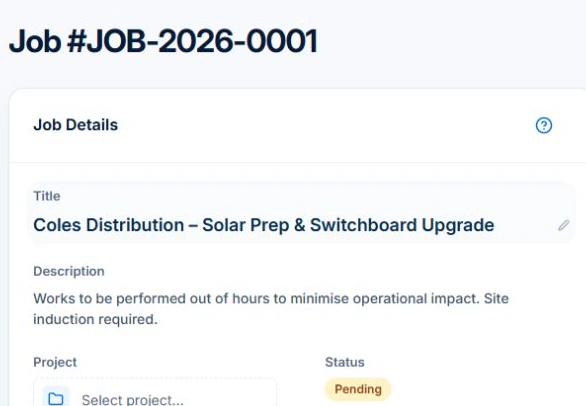
Schedule the job once its instructions and estimated duration are ready. After the work, review time and materials against the agreement before drafting an invoice. For a fixed-price job, check earlier claims and the remaining balance in the web Billing card. Issuing the invoice is a separate decision.
| Stage | Axiom Blue workflow | Your check |
|---|---|---|
| Accepted quote | Convert the agreed quote into a job | Customer, site and accepted scope are correct |
| Planned work | Set duration and scheduling requirements against the job | People, timing, access and materials suit the work |
| Work delivered | Record time, materials and task progress | Entries belong to this job; extra scope is agreed |
| Billing | Use the job's billing workflow and review the invoice | Charges match the agreement and previous billing |
| Payment | Review the invoice balance and recorded payments | An issued invoice and money received are different states |
Plan workable assignments, then review the proposal
A schedule needs enough time for the work and suitable people to deliver it. Axiom Blue's assisted scheduler proposes assignments using estimated job duration, existing bookings, working hours and travel. Professional adds crew management, recorded skills and approved leave, so those requirements can inform the proposed plan.
For the installation, enter the site and estimated duration, then the required skills on Professional. Preview it alongside the day's other work. Review the proposed people and times, warnings and unplaced jobs before applying. If someone becomes unavailable or an urgent job arrives, preview the changed day and check the result again.
Use the calendar to review bookings, then confirm site access, materials and customer availability before committing to the appointment.
Read next Job allocation software for tradies: plan, preview and assign work →
Record the work and use the agreed billing basis
The field record should explain what happened, not leave the office guessing. Use Description and Tasks for the work instructions, and record time and materials against the right job through the web platform or native iPhone and Android apps. Photo and document uploads start on Basic. Check that supported native field actions have synced before relying on the office record.
For completed time-and-materials work, use Generate Invoice to review entries, quantities, rates and tax. Check previous charges separately. For fixed-price claims, review the contract and Billing card in the web app.
Now add a change to the example: the customer requests another item outside the accepted scope. On Professional, record and price a variation and obtain approval before including that extra work in billing. Creating the invoice is followed by checking, approval and sending through the invoice workflow.
Read next Job invoicing software: bill from the job record → · Record and bill job variations in AxiomBlue →
Keep job costs, invoiced amounts and cash separate
Use Axiom Blue's recorded labour and materials to compare the job with its estimate. If the installation takes longer or uses more material, investigate the reason: an incomplete estimate, an access delay or agreed extra scope call for different responses. Check missing entries before interpreting the result.
For an illustrative job with $1,000 of agreed revenue and $650 of direct costs, both excluding GST, the difference is $350 before overheads and other business costs. That is direct contribution, not net profit or owner pay. The customer invoice and its recorded payments answer separate questions: what was billed, and what has been received.
Read next Review job costs in AxiomBlue: quote against actual work →
Test one ordinary job and one change
Try a familiar job from quote through delivery and billing. Free supports limited single-user core work; Professional adds advanced crews and variations. Fixed-price claims use the web workflow with invoicing permission.
- Prepare the customer, site and agreed quote. Convert the accepted quote to a job and inspect what carried across.
- Set the duration and schedule. On Professional, include required skills and approved leave; preview assignments and inspect warnings before applying.
- Record time and materials, and check the received entries. Preview billing using the job's agreed method, including previous charges.
- Introduce an overrun or a requested extra. Check how the changed record affects planning, cost and billing; on Professional, inspect variation approval.
- Review the resulting invoice and balance. Identify any missing approval, field record or accounting handover before using the workflow for customer work.
Choose the next check that fits your decision
Use this procedure to learn the AxiomBlue record handover. When comparing products, keep the same job, roles and expected invoice beside you. Your accounting package and any specialist system still need their own checks.
Read next How to choose job management software: a practical test checklist → · Compare job management software: build a shortlist for your trade business →
Choose a plan for the workflow and the team
Choose the capabilities you need before calculating the team cost. A second user or file uploads need a paid plan. Crew management, skills, leave, recurring series, variations and accounting sync require Professional.
| Plan | Monthly first-seat price | Workflow fit and limits |
|---|---|---|
| Free | $0 | One user; 10 jobs per week, 10 quotes and 10 invoices per month, 25 customers and 25 leads. Core quoting, individual scheduling and invoicing; no file uploads. |
| Basic | $29 AUD excluding GST | Core job workflow, additional users and file uploads; no job-volume cap. |
| Professional | $59 AUD excluding GST | Advanced crew, recurring-work and billing workflows, including variations and accounting sync; no job-volume cap. |
- Additional seats have graduated discounts: seat two is 10% off the first-seat rate, seat three 20% off, through to 50% off from seat six. Earlier seats retain their own rate.
- For example, three Professional seats billed monthly total $59 + $53.10 + $47.20 = $159.30 AUD excluding GST. This is an illustrative same-plan subscription calculation, not a flat $59 multiplied by three.
- Check annual billing and your actual team configuration on the pricing page. SMS credits and payment-processing charges are separate; online payment requires Professional and a connected Stripe account.
Common questions
Practical questions about using Axiom Blue
Can I keep my accounting software?
Yes. Axiom Blue manages job records and billing alongside your accounting setup. Xero sync requires Professional; check the configured customer, invoice and payment flows against your accountant's process. Axiom Blue does not run payroll, lodge BAS, provide bank feeds or produce a full set of financial statements.
What happens when the field team has no signal?
The native iPhone and Android apps can queue supported field actions for synchronisation when a connection returns. Test the actions your team uses and check that the records have arrived before billing. Web browser access has different offline behaviour; do not assume every screen or action works without a connection.
Do I need to move every old job before starting?
Decide which customers, price-book items and active work you need in the new workflow. Axiom Blue supports customer and price-book CSV imports; inspect column mapping and validation before adding records. Keep access to the history you need in the existing system. The preparation and changeover time depend on your data and processes, so test a small set before setting a date.
Put it to work
Your practical checklist
- The accepted scope remains identifiable after the job is created.
- Assignments fit the people, timing and site requirements you checked.
- Field records have arrived, and billable entries match the agreement.
- Extra work has the required approval and previous charges are accounted for.
- Your chosen plan supports the whole workflow and the calculated team cost.
See the records in Axiom Blue
Inspect AxiomBlue’s job-management workflow
Use the product overview for capabilities and plan fit, then return to this procedure to test your own familiar job.