
Use the agreement to choose the calculation
For per-visit billing, count completed visits at the agreed price and add approved extras. For periodic billing, check what the monthly agreement includes and how it treats a skipped service.
Check one bill by hand
At an illustrative $80 per completed visit, three completed mows total $240. If an additional $45 cleanup is approved, completed and due, the total is $285 before any applicable tax. Compare that with earlier billing before sending.
Use visit records to decide what belongs on the bill
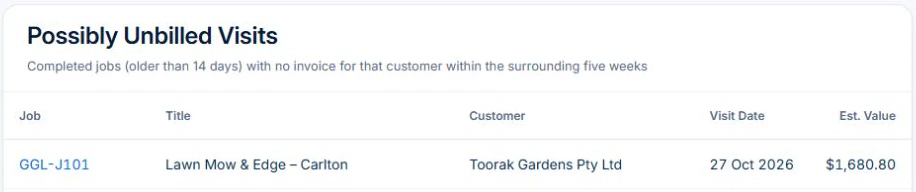
Open the relevant jobs and match their dates, services and outcomes to the agreement. On Professional, with reporting access, use Billing Reconciliation to find possibly unbilled visits. Check the job and customer’s invoices before deciding what belongs on the bill.
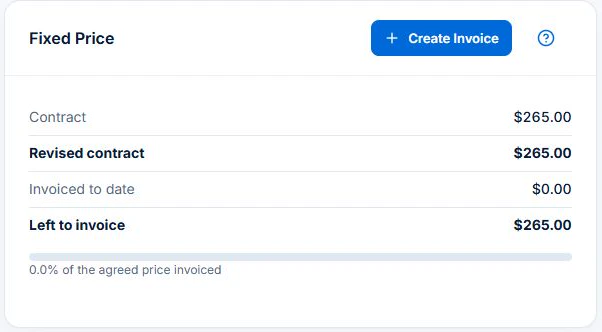
On a fixed-price visit, check Contract, Invoiced to date and Left to invoice in the web Fixed Price card. For an agreed monthly bill, reconcile the covered visits and agreed extras before preparing the invoice. Review the billing setup for any Professional Job Series before issuing it.
Agree what the recurring price covers
Write down the service before choosing the billing rhythm. Does the price cover mowing and edging, or also removal of clippings? Is an additional garden cleanup included? The crew and the customer should be working from the same description.
Choose per-visit or fixed-period billing under the customer agreement. A monthly invoice can group individual visits; make the charging basis clear on the document.
Keep a visit record that explains the charge
Record the service date, site and work completed. If access was unavailable or the weather stopped the work, record that outcome instead of marking the usual service complete. The person billing later needs to see the exception.
For additional work, note what was requested, its price and the approval before treating it as chargeable. Attach the detail to the relevant job so it can be checked without searching a separate message thread.
- Service date and job reference
- Regular work completed or reason it was not completed
- Extra work and the agreed amount
- Any return visit or customer query
- Whether the visit has already been invoiced
Work through a month with a skipped visit
Illustrative example: a customer agrees to $80 per completed visit. Three visits are completed, one planned visit is skipped and an additional $45 cleanup is approved and completed. The service amounts total 3 × $80 + $45 = $285 before any applicable tax.
Describe the three service dates and the cleanup separately. Do not charge the skipped visit under this example’s per-completed-visit agreement. If your actual agreement uses a fixed periodic fee or a cancellation charge, review that agreement instead of borrowing the example’s billing rule.
Review the bill before the next round starts
Check the service period against the completed jobs, approved extras and previous invoices. Then inspect the invoice as the customer sees it: can they recognise the sites, dates and work? Record payments against the invoice and review the remaining balance.
In AxiomBlue, recurring job series require Professional. Use the series for the visit pattern and individual jobs for what happened. Prepare and review billing separately; inspect the agreed arrangement rather than assuming all visits combine automatically into one monthly invoice.
For a real product example of that distinction, inspect the landscaping maintenance and billing records for the same scheduled demo visit. Its fixed-price panel has an unbilled balance; compare it with delivery and the agreement before creating an invoice.
If an issued invoice remains overdue, you can set up an overdue invoice reminder and owner follow-up on Professional. Check the current balance, contact details and any payment arrangement; the workflow’s SMS action needs purchased credits, and replies or disputes still need a person.
Put it to work
Your practical checklist
- Confirm per-visit or fixed periodic billing.
- Match completed visits to their job references.
- Review skipped visits and approved extras.
- Check for work already invoiced.
- Preview the invoice and follow its remaining balance.
See the records in Axiom Blue
Try the workflow with a familiar job.
Features and usage limits vary by plan. Review the tools relevant to your process before choosing your setup.