
Record the board as well as the address
Identify the switchboard and work area in the job. Add the approved task, what the first electrician completed and any findings that affect the next visit.
Give the returning electrician a decision they can act on
Say which check is still due, which part or access is needed, and who can answer a scope question. Open the job as the receiving worker and check that those details are visible.
Put the board reference and return work on the job
Select the customer and the saved site for the return. In Description, record the board or circuit identifier, the earlier job number and the agreed work. Use Tasks for the remaining checks and record the outcome on the visit.
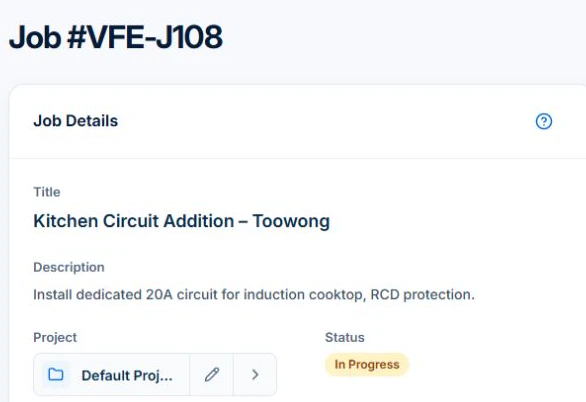
Check the assigned electrician’s native-app view. Keep durable property information on the customer’s site record in the web app and put visit instructions in Description or Tasks. Attach the relevant supporting document when needed and permitted. Uploads require Basic or Professional.
Distinguish the person who calls from the site and payer
Record the customer and billing contact, then identify the property where the work occurs. A property manager, occupant and owner may have different roles. Confirm who can approve extra work and which reference belongs on the invoice rather than assuming the person opening the door is the payer.
Give the job a specific installation reference
Use a clear location or equipment description that a suitably qualified person can recognise. Keep the inspection finding, accepted scope, relevant testing or certificate references and outstanding action with the job. These records support the handover; they do not replace the required authorised testing or certification process.
- Customer and payer reference
- Site address and access contact
- Installation or affected-area reference
- Accepted scope and change approval
- Work completed, required document references and next action
Test the record with a return visit
Illustrative case: the first visit diagnoses a fault and the customer approves a replacement. Another electrician returns with the part. Ask them to find the diagnosis, approved work and what still needs checking without relying on a phone explanation. Record the actual return outcome, not just the date booked.
To inspect the wider software handover, use the AxiomBlue electrical workflow to follow a job’s site details, recorded labour, parts and billing review in one place.
Make the next visit usable from the field account
Keep lasting site detail separate from today’s scope and unresolved tasks. In AxiomBlue, the separate customer-site notes field is available in the web app; put the instructions needed by a native-app worker in the job description or tasks. Verify access from the worker’s account. Uploads need Basic or Professional; Free has customer and usage limits.
Restrict sensitive access information and share only what the person needs. Check current details with the customer instead of carrying an old instruction into every future job. Professional adds crew management and recurring job series where those suit the work.
Sources: Protect customer information
Common questions
Questions about this process
Where should instructions for the native app go?
Use the job description or tasks for instructions required on that visit. The separate customer-site notes field is shown in the web app; verify the worker’s actual view.
Put it to work
Your practical checklist
- Separate customer, site, approver and payer.
- Identify the installation and current scope.
- Retain document references through the proper process.
- Make unfinished work and its owner visible.
- Test the return handover on the field device.
See the records in Axiom Blue
Try the workflow with a familiar job.
Features and usage limits vary by plan. Review the tools relevant to your process before choosing your setup.