
Find the stage that can proceed
Check dependencies, access and the scope approved for the next site job. A stage date on a plan is a starting point; confirm that the crew can actually begin the work.
Place the site job on the calendar
Open the matching job and check its location and duration against the available crew time. Review the proposed date before telling the site supervisor when to expect labour.
Decide what is ready before you place the job
Open the project ticket for the next stage. Check the scope, owner and status. If the vanity delivery or preceding work is still outstanding, record who will confirm it before you commit the crew.
On the site job, check the location, estimated duration and access window. Review available people and existing bookings in the Job Calendar. If the job is still unassigned, use Auto Schedule to inspect its proposed date, worker or crew and any work left unplaced. Project planning and crew scheduling require Professional. Applying a proposal requires full scheduling management permission.
Name the readiness test for each stage
Record the work, delivery or approval needed before the next trade starts. Assign an owner to confirm readiness and keep that result with the stage task.
Where a stage depends on hired or owned plant, use the construction plant record workflow to check the item, hire responsibility and unresolved faults before treating the equipment as ready.
Plan an affected handover before shifting the whole project
Illustrative case: a bathroom fit-off is delayed by a fixture delivery. Review the work that remains possible and who is actually needed. Confirm the subcontractor’s availability and the client effect. Retain the reason for the change so an updated date is not mistaken for a new agreement about scope or price.
Use project planning and daily scheduling for their different decisions
AxiomBlue Professional provides project tasks and phases alongside crew planning. Assisted job scheduling proposes assignments using the recorded constraints; inspect warnings and unplaced work before applying. Do not assume the project chart automatically guarantees resources, material readiness or every dependent date. Test the relationship with your own staged job.
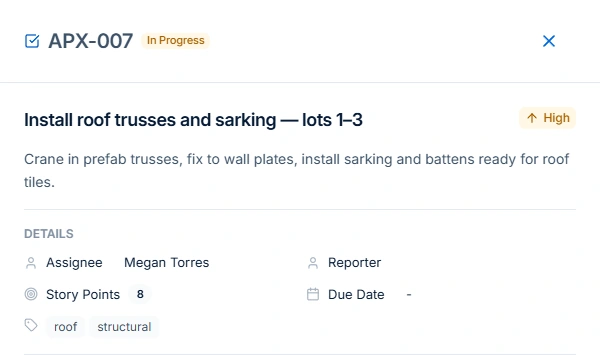
See that distinction in the AxiomBlue construction workflow using a current project’s assigned roof-stage task and open structural question. Review the actual job, people and site readiness separately from the ticket list before applying a daily assignment.
Close the day with a usable next-stage record
Record completed work, unresolved issues and the next owner. Check approved changes separately from delivery delay and progress billing. Put the instructions required by tomorrow’s team in the current job tasks or description. Confirm attendance and customer arrangements through the appropriate communication process.
Common questions
Questions about this process
Does a task date confirm subcontractor attendance?
Use the project task to coordinate the stage, then confirm subcontractor attendance and site readiness separately.
Put it to work
Your practical checklist
- Write prerequisites and a readiness owner for each stage.
- Confirm materials and subcontractor arrangements.
- Review the practical effect of the changed handover.
- Inspect daily assignments separately from project dates.
- Record unresolved work before the next stage or claim.
See the records in Axiom Blue
Try the workflow with a familiar job.
Features and usage limits vary by plan. Review the tools relevant to your process before choosing your setup.