Software for Air conditioning & refrigeration businesses

Send the technician back with the history of the right unit

Record which unit was serviced, what the technician found and what needs attention next. Use those job records to prepare the next visit and check which time and parts belong on the invoice.

Free: one user and limited core work. Basic: uploads and more capacity. Professional: crew skills and leave, recurring visits, variations and specialist registers. Compare plans →

AxiomBlue · DSP3-1026-10 · technician time
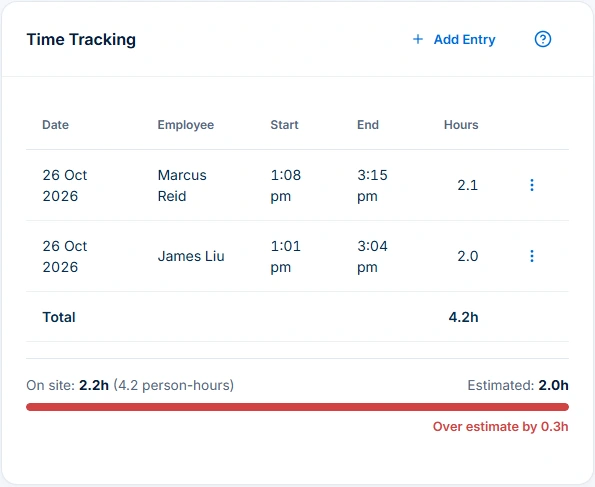
Arctic HVAC installation time tracking shows 2.2 hours on site and 4.2 person-hours against a two-hour estimate.
Compare technician entries with elapsed time: this installation records 4.2 person-hours and 2.2 hours on site.

When one site has several units

Identify the unit on each service job and record what the technician found. On the next visit, check the unit reference and earlier outcome before allocating a technician or ordering parts.

Keep planned services visible around installations

Use Professional recurring visits for the maintenance pattern and check the individual bookings. After each visit, match labour and parts with the agreed scope before preparing the invoice.

Try two units at one address

Record service on one unit and an unresolved fault on the other. Ask a different technician to identify the unit requiring a return and the last service outcome before they head out.

A practical example / HVAC & Refrigeration

Follow one installation from recorded time to billing review.

  1. 01

    Check the site and agreed work

    Keep the installation scope, equipment reference, site address and access instructions together so the technician and office can follow the same job.

  2. 02

    Inspect the labour behind the charge

    The job displays 2.2 hours on site and 4.2 person-hours from two technicians. Review the actual time entries and billing rules. Elapsed time at the property, summed workers’ hours and the agreed charge are different measures; rounded row values may not sum to a rounded total.

  3. 03

    Review recorded parts and their units

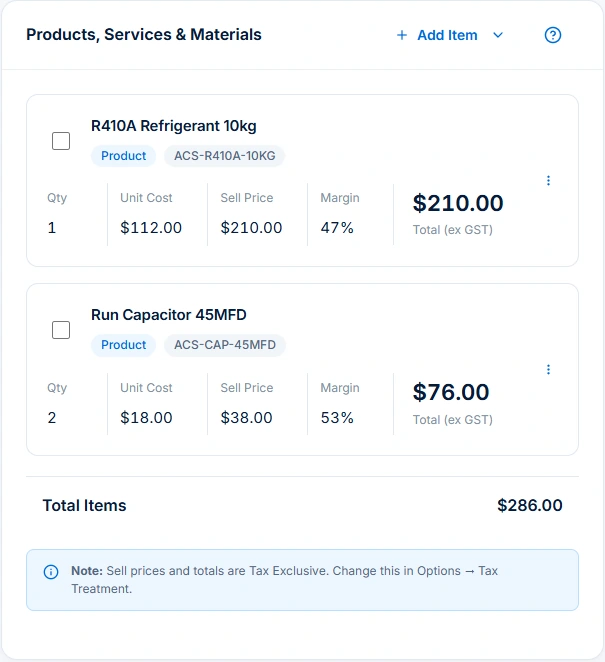
    The job contains an R410A product line at $210 and two capacitors at $38 each, giving $286 excluding GST. Confirm what was supplied or used and how its stock unit is defined. Record relevant refrigerant activity separately in the appropriate Professional register and your required process.

  4. 04

    Resolve missing costs before relying on margin

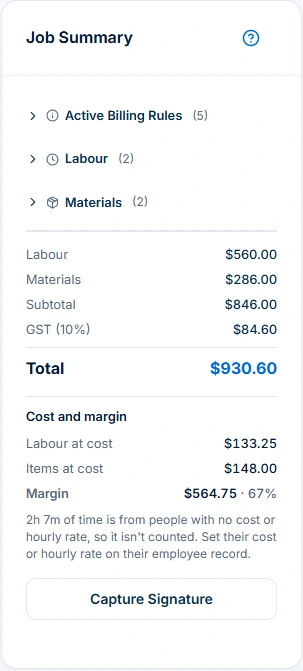
    The summary shows $846 before GST, $84.60 GST and a $930.60 total. It also warns that 2h 7m lacks employee cost or hourly-rate inputs. Complete those inputs and compare the agreement and previous invoices before interpreting margin or preparing the bill.

AxiomBlue · Same HVAC job · recorded items
Two Run Capacitor 45MFD items recorded at $38 each, totalling $76 excluding GST on the same HVAC job.
Record parts, quantities and prices against the job, including two capacitors totalling $76 excluding GST.

The tools behind the working day

Start with the part
you usually have to chase.

01 / Quotes and installations

Keep the installation scope with its job.

Build an itemised quote for equipment, labour, materials and exclusions, then retain the accepted work with the job. Record the site, access and equipment references the technician needs. Professional variations retain agreed changes; confirm readiness and the agreement before treating extra work as chargeable.

Explore quoting →

Free includes limited core quoting. Basic adds uploads and capacity; Professional adds custom PDF templates and automation.

A closer look / Quoting

  • Products and services price book
  • Reusable quote assemblies
  • Quote templates
  • Grouped scope and line items
  • GST, discounts and expiry dates
See how it works →

02 / Repairs and service handovers

Give the next technician a usable equipment reference.

Keep the relevant unit’s location, manufacturer, model or serial reference in the job description, notes and supporting files where available. Record findings and outstanding work against that job. Basic and Professional asset records support equipment identity and custody, such as shared testers; custody history alone is not service evidence or a dedicated installed-unit maintenance history. Uploads start on Basic.

Explore assets & service records →

Asset register and custody access is available on Basic and Professional, subject to permissions. Recurring service jobs and specialist compliance registers require Professional; uploads start on Basic.

A closer look / Assets & service records

  • Asset register and categories
  • Equipment identification
  • Asset assignment
  • Service findings retained in job records
  • Purchase and warranty details
See how it works →

03 / Technicians and repeat visits

Review the service round beside installation work.

Plan service visits using duration, bookings, working hours and travel. Review the proposed assignments and unplaced work before applying. Professional adds crew skills, leave and recurring maintenance; confirm site access and parts readiness.

Explore crew scheduling →

Free and Basic include individual scheduling. Professional adds crews, skills, leave and recurring series; Free usage limits apply.

A closer look / Crew scheduling

  • Reviewed schedule proposals
  • Job duration, bookings, working hours and travel
  • Crew skills and approved leave on Professional
  • Assignment warnings and unplaced jobs
  • Day rescheduling with preview and undo
See how it works →

04 / Job billing

Check the inputs as carefully as the total.

The sample’s $560 labour plus $286 materials gives $846 before GST and $930.60 including GST. These are sample charges, not recommended HVAC rates. Missing employee costing makes the displayed margin incomplete. Even complete direct job costs do not establish business profit, owner pay or cash collected. Review prior charges and the billing agreement before generating an invoice.

Explore invoicing →

Core invoicing is available on every plan; Free includes 10 invoices a month. Professional adds automation, accounting connectors and connected Stripe card payments. Setup and processing fees apply.

AxiomBlue · Same HVAC job · billing and costing review
HVAC Job Summary totals $930.60 including GST and warns that 2h 7m has no employee cost or hourly rate.
Check recorded charges and GST before billing. Resolve the missing employee costs before relying on the margin.

05 / Specialist records

Keep refrigerant activity separate from stock lines.

Use Professional refrigerant logs and certificate registers to retain specialist records with the job. Record actual transaction details and complete the required technical checks and regulatory submissions through your business process.

Explore trade compliance records →

Compliance management requires Professional. Check that the available record fields suit the requirements of your trade and jurisdiction.

A closer look / Trade compliance records

  • Compliance certificate records
  • Test-and-tag register
  • Refrigerant transaction records
  • Job-linked compliance detail
See how it works →

Choose by the work you need to do

Check the fit.
Then check the plan.

Start with the everyday tools. Check the specialist features before choosing what your team needs.

Quoting

Free includes limited core quoting. Basic adds uploads and capacity; Professional adds custom PDF templates and automation.

Job management

Free: one user and limited core work. Basic adds uploads and capacity. Professional adds advanced crews, variations and recurring visits.

Crew scheduling

Free and Basic include individual scheduling. Professional adds crews, skills, leave and recurring series; Free usage limits apply.

Recurring jobs & services

Recurring job series require Professional at $59 AUD for the first seat per month, excluding GST; additional seats receive graduated discounts. Free and Basic support individual jobs and scheduling; copying an individual job is separate from a recurring series. Recurring invoice templates and automated service reminders also require Professional.

Assets & service records

Asset register and custody access is available on Basic and Professional, subject to permissions. Recurring service jobs and specialist compliance registers require Professional; uploads start on Basic.

Trade compliance records

Compliance management requires Professional. Check that the available record fields suit the requirements of your trade and jurisdiction.

Invoicing

Core invoicing is available on every plan; Free includes 10 invoices a month. Professional adds automation, accounting connectors and connected Stripe card payments. Setup and processing fees apply.

Variations & progress billing

Variation tracking and approvals require Professional. Check the job billing method before preparing a progress claim.

Before you decide

Questions for
air conditioning & refrigeration businesses.

Can I manage HVAC installations, repairs and maintenance together?

Yes. Quotes and jobs retain the scope, site details, recorded time, parts and billing for individual work. Professional adds crew planning, recurring job series and variation approvals. Keep the installation scope and each maintenance visit’s actual outcome clear before billing.

Which plan includes technician crews and recurring maintenance?

Free supports one user and limited core work and individual scheduling. Basic adds uploads and capacity. Professional adds crews, maintained skills and approved leave, recurring job series, variations and specialist registers. Permissions, setup and usage limits still apply.

Can I retain equipment identity and service findings?

Keep unit identifiers, location, findings and outstanding work in the job’s description, notes and files. Basic and Professional asset records add equipment identity, status and custody.

Does a refrigerant stock item record refrigerant usage?

A product line records an item and quantity in its configured stock unit. It does not by itself establish refrigerant mass handled or complete a refrigerant log. Professional specialist registers support relevant transaction records; review their fields and your required process separately.

Why does the demo warn about missing employee costs?

Complete the missing employee cost or hourly-rate inputs flagged in the summary before relying on the displayed margin.

Does AxiomBlue certify HVAC or refrigerant work?

Specialist records retain relevant information. They do not perform technical testing, validate a licence, issue an authorised certification or lodge regulatory records. Complete the applicable authorised process separately.

Practical guides for your business.

Start, choose tools or improve the handover between your clients, team and invoices.

Browse hvac & refrigeration guides →

Considering a switch?

Check the fit before
moving your business.

Use a familiar job to compare the way you work today with the way Axiom Blue handles it.

  1. 1. Follow a job in the demo

    Check the quote, schedule, job record and invoice. Look for the details your team needs.

  2. 2. Check your plan and team cost

    Compare usage limits, paid seats and specialist features. See plans and pricing →

  3. 3. Confirm your move

    Try your own quote on the free plan. Before moving existing records, ask us about your data and setup needs.

Put it to a practical test

Bring the job
you know best.

Use these starting points in the public demo. Then try your own quote with a free account.

Free forever for one person. No credit card. Usage limits apply.

  1. 01

    Open DSP3-1026-10 and check its separate work site and recorded time.

  2. 02

    Review the HVAC items, quantities and stock units without assuming they establish refrigerant usage.

  3. 03

    Read the missing-cost warning before interpreting margin or preparing an invoice.