
Price the job the customer asked for
Write the scope and exclusions plainly, then add labour, materials and quantities using your own prices. Use sections when the customer needs to compare separate parts of the work.
Hand over the accepted version
Preview the customer document and check rates and tax. After acceptance, convert the quote and make sure the crew receives the site and tasks from that agreement.
See the scope before comparing the total
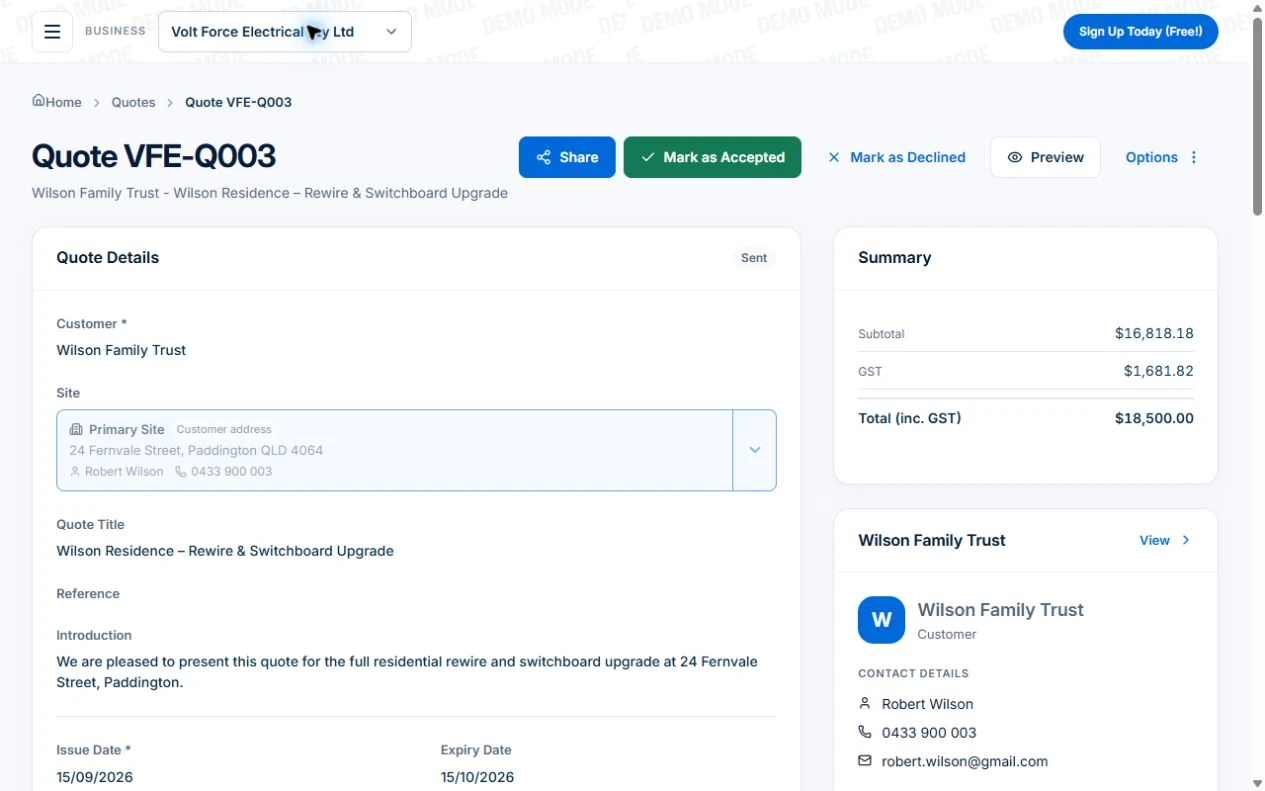
The public electrical demo shows a quoted job with its written scope and customer details. Use it to inspect the agreed work, not to assume its sample rates fit your business. For an illustrative installation, separate the main work from an optional addition so the customer can recognise what is included.
Choose the right customer and site, describe the areas or stages, and identify exclusions and assumptions. A useful quote should support both the customer’s decision and the team’s delivery instructions.
Build the price from quantities and reusable items
Use the price book for current labour and material items. Assemblies can bring a familiar group of items into the quote, while sections organise them by room, area or stage. Inspect the imported quantities and rates for this job rather than treating reuse as proof of a complete estimate.
Keep cost and sell price distinct. Allow for the delivery you expect, and check any required labour, travel or material assumptions. If the job needs a different scope, adjust the estimate instead of changing only the total.
Read next Review job costs in AxiomBlue: quote against actual work →
Walk through the labour and material quantities in AxiomBlue
List the labour and material quantities used to prepare the price. Check the units, current cost and any allowance. A line marked “materials” may be acceptable in a customer-facing summary, but you still need enough internal detail to understand your estimate.
Axiom Blue includes price-book items, quote assemblies and materials calculators. The verified calculator covers paint, tiles, wallpaper and flooring. Use measured inputs and review assumptions; a calculated quantity is an estimate to check against the site and product.
Give scope changes a separate record
Once work starts, a request for something extra should not disappear into a text message. Record the new scope and agreement before treating it as part of the contract.
In Axiom Blue, an accepted quote can become a job, and Professional variations support later agreed changes. Follow that sequence in the demo and inspect what the team and customer will see at each point.
Review the document as the customer will see it
Check customer and site, work descriptions, quantities, prices, tax treatment, exclusions and terms. GST follows business registration and taxable lines; inspect the actual document and obtain advice on requirements that apply to the agreement.
Share the quote’s viewing link so the customer can review and accept without an account. Check the recipient, scope, prices and issued version before sending.
Carry accepted work into the job and handle changes separately
Convert the accepted quote into a job, then inspect the customer, site and carried scope. Set the duration and work instructions before scheduling. Keep the accepted quote identifiable as the reference for delivery and billing.
Use Professional Variations to record an added area or task, its price and approval. Keep that agreed addition separate from costs incurred delivering the original scope.
Read next Record and bill job variations in AxiomBlue → · Run a job in AxiomBlue: from quote to invoice →
Run the ordinary quote and the changed scope test
Use a completed job whose expected quote and bill you understand. Run the same scope through shortlisted tools on the plan you intend to use. Record any missing item, unclear customer view or lost handover.
- Build the scoped quote from checked quantities and rates.
- Inspect the customer document, terms, exclusions and tax.
- Test acceptance and conversion with controlled records.
- Check what the resulting job carries into planning and delivery.
- On Professional, inspect a requested variation and the billing basis; review previous charges before invoicing.
Check the plan and the total for your team
Core quotes, price-book use, assemblies and accepted-quote conversion can be tested within Free limits. Paid access supports more users and uploads; Professional is needed for later variation approvals and advanced crew planning.
Axiom Blue monthly first-seat prices are $29 AUD on Basic and $59 on Professional, excluding GST. Additional seats use graduated discounts: 10% off for seat two, 20% for seat three, through to 50% off from seat six. Paid plans have no job-volume cap. Check your actual team and billing interval on the pricing page; SMS credits and payment-processing fees are separate.
Free is a one-user core-workflow test: 10 jobs per week, 10 quotes and 10 invoices per month, 25 customers and 25 leads, with no file uploads. Use the demo to inspect Professional capabilities before choosing a plan.
Common questions
Quote and accepted-scope questions
Does using an assembly prove I included everything?
No. Inspect its quantities and items against this job’s scope, conditions and current prices. Reuse supplies a starting point; the estimate still needs review.
Does acceptance automatically confirm the crew appointment?
No. Inspect the created job, requirements and schedule, then confirm the appointment through your process. Agreed scope and a confirmed time are different decisions.
Should I change the original quote when the customer adds work?
Keep the accepted agreement identifiable and record the requested change through the appropriate process. Professional variations provide a scope, price and approval record; check the billing effect before preparing a claim or invoice.
Put it to work
Your practical checklist
- Customer, site and included scope are clear.
- Quantities, cost and sell prices checked.
- Customer document and terms reviewed.
- Accepted work reaches the correct job.
- Requested extras remain separate from overruns.
See the records in Axiom Blue
Test the quote and accepted-work handover
Inspect this workflow in the public demo, or use Free for limited single-user core work. Uploads start on Basic; crew management, recurring series, variations, weekly timesheets and automation require Professional.
Product instructions
Published by Axiom Blue, which is the product described. Guidance on quotes, pricing and contracts comes from business.gov.au, the ACCC, Consumer Protection WA, Consumer Affairs Victoria, NSW Fair Trading, the QBCC and the ABS as cited, checked 25 September 2026. It is general information, not legal advice; contract rules vary by state and by type of work.