
Start from your own prices
Reuse catalogue items and assemblies for repeat work, then update quantities and prices to suit the job.
Quoting / AxiomBlue
Build the quote from your labour, materials and scope. Preview what the customer will receive, then carry the accepted details into the job instead of typing the work out again.
One agreed scope to price, review and hand over.
Plan fit: Free includes one user and 10 quotes per month, within core-work limits. Basic adds capacity and uploads. Professional adds custom PDF templates and workflow automation. Compare plans →
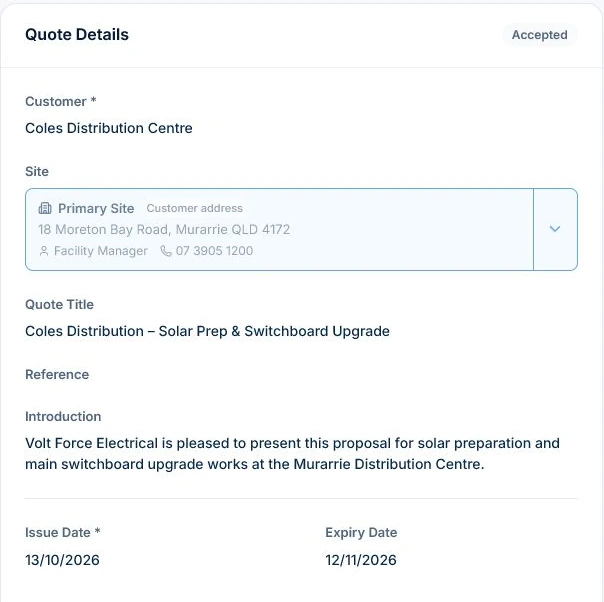
Group work by stage, room or service when those pieces carry different prices. Enter the labour and material quantities and your own rates. Preview the customer document to check what it includes.
Carry the accepted scope into a job and confirm the site before booking it. The worker can see what was sold and the office can check later changes against the original agreement.
Reuse catalogue items and assemblies for repeat work, then update quantities and prices to suit the job.
Group labour, materials or stages into sections so customers can follow the scope, prices and terms.
Convert an accepted quote into a linked job, retaining the scope and items ready for planning.
Inspect the same demo quote / VFE-Q005
The Cable & Wiring section groups two lines into a $5,050 subtotal excluding GST. Use sections to make each part of your own quote easy to review.
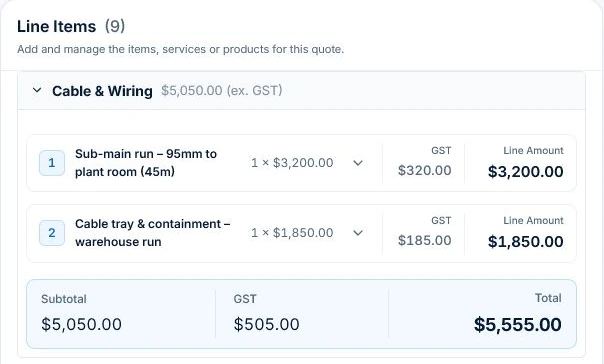
Inspect the same demo quote / VFE-Q005
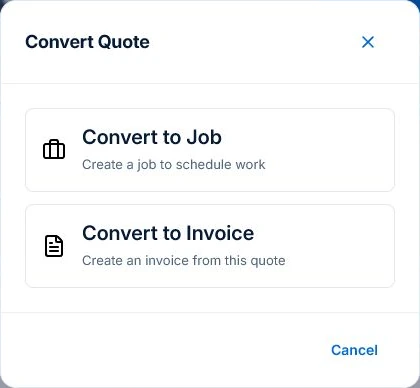
Use Convert to create a job for work that needs planning, or an invoice when billing is the next step. Check the resulting record before proceeding.
Picture it in your business / Example
One electrical quote groups nine items across cable and wiring, labour, materials, metering, switchgear and paperwork, keeping the scope and price easy to follow.
A practical starting point
For a new draft, choose the customer and site, describe the work and add your own items or assemblies. Group the scope, check quantities, selling prices and tax, then add the terms.
Use Preview to check the customer-facing scope, totals and terms before sending. Professional adds custom PDF templates.
After acceptance, convert the quote to a job and check its site and items before scheduling. Quote and job limits depend on your plan.
Know what’s included
Free includes one user and 10 quotes per month, within core-work limits. Basic adds capacity and uploads. Professional adds custom PDF templates and workflow automation.
Compare plans, limits and pricing →Check the workflow in detail
Explore the detail
Availability varies with plan, permissions and enabled features. Check plan inclusions.
See how this fits: win more work →Before you get started
Have a specific workflow in mind? Talk it through with us.
Yes. Free includes one user and 10 quotes per month, within its core-work limits. See pricing for the capacity your workload needs.
Yes. Reuse catalogue items and assemblies, organise work into sections, and update the quantities and prices for each job.
Convert it into a linked job or invoice. For a job, check the carried-forward site and items, then schedule the work.
Professional includes custom PDF templates and workflow automation. Basic adds uploads and paid-plan capacity. See pricing for current inclusions.
Keep the work connected
Considering a switch?
Use a familiar job to compare the way you work today with the way Axiom Blue handles it.
Check the quote, schedule, job record and invoice. Look for the details your team needs.
Compare usage limits, paid seats and specialist features. See plans and pricing →
Try your own quote on the free plan. Before moving existing records, ask us about your data and setup needs.
Make the next step a small one
You know where the friction is in your business. Open the demo and see how AxiomBlue handles it. Then start with your own quote on the free plan.
Free forever for one person. No credit card. Usage limits apply.
Try a quote like one you send every week. Check the detail your customer will see.
Explore a job, its crew, time and materials. Look for the information you usually chase.
Compare the features and limits you need. See plans and inclusions →