
Use two customers or two clearly different scopes
Set up one recurring maintenance visit and a separate garden project. Ask the team to find the work address, required equipment and service due for each booking.
Test the two bills
Skip a maintenance visit and approve a change to the project. Check what the office can recover about each decision when it prepares billing. Compare seats and plan requirements using the same two jobs.
Give each shortlisted app the same two-job test
In AxiomBlue, open a generated maintenance visit and check the site and agreed service. Then open a separate project job and check the written scope. The two sample records show different customers. For your trial, use one customer and check the quote and billing method on each job.
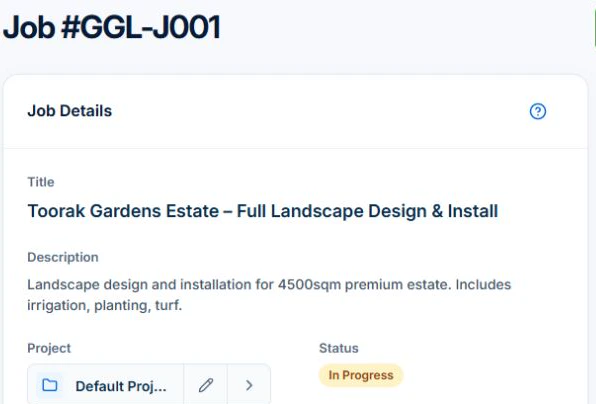
Use the same test in every shortlisted app. Give one visit a change in access and one project an extra item. Check whether the change stays with the correct record. Job Series and variation approvals require Professional in AxiomBlue.
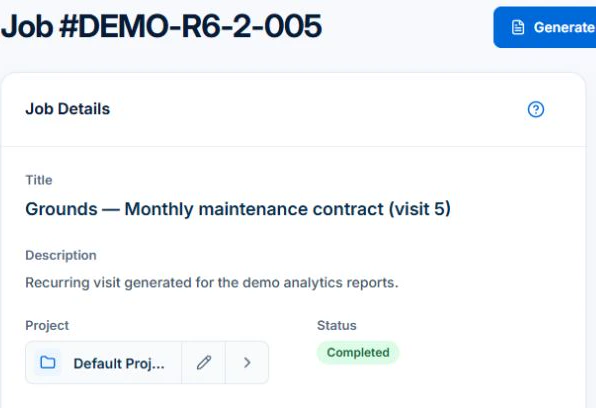
Use two different types of work at the same property
Illustrative test: a fortnightly maintenance client accepts a garden refresh. Keep the repeat service agreement and one-off project scope distinct. Ask a field worker to identify which tasks belong to today’s visit. Check whether materials for the project can be mistaken for the maintenance charge.
For a concrete operational example, inspect the landscaping business software overview to follow a maintenance series through its visit and fixed-price panel, then apply the same review to your separately quoted garden project.
Change the weather and the crew
Move one outdoor visit after rain, substitute a crew member and inspect the proposal before applying. Check the effect on the wider round and the work not placed. Recorded skills and leave should be kept current; route or calendar features alone do not establish a suitable assignment.
Add a material and follow it to the invoice
Record a sample extra load requested by the client, its approval, cost and charging basis. Review the project invoice separately from repeat billing. Check the site history, phone instructions and export with multiple properties for one customer. The test should reveal where a manual review is still needed.
Price the roles and required plan, then check the handover
Ask each shortlisted vendor for the plan and total cost for your actual office and field users, workload, billing interval and devices. Include tax basis, optional messaging, payment charges, training and exports. Keep a written result for each test: worked, needs a manual step, or unavailable. A feature-list tick is not a completed test.
AxiomBlue’s Free plan supports one user within usage limits and has no uploads. Basic adds uploads; Professional adds crew skills and leave, recurring job series, variations and project tools. Check the current pricing page for the team total. Try a required Professional process in the demo and confirm access before choosing a plan.
Common questions
Questions about this process
Should I choose the tool only for its route view?
Check the whole handover. Route planning helps place work, while scope, site instructions, material records and billing determine whether the correct work is delivered and charged.
Put it to work
Your practical checklist
- Run repeat maintenance and project work together.
- Test rain and a changed crew.
- Keep project materials separate from visit charges.
- Inspect site instructions on the worker’s device.
- Price recurring, crew and variation access.
See the records in Axiom Blue
Try the workflow with a familiar job.
Features and usage limits vary by plan. Review the tools relevant to your process before choosing your setup.