
Tools for small trade & service businesses / Win more work

Move enquiries toward a quote without losing the next action

Give each new request a customer record and a next step. Once the team has confirmed the site and scope, prepare the quote from the details already collected.

How the pieces connect

  1. 01Capture an enquiry
  2. 02follow it up
  3. 03quote the work

Start with the part of your business that needs attention. Add depth as the work grows.

Ask once for the details that matter

Use a hosted form, link or embed to collect the site, scope and preferred date. Review the lead and record who will call back. A submitted date is a preference until the team confirms the booking.

Quote from the confirmed request

Turn the agreed scope into a customer quote. After acceptance, carry those details into the job so the person scheduling the work and the person delivering it see the same agreement.

Start with a form that captures the work to be priced

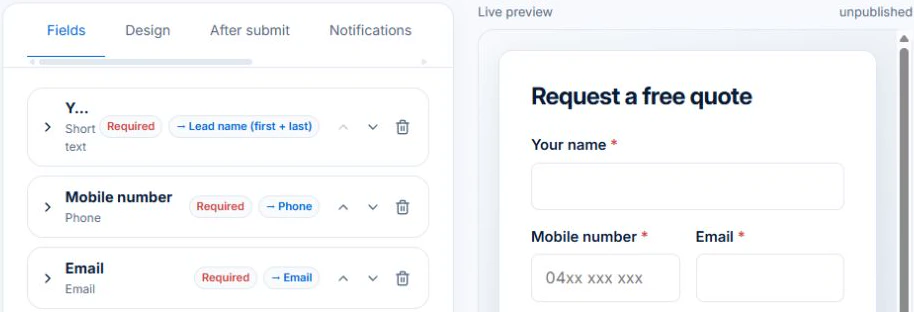
The demo form editor shows how contact questions map to the lead’s name, phone and email. Preview the hosted form to check its labels and any preferred-date field.

AxiomBlue · Lead field mappings in the enquiry form editor
The unpublished form editor maps contact questions to lead name, phone and email fields.
Review the contact field mappings in the form before publishing.

Review the submission in CRM. Confirm the scope and timing with the customer before preparing the quote. A preferred date is a request for the team to consider.

Explore the tools

Start with the improvement.
Follow it into the detail.

01 / Lead capture forms

Turn a website enquiry into a lead you can act on.

Collect the details needed to quote and plan a visit through a hosted form, website embed or QR code. Use fields and conditional questions to capture the work, then review the submission as a lead before confirming a booking.

Explore lead capture forms →
  • Hosted enquiry links
  • Website embeds and popup buttons
  • QR codes and email-signature links
  • Configurable form fields
  • Conditional form questions
  • Submission records
  • Enquiry, quote, service-request and emergency form starters
  • Service requests with preferred dates (not instant bookings)

Form availability follows your lead-management access. Free-plan record limits apply. Workflow follow-ups require Professional.

02 / Quoting

Quote the scope. Carry accepted work into the job.

AxiomBlue quoting software brings your customer, scope, labour and materials into one quote. Reuse price-book items and assemblies, organise the work into sections and check the customer-facing price. When the quote is accepted, convert it into a job ready to plan and deliver.

Explore quoting →
  • Products and services price book
  • Reusable quote assemblies
  • Quote templates
  • Grouped scope and line items
  • GST, discounts and expiry dates
  • Customer quote sharing and acceptance
  • Accepted quote conversion
  • Paint, tile, wallpaper and flooring calculators

Free includes limited core quoting. Basic adds uploads and capacity; Professional adds custom PDF templates and automation.

03 / CRM & sales pipeline

Keep each enquiry, customer and next action connected.

AxiomBlue connects customer and lead records with tasks and quotes, giving every enquiry a next action the team can find. On Professional, use the visual sales pipeline to review opportunities by stage and configure workflows for repeat follow-up. Keep the customer context as proposed work becomes a job.

Explore crm & sales pipeline →
  • Lead and customer records
  • Sales pipeline stages
  • Follow-up tasks
  • Customer history
  • Sales dashboard

Core customer, lead and task tracking are included in Basic. The visual sales pipeline, CRM dashboard and workflow automation require Professional.

Considering a switch?

Check the fit before
moving your business.

Use a familiar job to compare the way you work today with the way Axiom Blue handles it.

  1. 1. Follow a job in the demo

    Check the quote, schedule, job record and invoice. Look for the details your team needs.

  2. 2. Check your plan and team cost

    Compare usage limits, paid seats and specialist features. See plans and pricing →

  3. 3. Confirm your move

    Try your own quote on the free plan. Before moving existing records, ask us about your data and setup needs.

Make the next step a small one

Put a familiar job
through its paces.

You know where the friction is in your business. Open the demo and see how AxiomBlue handles it. Then start with your own quote on the free plan.

Free forever for one person. No credit card. Usage limits apply.

  1. 01

    Price the work

    Try a quote like one you send every week. Check the detail your customer will see.

  2. 02

    Follow it through the day

    Explore a job, its crew, time and materials. Look for the information you usually chase.

  3. 03

    Check the fit and the price

    Compare the features and limits you need. See plans and inclusions →