
Keep each clean on track, even when the cleaner changes
Use AxiomBlue Professional to plan repeat visits. Open the individual clean to check access and tasks, then record what happened so the office can reconcile the bill.
Explore AxiomBlue for cleaning →On the cover cleaner’s phone
Open the individual visit. Confirm the work address, access arrangements and tasks due that day. A job that repeats weekly can include a separate service at a longer interval.
When a visit changes
Move or record the affected clean, then check what remains due. At billing time compare the completed work and agreed extras with the contract, especially where the customer pays a monthly amount.
Check one recurring clean before billing
The Spotless demo visit DEMO-R7-3-001 shows a fortnightly recurrence, scheduled visit details and its own time record. Use Description or Tasks on your own visit for the handover.
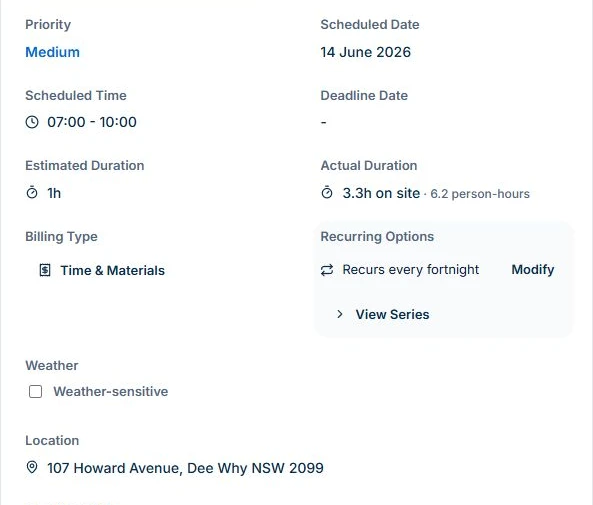
Open a generated visit and confirm the site, scheduled time and agreed rooms. Put the instructions the cleaner needs in Description or Tasks and check them on the phone they’ll use. If the cleaner couldn’t get in or missed an area, record that outcome on the visit. Before billing, compare it with the service agreement and earlier invoices. Uploads require Basic or Professional.
Choose a guide
- Choose software
- Plan the work
- Invoice the work
- Clients & sites
- Equipment records
- Other workflows