
Identify what was actually inspected
Write the property and unit reference against the job. Record the fault found, the work carried out and what still prevents completion.
Leave the return worker a usable instruction
Name the part, access requirement and customer-approved action. Open the return booking and check that the plumber heading out can find those details.
Give the next plumber a finding and an action
Open the original job and check the customer, work address and unit. The sample job names a blocked drain in Unit 4 and records why emergency attendance was needed. Add what was found, what was completed and what still needs doing to your own job.
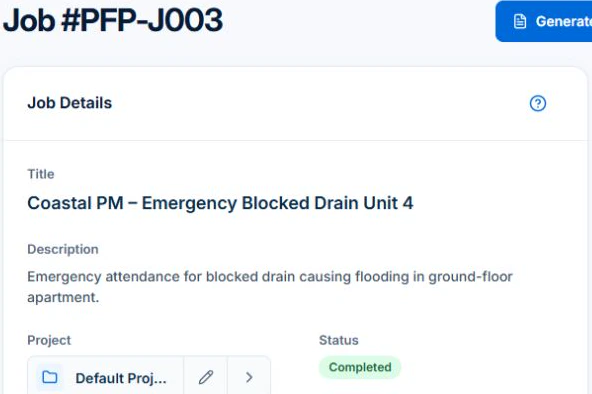
If the return has its own booking, give it the original job reference, access instructions and a task to verify the required part. Put crew instructions in Description or Tasks and confirm the assigned worker can read them. Photo and document uploads start on Basic.
Keep the property and approval roles clear
An owner, tenant and property manager may all contact you about the same repair. Record who arranges access, who approves work and who pays. Keep each property distinguishable when one customer manages several addresses. Confirm a purchase-order or job reference before relying on it for billing.
Record a finding the next plumber can use
Identify the affected fixture or equipment, the reported issue and what the visit established. Record the agreed next action, part identification and whether it has arrived. Avoid turning an unconfirmed diagnosis into a stated repair outcome. Keep relevant required documentation through the correct authorised process.
- Property and fixture reference
- Reported issue and observed finding
- Repair scope and customer approval
- Part description and readiness
- Outstanding task, access arrangement and previous charge reference
Rehearse the parts-dependent return
Illustrative case: a mixer cartridge is ordered after investigation. The next plumber should be able to identify the fixture, correct part and agreed work before travelling. If a different fault is found, retain the new finding and seek the appropriate approval rather than overwriting the original diagnosis.
When evaluating the software behind that handover, use the AxiomBlue plumbing workflow to inspect a real sample job’s labour, recorded part and billing review. Confirm that the records expose the inputs you need rather than relying on a completed status alone.
Make the next visit usable from the field account
Keep lasting site detail separate from today’s scope and unresolved tasks. In AxiomBlue, the separate customer-site notes field is available in the web app; put the instructions needed by a native-app worker in the job description or tasks. Verify access from the worker’s account. Uploads need Basic or Professional; Free has customer and usage limits.
Restrict sensitive access information and share only what the person needs. Check current details with the customer instead of carrying an old instruction into every future job. Professional adds crew management and recurring job series where those suit the work.
Sources: Protect customer information
Common questions
Questions about this process
Should I overwrite the first diagnosis when the return finding changes?
Retain the earlier finding and record the new one with the agreed next action. The sequence helps explain the repair and billing without treating a provisional diagnosis as a completed result.
Put it to work
Your practical checklist
- Identify property, fixture and approval roles.
- Record findings separately from proposed repairs.
- Keep the part and readiness visible.
- Retain previous visit and charge references.
- Give the returning plumber a current task.
See the records in Axiom Blue
Try the workflow with a familiar job.
Features and usage limits vary by plan. Review the tools relevant to your process before choosing your setup.