Software for Small builders & construction businesses

Keep the site scope and the next progress claim in agreement

Connect the building stage to the site job and brief the crew on approved changes. Use Professional project planning and variations, then check earlier billing in the web app before drafting the next claim.

Free: one user and limited core work. Basic: uploads and more capacity. Professional: project planning, advanced crews and variations. Fixed-price claims are available in the web app on all plans, subject to usage limits. You need View Jobs and Create Invoices. Compare plans →

AxiomBlue · APX-007 · roof-stage handover
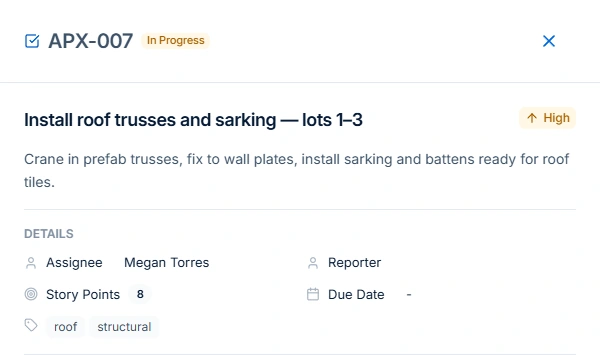
Apex project ticket APX-007 describes roof trusses and sarking for lots 1–3, assigned to Megan Torres, with High priority and In Progress status.
Give each project task a scope, owner, priority and status so the next person can see what needs attention.

Before a stage goes to site

Tie the site job to the project stage and identify the authorised scope. If the client changes the work, check approval before updating what the crew should deliver.

Before the next progress claim

Use the revised agreement and previous billing to calculate the amount ready to claim. Review the web billing record alongside the stage and approved variations. Professional covers the project and variation workflows.

Test one change before the next claim

Choose a stage partly billed last month and add one approved extra. Check whether the site supervisor can see the new scope and the office can explain the amount left before issuing another claim.

A practical example / Builders & Construction

Check what the next building stage actually needs.

  1. 01

    Open the stage’s scope and owner

    In Apex’s Riverbend project, open ticket APX-007: install roof trusses and sarking for lots 1–3. Its description specifies craning prefab trusses, fixing them to wall plates, and preparing sarking and battens for roof tiles. Megan Torres is assigned. Check the actual instructions and readiness for your own work rather than relying on the title alone.

  2. 02

    Keep an unresolved question visible

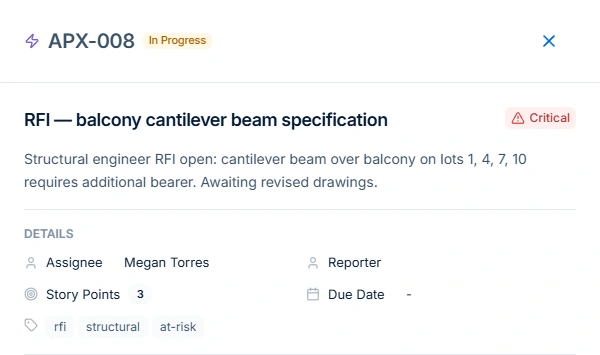
    Keep structural questions in a ticket with an owner, priority and affected areas. The balcony beam example remains In Progress while revised drawings are awaited, making the next action visible to the team.

  3. 03

    Review the site day separately from the project list

    Organise stages and tickets in the project plan, then coordinate the site job’s duration, people and access in daily scheduling. Confirm preceding work, materials and subcontractor attendance before the next stage starts.

  4. 04

    Keep the commercial change distinct from delivery progress

    For your own fixed-price job, retain the accepted contract. Use Professional Variations to record any priced change and its approval state. Review the billing method, agreed stage or claim basis, approved changes and earlier claims before preparing the next draft. The project screenshots are not a worked claim reconciliation.

AxiomBlue · Same project · unresolved structural question
APX-008 is a Critical In Progress ticket assigned to Megan Torres, awaiting revised drawings for a balcony cantilever beam.
Keep an unresolved structural question visible with its owner and affected lots, ready for the engineer’s response.

The tools behind the working day

Start with the part
you usually have to chase.

01 / Quotes and site jobs

Carry the accepted building scope into the working record.

Use an itemised quote to retain the agreed work, exclusions and price basis, then convert accepted quoted work to a job. Confirm the customer and separate work site, delivery instructions, billing method and required references. Record labour and materials against the work so the office can review delivery costs without treating every cost overrun as an approved extra.

Explore job management →

Free: one user and limited core work. Basic adds uploads and capacity. Professional adds advanced crews, variations and recurring visits.

A closer look / Job management

  • Job status and priorities
  • Site and customer details
  • Time entries
  • Job materials and costs
  • Photos, notes and tasks
See how it works →

02 / Project planning · Professional

Give staged work a task, an owner and a readiness check.

Plan staged delivery with Professional project tickets, phases, Gantt views and dependencies. Assign owners and dates, track unresolved questions, and coordinate daily jobs with material and subcontractor readiness.

Explore project management →

Project management, kanban tickets and sprint planning are Professional features. Core job scheduling is available on Basic. New Australian construction-policy setup is available only for Australian businesses; general project planning remains separate.

AxiomBlue · APX-2024-003 · project context
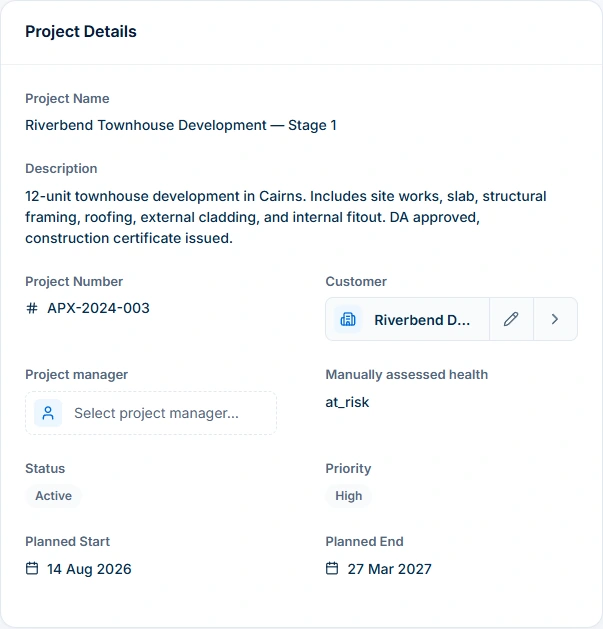
The same Riverbend project overview retains its description, customer, Active status, High priority, manually assessed at-risk health and planned dates.
Keep the project’s customer, planned dates, status and assessed health in one overview.

03 / Variations · Professional

Retain what changed and whether it was approved.

Describe and price a requested change in the job’s variation workflow, then follow its approval before relying on a revised commercial value. Keep the original agreement inspectable. Extra labour can explain an overrun without changing the customer’s fixed price. Confirm the change’s scope, approval and billing treatment instead of reconstructing them from a task status or informal message.

Explore variations & progress billing →

Variation tracking and approvals require Professional. Check the job billing method before preparing a progress claim.

A closer look / Variations & progress billing

  • Contract variations
  • Variation approvals
  • Revised contract value
  • Progress claims against fixed-price work
  • Retention held and release for configured contracts
See how it works →

04 / Progress claims · Web app

Check the next claim against the contract and earlier billing.

On the fixed-price job, review the contract/Billing record, approved Variations and Payment Schedule where used. Inspect New Claim using the applicable amount, percentage or milestone basis, then compare the preview with previous claims and the remaining agreed value. Review retention and other adjustments under the actual agreement. Software records and calculations do not decide contractual or statutory entitlement to payment.

Explore invoicing →

Core invoicing is available on every plan; Free includes 10 invoices a month. Professional adds automation, accounting connectors and connected Stripe card payments. Setup and processing fees apply.

A closer look / Invoicing

  • Job-to-invoice workflow
  • Invoice lines, GST and terms
  • Payment recording and balances
  • Credit notes and allocation
  • Customer payment links
See how it works →

05 / Site records and handovers

Put current instructions where the next person can use them.

Keep the relevant site reference, work scope, unresolved issue and owner clear in the project or job record. Job photo and document uploads start on Basic. Check permissions and the information visible from the worker’s actual account. A ticket titled RFI can retain a question, as APX-008 does; its title and tags do not supply engineering advice, design approval or evidence that a formal response process is complete.

Explore documents & questionnaires →

Basic adds file uploads, with plan storage limits. Professional adds questionnaires and custom PDF/email templates; appropriate permissions apply.

A closer look / Documents & questionnaires

  • Business document records
  • Document editing
  • Questionnaires and shared response forms
  • Job attachments
  • Business CSV backup export
See how it works →

Choose by the work you need to do

Check the fit.
Then check the plan.

Start with the everyday tools. Check the specialist features before choosing what your team needs.

Before you decide

Questions for
small builders & construction businesses.

Who is AxiomBlue construction software for?

Small builders and construction contractors who want quotes, site jobs, recorded work and billing connected. Professional adds project planning and variations. Test your actual stages, office and field roles, contract and required specialist systems before choosing the workflow.

Which plan includes construction projects and variations?

Professional includes project planning, advanced crews, variation tracking and approvals. Free supports one user and limited core job work. Basic adds uploads and capacity. Permissions, setup and usage limits apply.

Can I plan project stages and progress claims?

Use Professional project phases, Gantt planning and dependencies to coordinate stage tasks. For fixed-price progress claims, review the job and contract in the web workflow with invoicing permission.

Can I review fixed-price progress claims and approved extras?

Fixed-price claims are available in the web app on all plans, subject to usage limits. You need View Jobs and Create Invoices. Check the contract, previous billing and any changes approved through Professional Variations before preparing the draft. Check retention and other contractual adjustments where relevant. The recorded calculation does not itself establish that a stage is ready or that every payment-claim requirement has been satisfied.

Does an RFI ticket resolve the engineering question?

A project ticket can retain the question, description, owner, priority and status. The APX-008 sample is explicitly awaiting revised drawings. It does not provide engineering advice, approve the design or complete an external technical response process.

Are story points the same as hours or percentage complete?

No. The example’s eight and three story points are planning estimates on separate tickets. They are not person-hours, invoiced values or proof of stage completion. Review recorded job time and the agreed billing basis separately.

Considering a switch?

Check the fit before
moving your business.

Use a familiar job to compare the way you work today with the way Axiom Blue handles it.

  1. 1. Follow a job in the demo

    Check the quote, schedule, job record and invoice. Look for the details your team needs.

  2. 2. Check your plan and team cost

    Compare usage limits, paid seats and specialist features. See plans and pricing →

  3. 3. Confirm your move

    Try your own quote on the free plan. Before moving existing records, ask us about your data and setup needs.

Put it to a practical test

Bring the job
you know best.

Use these starting points in the public demo. Then try your own quote with a free account.

Free forever for one person. No credit card. Usage limits apply.

  1. 01

    Open Apex’s Riverbend project tickets and inspect APX-007’s scope and owner.

  2. 02

    Read APX-008’s unresolved drawing question and distinguish the affected work from assumptions.

  3. 03

    Use a fixed-price sample in the web app to check the claim. Use Professional to test a variation approval.