
Reconcile maintenance by visit or period
Check the maintenance agreement and the visits completed during the billing period. Flag a skipped visit for review under those terms instead of treating the planned schedule as proof of delivery.
Check project extras separately
For project work, compare the original price, approved extras and earlier claims. Check labour, materials and GST in the preview and make each charge recognisable to the customer.
Check which job the labour and irrigation parts belong to
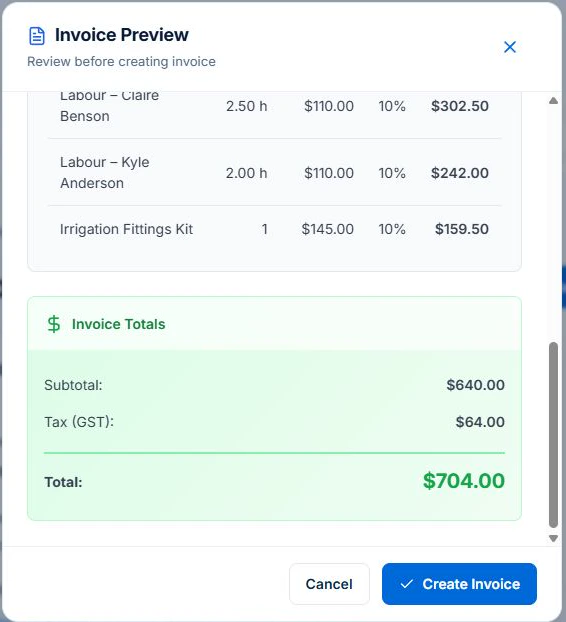
Open the completed maintenance job, confirm its billing method and review Generate Invoice. Check the labour, irrigation fittings and GST against the agreement and the work recorded before creating a draft.
Open the project job for separately quoted work. Review what you already claimed and whether an extra was approved before you bill it. Professional is required for variation approvals. A draft is ready for review before an authorised person issues it.
Keep the repeat-service agreement distinct
Set the maintenance billing basis—per visit, monthly or another agreed arrangement—and specify how skipped or moved visits are handled. Reconcile the work against that agreement before invoicing.
Retain approval for the project addition
Review labour and material records against the quoted garden work. An extra delivery can be a business cost, an approved customer addition or part of the original scope. Record the decision before billing. Compare the original estimate separately from the customer’s charging agreement.
Use a property-level invoice example
Illustrative charges excluding GST: an agreed maintenance visit is $90, a completed quoted garden refresh is $700 and an approved additional mulch delivery is $120. If all three are due under the agreements and none was billed earlier, the total is $910 before GST. Separate the lines so the customer can see which work each charge covers.
| Illustrative charge | Amount excluding GST |
|---|---|
| Maintenance visit | $90 |
| Quoted garden refresh | $700 |
| Approved additional mulch delivery | $120 |
| Total before GST | $910 |
Review the draft, recipient and balance before sending
Check the agreed price, approved extras, previous invoices, payments and any disputed amount. Verify the payer and required invoice reference. Confirm GST treatment for your registration and supply, and check the ATO requirements for the document. Issuing an invoice and receiving payment are separate events.
AxiomBlue connects quotes, job records and invoicing. Review the job’s billing method and draft rather than assuming every recorded cost is a customer charge. Core invoicing is available on Free within its limits. Professional adds variations and advanced billing processes; online sending and payments need a connection.
Sources: ATO tax invoice requirements
Common questions
Questions about this process
Can project materials go on the regular maintenance invoice?
Only when that follows the agreed charging arrangement. Make the separate project or extra-work basis clear and check that the same value is not already billed elsewhere.
Put it to work
Your practical checklist
- Identify visit, project and additional-work agreements.
- Check skipped or incomplete repeat visits.
- Retain approval for extra materials.
- Reconcile earlier and repeat invoices.
- Name the property and service on the draft.
See the records in Axiom Blue
Try the workflow with a familiar job.
Features and usage limits vary by plan. Review the tools relevant to your process before choosing your setup.