
Tools for small trade & service businesses / Make it work your way

Collect the information, follow up and see what needs attention

If the crew arrives without site details, start with a form or questionnaire. If the office repeats the same follow-up, explore workflows. Use reports to see which records need a closer look.

How the pieces connect

  1. 01Capture the right detail
  2. 02repeat useful processes
  3. 03review the result

Start with the part of your business that needs attention. Add depth as the work grows.

Get the details before the worker travels

Use a form to receive a new request and a questionnaire when you need structured answers for a job. Add a custom field where your team needs the same specific detail on a record.

Stop repeating the same follow-up

Use an enabled Professional workflow to contact eligible customers at the right stage. For example, check for an unanswered quote before emailing a reminder.

See where a process needs attention

Choose a report by the decision you need to make, such as which recurring visits have lapsed. Open the underlying records before contacting a customer or creating a charge.

Automate customer follow-up emails

Choose the record before building the workflow

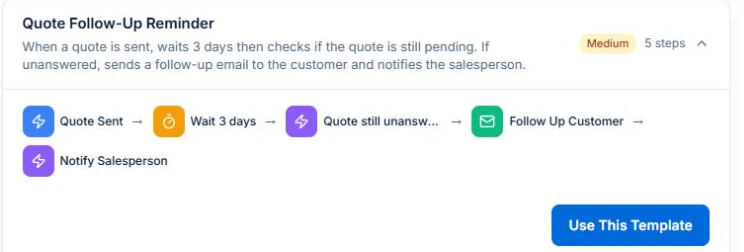
The demo’s Quote Follow-Up Reminder starts from a sent quote and checks the record again after a delay. That makes the quote status the first thing to inspect before choosing what should happen next.

AxiomBlue · Quote Follow-Up Reminder
Workflow template showing Quote Sent, Wait 3 Days, a pending-status check and follow-up actions.
The preset waits and checks quote status before the follow-up.

If you only need to collect the same detail on every job, start with Custom Fields. If you want an action after a specific event, open Workflows and preview the trigger and conditions before enabling it.

Explore the tools

Start with the improvement.
Follow it into the detail.

01 / Workflow automation

Workflow email automation for trade businesses

Build a workflow for a repeatable email task, such as following up a quote or checking an unpaid invoice. AxiomBlue Professional supports configured triggers, conditions, delays and actions. Review recipients and timing, test the exceptions and enable the workflow when it behaves as intended. Scheduled execution runs on the server; you do not need to keep the portal open.

Explore workflow automation →
  • Workflow templates and suites
  • Visual workflow builder
  • Event and scheduled triggers
  • Conditions and delays
  • Email and SMS actions
  • Execution history and testing
  • Webhook and data actions

Workflow automation requires Professional and a configured, enabled workflow. The monthly first seat is $59 AUD excluding GST; additional seats receive graduated discounts. SMS uses purchased business credits; external services may have their own setup and charges.

02 / Custom fields

Give the detail your business needs a consistent field.

AxiomBlue Professional lets you define business-specific fields on supported leads, quotes, jobs, projects and invoices. Choose the field label, type, options and requirements so staff know what to record. Check the result on the relevant record and confirm who can view or edit it.

Explore custom fields →
  • Fields on leads, quotes, jobs, projects and invoices
  • Text, numbers, dates and currency
  • Choices and yes/no fields
  • Customer and employee references
  • Required fields and help text
  • Field layout and list columns

Defining custom fields requires Professional. Field access and display also depend on the record and user permissions.

03 / Documents & questionnaires

Keep job files together and collect the answers you need.

AxiomBlue keeps uploaded photos and documents with the relevant work on paid plans. Professional questionnaires collect structured answers through a shared form and response view, so you can review the details before a visit. Choose whether the information belongs in a job attachment, a document or a questionnaire response.

Explore documents & questionnaires →
  • Business document records
  • Document editing
  • Questionnaires and shared response forms
  • Job attachments
  • Business CSV backup export

Basic adds file uploads, with plan storage limits. Professional adds questionnaires and custom PDF/email templates; appropriate permissions apply.

04 / Trade compliance records

Keep the certificate, testing and refrigerant detail with the work.

AxiomBlue Professional provides certificate records, a test-and-tag register and refrigerant logs for the work that needs them. Record the relevant details and job context, then review completeness against your business process. These records support your evidence; they do not certify the work or replace the checks required for your trade.

Explore trade compliance records →
  • Compliance certificate records
  • Test-and-tag register
  • Refrigerant transaction records
  • Job-linked compliance detail

Compliance management requires Professional. Check that the available record fields suit the requirements of your trade and jurisdiction.

05 / Business reports

Choose the business question. Review the records behind the report.

AxiomBlue Professional reports bring aged balances, payment behaviour, recurring-service health, customer retention and crew activity into focused views. Select the period and filters for the question you need to answer, then investigate the source records. The result depends on keeping job, customer and financial entries current.

Explore business reports →
  • Aged receivables and payables
  • Recurring service health
  • Billing reconciliation
  • Cancellation analysis
  • Client retention
  • Revenue mix and pipeline
  • Payment behaviour
  • Gateway fees
  • Crew throughput
  • Financial, customer and sales dashboards

Advanced financial and business reporting requires Professional. Report usefulness depends on current and complete source records.

Considering a switch?

Check the fit before
moving your business.

Use a familiar job to compare the way you work today with the way Axiom Blue handles it.

  1. 1. Follow a job in the demo

    Check the quote, schedule, job record and invoice. Look for the details your team needs.

  2. 2. Check your plan and team cost

    Compare usage limits, paid seats and specialist features. See plans and pricing →

  3. 3. Confirm your move

    Try your own quote on the free plan. Before moving existing records, ask us about your data and setup needs.

Make the next step a small one

Put a familiar job
through its paces.

You know where the friction is in your business. Open the demo and see how AxiomBlue handles it. Then start with your own quote on the free plan.

Free forever for one person. No credit card. Usage limits apply.

  1. 01

    Price the work

    Try a quote like one you send every week. Check the detail your customer will see.

  2. 02

    Follow it through the day

    Explore a job, its crew, time and materials. Look for the information you usually chase.

  3. 03

    Check the fit and the price

    Compare the features and limits you need. See plans and inclusions →