Software for Small professional service businesses

Keep the consulting work and the client fee in agreement

Carry the accepted scope into the engagement and record the team’s time against the work. Before billing, check whether the client agreed to a fixed fee, time-based charges or an approved change.

Free: one user and limited core work. Basic: uploads and more capacity. Professional: projects, advanced crews and variations. Fixed-price claims use the web workflow with invoicing permission. Compare plans →

AxiomBlue · DSP8-1028-05 · recorded workshop time
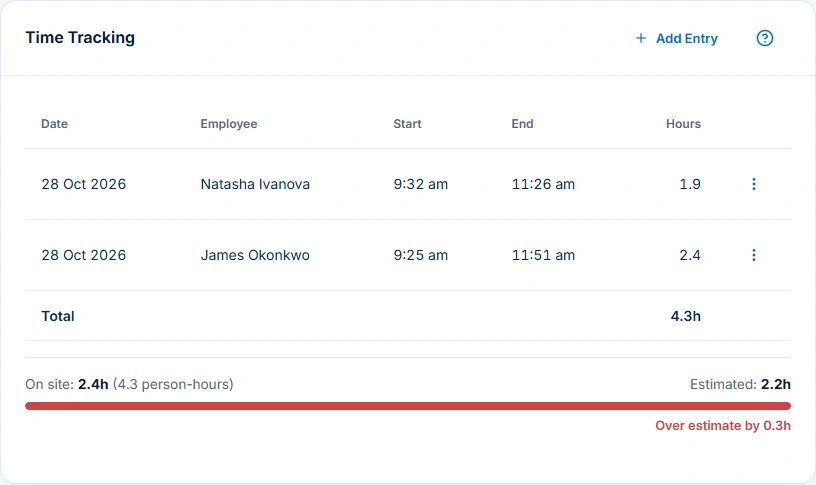
Meridian workshop time shows 4.3 person-hours across two employees and 2.4 hours on site, against a 2.2-hour estimate.
Compare team effort with elapsed time: 4.3 person-hours across a 2.4-hour workshop.

When more than one consultant attends

Keep each person’s time against the engagement. The total hours worked by the team can exceed the time the client spent in the workshop. Compare effort with the accepted fee basis before billing.

When the client asks for another deliverable

Check the accepted brief and obtain the appropriate approval for changed scope. With Professional, review the variation and prior billing before drafting a claim. Leave the approval owner and next action on the engagement for the team.

Check the fee after a second workshop

Review one client workshop under the accepted fee. Add an agreed extra workshop and check which team time contributes to delivery cost, which amount has approval and what was already invoiced.

A practical example / Professional Services

Keep client work moving from quote to invoice.

  1. 01

    Define the scope and fee

    Define the deliverables, client inputs, exclusions and fee basis in a quote. Once accepted, carry the scope into a job so your team has a shared brief.

  2. 02

    Track each consultant’s time

    Track each consultant’s time against the job. Compare total person-hours with time on site to understand delivery effort and improve future estimates.

  3. 03

    Choose the agreed charges

    Add workshop, analysis or other service items alongside recorded time. Use the agreed fee and billing rules to choose the charges, avoiding overlap between day rates and hourly labour.

  4. 04

    Review costs and approved extras

    Check cost inputs, approved extras and previous invoices, then review the draft. Professional Variations keeps additional workshops and deliverables separate from the original scope.

AxiomBlue · Same workshop · configured service items
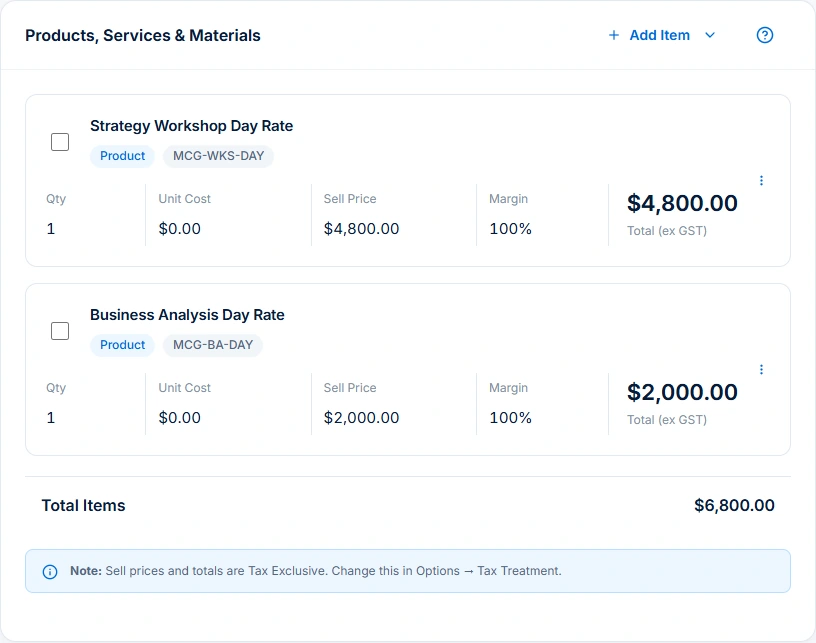
The same workshop contains Strategy Workshop Day Rate at $4,800 and Business Analysis Day Rate at $2,000, quantity one each, totalling $6,800 excluding GST.
Keep the workshop’s service items and prices together, with a $6,800 total excluding GST.

The tools behind the working day

Start with the part
you usually have to chase.

01 / Consulting quotes

Send a clear proposal your client can accept.

Build quotes around workshops, reports or other deliverables. Group scope, client inputs and exclusions into clear sections, then share a document the client can review and accept.

Explore quoting →

Free includes limited core quoting. Basic adds uploads and capacity; Professional adds custom PDF templates and automation.

A closer look / Quoting

  • Products and services price book
  • Reusable quote assemblies
  • Quote templates
  • Grouped scope and line items
  • GST, discounts and expiry dates
See how it works →

02 / Professional project delivery

Keep phases and the next task clear.

Plan longer engagements with Professional project phases and kanban tasks. Keep owners, dates, client decisions and job records available for a clearer handover. Attach supporting job files on Basic or Professional.

Explore project management →

Project management, kanban tickets and sprint planning are Professional features. Core job scheduling is available on Basic. New Australian construction-policy setup is available only for Australian businesses; general project planning remains separate.

A closer look / Project management

  • Project records
  • Gantt planning and dependencies
  • Kanban boards
  • Tickets and task detail
  • Backlogs
See how it works →

03 / Consultant scheduling

Plan consultant time around availability.

Plan work around availability, existing bookings, duration and travel. Review proposed people, times and unplaced work before applying. Professional adds crew skills and leave; confirm client attendance and required inputs.

Explore crew scheduling →

Free and Basic include individual scheduling. Professional adds crews, skills, leave and recurring series; Free usage limits apply.

A closer look / Crew scheduling

  • Reviewed schedule proposals
  • Job duration, bookings, working hours and travel
  • Crew skills and approved leave on Professional
  • Assignment warnings and unplaced jobs
  • Day rescheduling with preview and undo
See how it works →

04 / Scope changes · Professional

Price and approve extra work.

Record added work, its price and approval in Professional Variations, keeping the original agreement intact. Approved scope changes stay visible when you prepare the next invoice or claim.

Explore variations & progress billing →

Variation tracking and approvals require Professional. Check the job billing method before preparing a progress claim.

A closer look / Variations & progress billing

  • Contract variations
  • Variation approvals
  • Revised contract value
  • Progress claims against fixed-price work
  • Retention held and release for configured contracts
See how it works →

05 / Time and billing

Turn recorded work into a checked invoice.

Use invoice preview for completed time-and-materials work, or the web contract workflow for fixed-price progress claims with invoicing permission. Check agreed charges, approved extras, previous billing, tax and the recipient before sending.

Explore invoicing →

Core invoicing is available on every plan; Free includes 10 invoices a month. Professional adds automation, accounting connectors and connected Stripe card payments. Setup and processing fees apply.

AxiomBlue · Same workshop · billing and missing-cost review
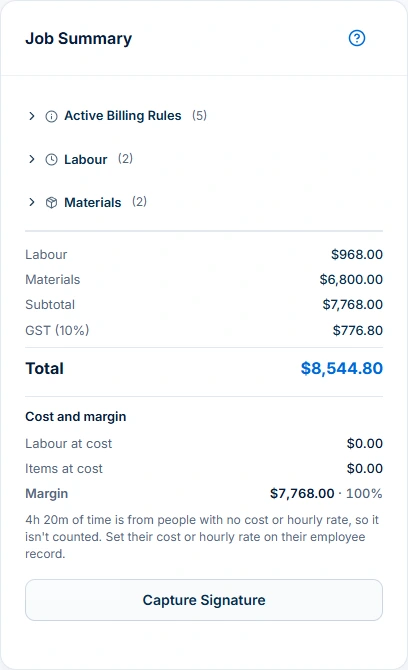
Job summary shows $968 labour, $6,800 items, $776.80 GST and $8,544.80 total. Its 100% margin has a warning that employee cost or hourly rates are missing.
Review charges, GST and delivery costs together. The warning highlights missing employee costs that affect the margin.

Choose by the work you need to do

Check the fit.
Then check the plan.

Start with the everyday tools. Check the specialist features before choosing what your team needs.

Before you decide

Questions for
small professional service businesses.

Who is this professional services software designed to help?

Small consulting teams that want quotes, jobs, time and billing in one place. Professional adds project phases, kanban tasks and variations for multi-stage engagements.

Does AxiomBlue support both hourly and fixed-fee work?

Yes. Choose the job’s agreed billing basis and review the charges before invoicing. Professional adds scope-change approvals; fixed-price progress claims use the web contract workflow with invoicing permission.

Why does the workshop show 4.3 hours and 2.4 hours?

4.3 is the total person-hours across two employees; 2.4 is the time on site. Use person-hours to review effort and elapsed time to plan visits.

Can I bill the day-rate items and hourly labour together?

Follow the fee agreement and configured billing rules. Check for overlapping inclusions before billing both service items and hourly labour.

Does the workshop’s 100% margin show the engagement is profitable?

Employee costs are missing and item costs are zero in this record. Complete those inputs before using the margin to assess delivery cost.

Which plan includes projects, uploads and approved scope changes?

Free includes one user and limited core work. Basic adds uploads and capacity. Professional adds projects, advanced crews and variations; see pricing for limits. Fixed-price claims use the web workflow with invoicing permission.

Considering a switch?

Check the fit before
moving your business.

Use a familiar job to compare the way you work today with the way Axiom Blue handles it.

  1. 1. Follow a job in the demo

    Check the quote, schedule, job record and invoice. Look for the details your team needs.

  2. 2. Check your plan and team cost

    Compare usage limits, paid seats and specialist features. See plans and pricing →

  3. 3. Confirm your move

    Try your own quote on the free plan. Before moving existing records, ask us about your data and setup needs.

Put it to a practical test

Bring the job
you know best.

Use these starting points in the public demo. Then try your own quote with a free account.

Free forever for one person. No credit card. Usage limits apply.

  1. 01

    Open the workshop and compare team effort with time on site.

  2. 02

    Follow the service items through to the billing summary.

  3. 03

    Check the cost warning before assessing the job’s margin.