
Separate the machine from the hire arrangement
Identify the plant item and its current holder. For hired equipment, add the docket and expected return so the site team knows which machine must leave and when.
Record the condition at handback
Match the returned item to its record and log its condition. Keep the hire details with the equipment history so a later question about the return can be checked.
Tie the hire docket to the unit and its return
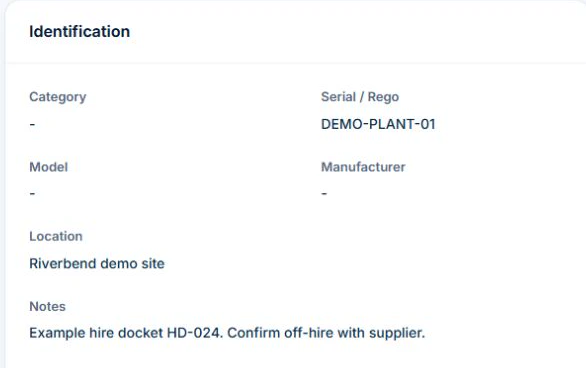
In Inventory, open Assets and find the unit by serial, rego or other recorded identifier. Set Location to the site where the unit is kept and record the supplier and hire docket in Notes. For an Active asset with no open check-out, a user with custody access can select Check Out, choose an active employee and enter the expected return date.
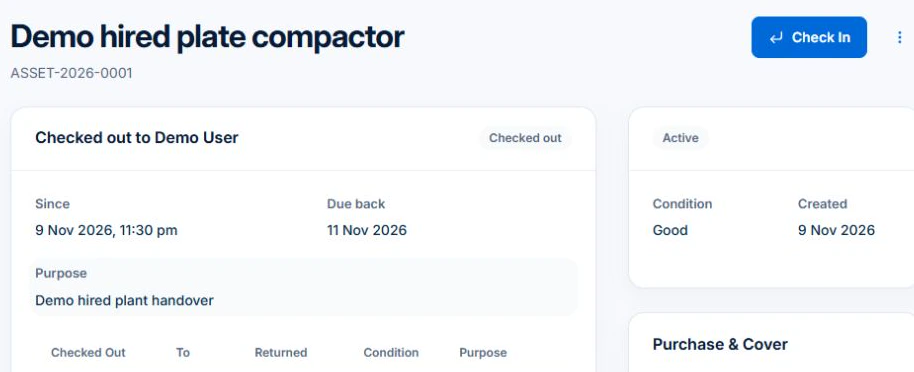
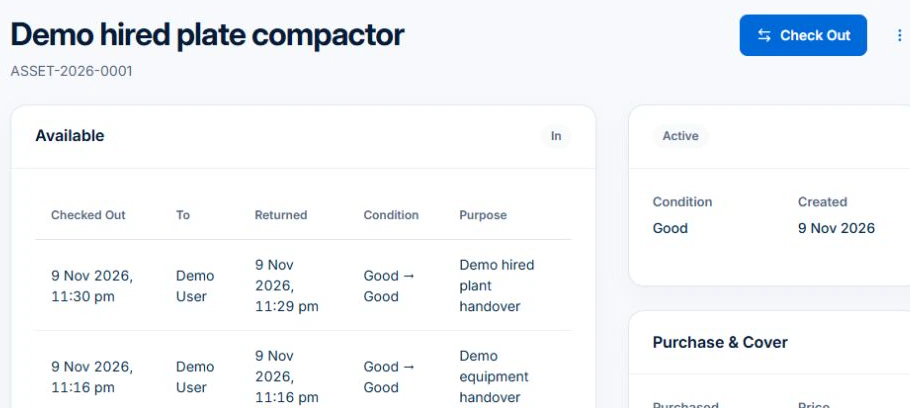
When the unit comes back, use Check In and record its condition. Check the Custody history for the internal handover. For hired plant, confirm off-hire and any inspection or return obligations separately with the supplier under the hire agreement.
Identify the item and the hire responsibility
Use the equipment ID and supplier or owner reference, with the site and responsible contact. Confirm which maintenance and inspection tasks belong to which party under the arrangement. Do not infer ownership or responsibility from who entered the item in the software.
Keep evidence with the item through the site handover
Retain applicable instructions and the inspection, maintenance or other relevant documents through your controlled process. Record the date, assessment and next action owner. A generic “checked” note should not stand in for the required evidence.
- Plant ID and supplier or owner
- Hire and responsibility references
- Instructions and relevant evidence
- Reported faults and action taken
- Assessment, next owner and return reference
Rehearse a fault reported before the next stage
Illustrative case: a hired compactor has a reported defect before another crew needs it. Follow the actual withdrawal and supplier process, record the issue and review how replacement affects the stage. Keep a booking for replacement separate from confirmation that suitable equipment has arrived.
Keep the record separate from permission to use the equipment
Use manufacturer instructions and the applicable competent assessment to decide inspection, maintenance and return to service. Follow your process for isolating or withdrawing unsafe equipment; a software status is not a physical control. Check requirements with the relevant state or territory authority where needed.
AxiomBlue Basic and Professional include an asset register with equipment identity, notes, status and custody history. Keep fault and service references in the asset notes or the relevant job and document records, then update the status through your process. Test how the evidence can be found before adopting the setup. Uploads need a paid plan. Do not assume sensor readings, live equipment location or a repair decision is supplied automatically.
Common questions
Questions about this process
Does an asset entry prove hired plant is ready for use?
Use the plant record’s identity and history alongside the relevant instructions, assessment and site controls when checking readiness.
Put it to work
Your practical checklist
- Identify the actual plant and responsible parties.
- Confirm hire and maintenance responsibilities.
- Retain required instructions and assessment evidence.
- Record faults and apply the actual site controls.
- Check replacement or return handover explicitly.
See the records in Axiom Blue
Try the workflow with a familiar job.
Features and usage limits vary by plan. Review the tools relevant to your process before choosing your setup.