
Match the tester to its record
Identify the instrument by serial number and review its service reference, holder and recorded condition. A similar model in another vehicle may have a different history.
Make the handover traceable
Record custody when the instrument changes hands. Use the referenced service evidence to decide whether it is suitable for the work; an asset entry on its own does not perform or certify the test.
Match the serial number to the service reference
Open Inventory and choose Assets. Find the instrument by serial number. Check the model and Location, then check the service-document reference in Notes. Confirm that the reference belongs to that exact instrument before relying on it.
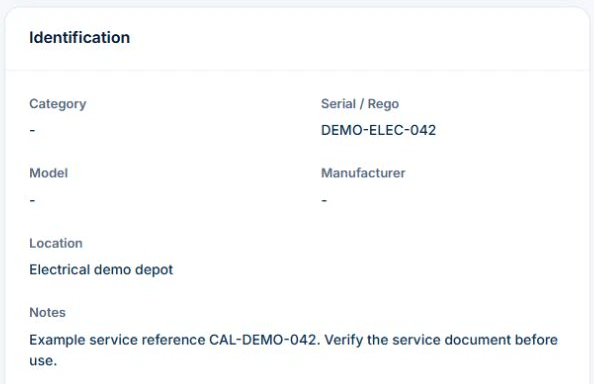
With custody permission, use Check Out for an active instrument with no open check-out. Check the holder and expected return. On return, use Check In and record the condition. Use your own calibration and equipment checks to decide whether the instrument is suitable for work.
Identify the actual instrument, not just its type
Record your identifier, manufacturer, model and serial number, along with where the team can find its instructions and relevant service evidence. Keep the instrument record separate from tests performed on a customer installation. A calibration record for a tool is not an installation certificate.
Make the service handover explain the result
Record the date, reported issue, work or assessment performed, provider and supporting document reference. Set the next action using the applicable instructions or assessment rather than a universal interval copied from a checklist.
- Instrument ID, model and serial number
- Applicable instruction and service references
- Reported issue and service date
- Provider and outcome evidence
- Current availability decision and next action owner
Test the handover after a damaged instrument
Illustrative case: a field worker reports damage and the instrument goes for assessment. Retain the fault and assessment outcome against the same ID. Tell the team which replacement they can use through your controlled process. Recording “serviced” alone does not explain whether the relevant issue was resolved.
Keep the record separate from permission to use the equipment
Use manufacturer instructions and the applicable competent assessment to decide inspection, maintenance and return to service. Follow your process for isolating or withdrawing unsafe equipment; a software status is not a physical control. Check requirements with the relevant state or territory authority where needed.
AxiomBlue Basic and Professional include an asset register with equipment identity, notes, status and custody history. Keep fault and service references in the asset notes or the relevant job and document records, then update the status through your process. Test how the evidence can be found before adopting the setup. Uploads need a paid plan. Do not assume sensor readings, live equipment location or a repair decision is supplied automatically.
Common questions
Questions about this process
Does a calibration record replace electrical installation testing?
No. Equipment service evidence concerns the instrument. The customer installation requires its own applicable testing and authorised documentation process.
Put it to work
Your practical checklist
- Identify every relevant instrument consistently.
- Retain the applicable instructions and evidence.
- Record the fault and assessment outcome.
- Control equipment use outside the software record.
- Name the next action and responsible person.
See the records in Axiom Blue
Try the workflow with a familiar job.
Features and usage limits vary by plan. Review the tools relevant to your process before choosing your setup.