
Check the individual sprayer
Match the serial number to the machine. Open its asset record for the holder, condition and service history before arranging collection.
Handover after the repaint
Record the return and any fault while the condition is known. The next crew can identify the same machine and check whether an issue needs attention before taking it to site.
Match the sprayer to its serial number
Open Assets and find the sprayer by its serial or asset number. Check its availability and checkout history. On the sample record, Identification shows the serial. Use Notes to keep a workshop reference with the right tool.
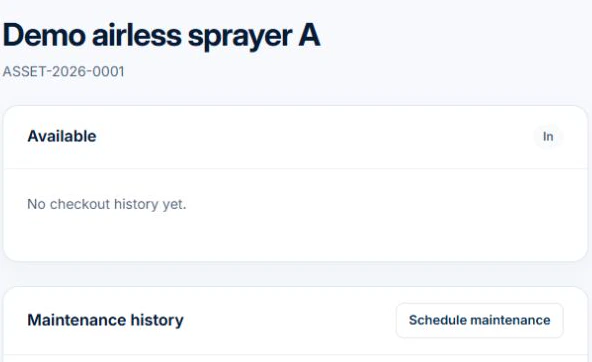
With edit access, use Schedule maintenance to record the title, type and date when service is due. Review the actual condition and the manufacturer’s maintenance instructions before releasing the equipment. Use the record to tell the next crew what was checked.
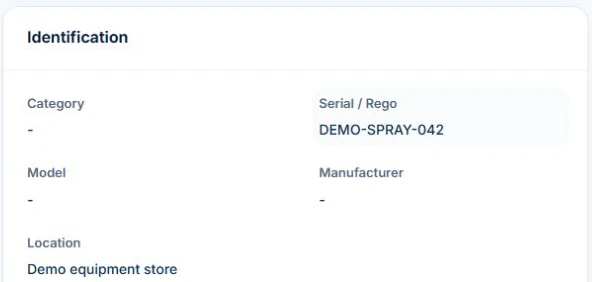
Identify the equipment without confusing it with the paint system
Record the tool ID, manufacturer, model and serial number where relevant. Keep coating and colour selections with the customer work and equipment maintenance with the actual item. Confirm hire or supplier responsibilities for equipment your business does not own.
Use the manufacturer’s process for the next maintenance action
Retain relevant instructions and service evidence, including who assessed or worked on the equipment. This record guide is not a repair procedure. Pressurised, powered or specialist equipment needs its applicable competent process; a generic job note cannot establish safe condition.
- Tool or equipment identity
- Manufacturer and service references
- Reported issue and work date
- Provider and outcome evidence
- Assessed availability and next action owner
Test a fault handover across two painting jobs
If a spray unit fault is reported, record the issue against its equipment ID and arrange the appropriate assessment. Retain the repair outcome so the next painter can check readiness before use.
Keep the record separate from permission to use the equipment
Use manufacturer instructions and the applicable competent assessment to decide inspection, maintenance and return to service. Follow your process for isolating or withdrawing unsafe equipment; a software status is not a physical control. Check requirements with the relevant state or territory authority where needed.
AxiomBlue Basic and Professional include an asset register with equipment identity, notes, status and custody history. Keep fault and service references in the asset notes or the relevant job and document records, then update the status through your process. Test how the evidence can be found before adopting the setup. Uploads need a paid plan. Do not assume sensor readings, live equipment location or a repair decision is supplied automatically.
Common questions
Questions about this process
Can the equipment log tell me how to repair a spray unit?
No. Use the manufacturer’s instructions and the applicable competent service process. The log retains identity, work and outcome evidence rather than providing a repair method.
Put it to work
Your practical checklist
- Identify the item separately from the finish specification.
- Retain instructions and responsibility references.
- Record the reported fault and actual outcome.
- Apply the appropriate equipment controls.
- Confirm the next job has suitable equipment.
See the records in Axiom Blue
Try the workflow with a familiar job.
Features and usage limits vary by plan. Review the tools relevant to your process before choosing your setup.