Software for Landscaping & grounds maintenance

Run the maintenance round and the garden project from one job system

Give the crew the property and scope for each booking. When it is time to invoice, reconcile routine visits against the maintenance agreement and check project extras against their approval.

Free: one user and limited core work. Basic: uploads and more capacity. Professional: recurring visits, crew skills and leave, project planning and variations. Compare plans →

AxiomBlue · One maintenance series · different service intervals
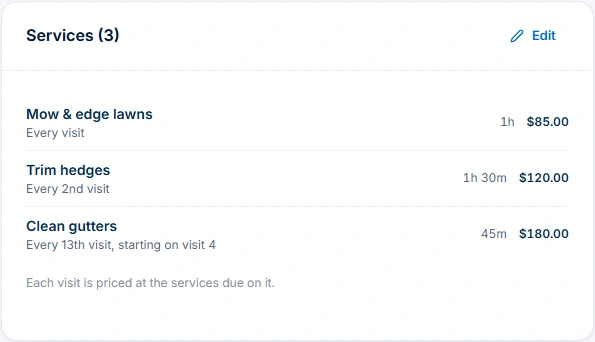
GreenGrove recurring series: mowing every visit, hedges every second visit, gutters every thirteenth visit starting on visit four.
Set different service intervals within one recurring maintenance series. Recurring series require Professional.

Keep garden projects off your regular customers’ time

Review the maintenance bookings before promising a project start. Verify the property, scope and expected duration and preview the crew’s availability. Professional adds recurring series and crew planning.

Keep both kinds of work straight at billing time

For maintenance, reconcile visits with the agreed frequency and terms. On a project, check the approved change and earlier claims. The office can explain the charge from the job instead of piecing it together from texts.

Try one maintenance stop and one garden project

Use two jobs for the same customer at different sites. Check the address on each worker’s phone, then ask the office to explain the maintenance charge and the separately approved project extra.

Check what to bill for visits and project extras

A practical example / Landscaping

Follow one maintenance visit from service rules to billing review.

  1. 01

    Start with the visit pattern and services

    Open GreenGrove’s “Garden maintenance — every 4 weeks” series. Mowing is due every visit, hedges every second visit and gutters every thirteenth visit starting on visit four. Compare each service interval with the customer’s agreement; a four-week visit pattern is different from a calendar-month bill.

  2. 02

    Inspect the individual visit

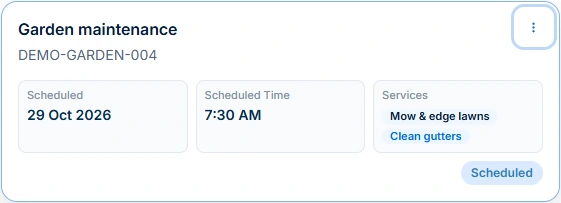
    Open the series’ fourth visit to see the scheduled mowing and gutter work, duration and instructions in the job record.

  3. 03

    Keep extra project work distinct

    For a garden refresh alongside that maintenance, create a separately scoped quote and job for the additional labour and materials. Review readiness and how it fits the round. Professional projects and variations can retain a larger plan and agreed scope changes; the maintenance example does not demonstrate an approved extra project.

  4. 04

    Review delivery and earlier billing

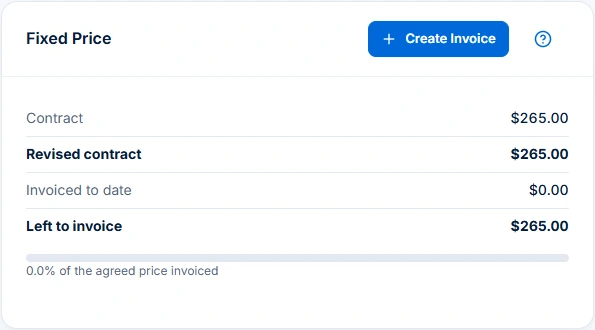
    The same visit’s fixed-price panel shows a $265 contract, $0 invoiced to date and $265 left to invoice. Check what was delivered, the agreement and existing invoices before preparing the bill. Scheduled work and an unbilled balance are not payment or profit.

AxiomBlue · Same series · visit DEMO-GARDEN-004
Scheduled GreenGrove visit DEMO-GARDEN-004 on 29 October 2026 lists mowing and gutter cleaning.
Check the services due on each visit: mowing and gutter cleaning are scheduled here.

The tools behind the working day

Start with the part
you usually have to chase.

01 / Recurring grounds maintenance

Give each visit the services that are actually due.

Professional recurring series hold the visit rhythm and service intervals, then give each visit its own job. Compare the generated work with the series rather than assuming every visit includes the same services. Record access instructions, what happened and unresolved work against the actual visit for the next person.

Explore recurring jobs & services →

Recurring job series require Professional at $59 AUD for the first seat per month, excluding GST; additional seats receive graduated discounts. Free and Basic support individual jobs and scheduling; copying an individual job is separate from a recurring series. Recurring invoice templates and automated service reminders also require Professional.

A closer look / Recurring jobs & services

  • Recurring job series
  • Visit frequency and dates
  • Individual service visits
  • Series status and management
See how it works →

02 / Quoted garden projects

Keep the garden refresh separate from the regular round.

Use an itemised quote for the agreed labour, materials and exclusions, then retain the accepted scope with its job. Record actual time and items there. For larger delivery, Professional project planning and variation approvals help retain the plan and agreed changes; confirm dependencies and customer arrangements before assigning work.

Explore quoting →

Free includes limited core quoting. Basic adds uploads and capacity; Professional adds custom PDF templates and automation.

A closer look / Quoting

  • Products and services price book
  • Reusable quote assemblies
  • Quote templates
  • Grouped scope and line items
  • GST, discounts and expiry dates
See how it works →

03 / Changed days and crews

Review the proposal before moving a wet day.

Preview a revised day using job duration, bookings and travel, with Professional crews, skills and leave where needed. Review people, times, warnings and unplaced work, then confirm changed arrangements with the customer.

Explore crew scheduling →

Free and Basic include individual scheduling. Professional adds crews, skills, leave and recurring series; Free usage limits apply.

A closer look / Crew scheduling

  • Reviewed schedule proposals
  • Job duration, bookings, working hours and travel
  • Crew skills and approved leave on Professional
  • Assignment warnings and unplaced jobs
  • Day rescheduling with preview and undo
See how it works →

04 / Visit billing

Use the work record and agreement to explain the charge.

The demonstrated visit has no time entries and remains Scheduled. Its fixed-price panel has $0 invoiced to date. Review delivery, approved extras and previous invoices before creating the next invoice. Per-visit services, fixed periodic fees and monthly collections of visits need their own agreed charging basis. Recurring scheduling and invoice creation are separate processes.

Explore invoicing →

Core invoicing is available on every plan; Free includes 10 invoices a month. Professional adds automation, accounting connectors and connected Stripe card payments. Setup and processing fees apply.

AxiomBlue · Same visit · fixed-price billing review
DEMO-GARDEN-004 fixed-price panel shows a $265 contract, $0 invoiced to date and $265 left to invoice.
Track the $265 fixed-price agreement and $0 invoiced to date, then review completed work before preparing an invoice.

Choose by the work you need to do

Check the fit.
Then check the plan.

Start with the everyday tools. Check the specialist features before choosing what your team needs.

Recurring jobs & services

Recurring job series require Professional at $59 AUD for the first seat per month, excluding GST; additional seats receive graduated discounts. Free and Basic support individual jobs and scheduling; copying an individual job is separate from a recurring series. Recurring invoice templates and automated service reminders also require Professional.

Crew scheduling

Free and Basic include individual scheduling. Professional adds crews, skills, leave and recurring series; Free usage limits apply.

Quoting

Free includes limited core quoting. Basic adds uploads and capacity; Professional adds custom PDF templates and automation.

Job management

Free: one user and limited core work. Basic adds uploads and capacity. Professional adds advanced crews, variations and recurring visits.

Inventory & materials

Products and services are included in Basic. Check stock-control permissions and enabled features for your business; paid-plan and record limits vary.

Variations & progress billing

Variation tracking and approvals require Professional. Check the job billing method before preparing a progress claim.

Project management

Project management, kanban tickets and sprint planning are Professional features. Core job scheduling is available on Basic. New Australian construction-policy setup is available only for Australian businesses; general project planning remains separate.

Invoicing

Core invoicing is available on every plan; Free includes 10 invoices a month. Professional adds automation, accounting connectors and connected Stripe card payments. Setup and processing fees apply.

Before you decide

Questions for
landscaping & grounds maintenance.

Can I manage maintenance rounds and one-off landscaping projects together?

Yes. Quotes and jobs retain one-off scope and work records. Professional adds recurring maintenance series, crew planning, project planning and variation approvals. Keep the regular agreement and separately quoted project work clear before assigning or billing it.

Can different services be due on different visits?

Yes. Set service intervals within a Professional recurring series—for example, mowing every visit and hedges every second visit—then inspect the generated job to see what is due.

How do I handle a rain-delayed maintenance day?

Preview the affected date using the day-rescheduling controls. Weather filtering uses jobs you marked weather-sensitive. Check conditions, proposed people and times, warnings and unplaced work before applying, then confirm revised arrangements separately. Professional crew planning uses maintained skills and leave.

Does a recurring series automatically invoice completed work?

Review the visit’s work record, agreement, approved extras and previous invoices before billing. The fixed-price panel keeps contract value and invoiced-to-date amounts together.

Which plan do I need for landscaping crews and recurring visits?

Free supports one user and limited core quotes, jobs, individual scheduling, time, materials and invoicing. Basic adds uploads and capacity. Professional adds recurring series, crews, skills, leave, project planning and variations. Permissions, setup and usage limits still apply.

Is this software for creating landscape designs?

AxiomBlue manages quotes, jobs, site instructions, work records and billing. Use your preferred design tool for landscape drawings and 3D plans.

Considering a switch?

Check the fit before
moving your business.

Use a familiar job to compare the way you work today with the way Axiom Blue handles it.

  1. 1. Follow a job in the demo

    Check the quote, schedule, job record and invoice. Look for the details your team needs.

  2. 2. Check your plan and team cost

    Compare usage limits, paid seats and specialist features. See plans and pricing →

  3. 3. Confirm your move

    Try your own quote on the free plan. Before moving existing records, ask us about your data and setup needs.

Put it to a practical test

Bring the job
you know best.

Use these starting points in the public demo. Then try your own quote with a free account.

Free forever for one person. No credit card. Usage limits apply.

  1. 01

    Compare the three service intervals in the four-week maintenance series.

  2. 02

    Open DEMO-GARDEN-004 and check its services, status, site and planned duration.

  3. 03

    Inspect the fixed-price panel, then identify the work and agreement you would review before billing.