
Identify the machine before arranging the handover
Two scrubbers of the same model can have different faults or holders. Match the serial or asset identity to the machine, then check custody and recorded condition on Basic or Professional.
Close the loop on its return
Record who handed it back and what condition it was in. If the operator reports a fault, leave that finding against the machine so the person allocating tomorrow’s clean can check it.
Record the fault against the machine
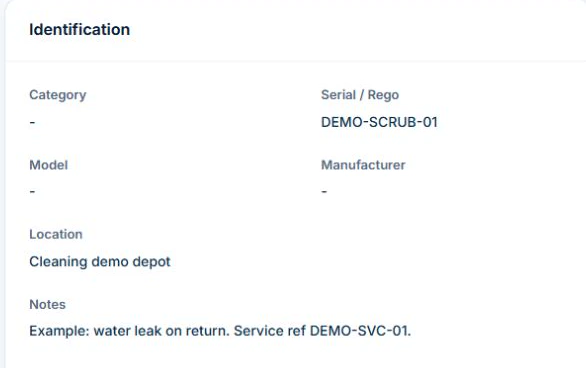
Open Inventory and select Assets. Match the scrubber’s serial number and Location before checking the Custody card. If the scrubber is checked out to a cleaner and comes back leaking, use Check In with the required custody access and record the condition on return.
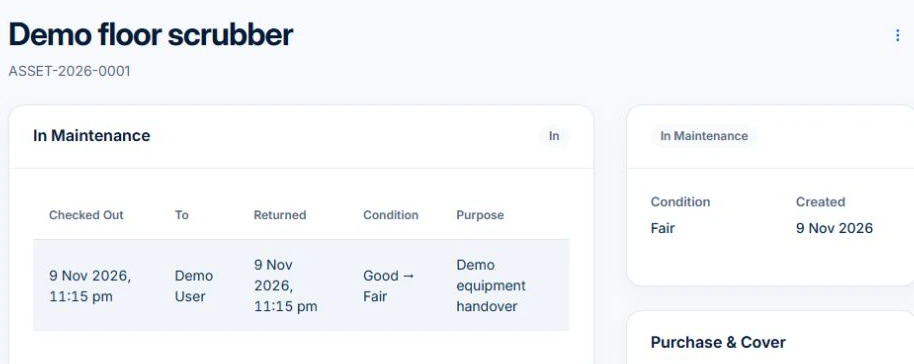
Add the fault and service reference to the asset’s Notes. If the scrubber is taken out for service, an authorised asset editor can set its status to In Maintenance. The next supervisor can check that status and the return history before allocating equipment. Follow your equipment process to assess the machine and decide when it can go back into service.
Separate the machine from the property visit
Record the equipment ID, model and owner or supplier reference. Keep the client’s clean and the machine’s maintenance as different records. Confirm responsibility for customer-owned or hired equipment rather than assuming it belongs to your business.
Retain the instruction and outcome, not just a tick
Use the manufacturer’s directions and your applicable process to set the service or inspection basis. Record what was reported, who performed the work and what evidence supports the result. Avoid reusing one generic interval or repair checklist for every machine.
- Equipment identity and ownership reference
- Operating and service instructions
- Reported issue and date
- Work performed and provider evidence
- Assessed use decision and next owner
Try a service exception before moving the machine
Illustrative case: a scrubber fault is reported after an office visit. Follow the actual withdrawal or repair process and record the unresolved issue. Decide how to deliver the next agreed clean with appropriate equipment and customer arrangements. A complete property clean does not mean the machine is ready for its next use.
Keep the record separate from permission to use the equipment
Use manufacturer instructions and the applicable competent assessment to decide inspection, maintenance and return to service. Follow your process for isolating or withdrawing unsafe equipment; a software status is not a physical control. Check requirements with the relevant state or territory authority where needed.
AxiomBlue Basic and Professional include an asset register with equipment identity, notes, status and custody history. Keep fault and service references in the asset notes or the relevant job and document records, then update the status through your process. Test how the evidence can be found before adopting the setup. Uploads need a paid plan. Do not assume sensor readings, live equipment location or a repair decision is supplied automatically.
Common questions
Questions about this process
Does a completed cleaning checklist establish equipment readiness?
No. The checklist describes the property service. Equipment faults, inspection and maintenance outcomes need their own record and appropriate assessment.
Put it to work
Your practical checklist
- Identify the machine and responsible parties.
- Keep the relevant instructions accessible.
- Record faults and actual service evidence.
- Review equipment availability separately from visit completion.
- Hand over the next action before moving sites.
See the records in Axiom Blue
Try the workflow with a familiar job.
Features and usage limits vary by plan. Review the tools relevant to your process before choosing your setup.