Software for Painting & decorating businesses

Take the room-by-room quote onto the painting job

Build the quote around the surfaces, preparation and finishes you have allowed for. Carry the accepted work into the job so the crew can see the specification and the office can check changes before billing.

Free: one user and limited core work. Basic: uploads and more capacity. Professional: advanced crews and variations. Fixed-price claims use the web workflow with invoicing permission. Compare plans →

AxiomBlue · PPG-Q001 · room and surface scope
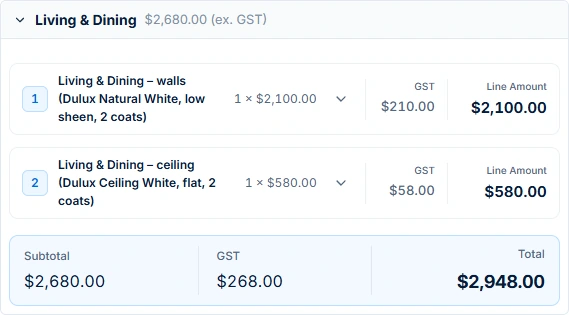
Accepted painting quote PPG-Q001 separates Living and Dining walls at $2,100 and ceiling at $580, with product, colour, finish and two-coat descriptions.
Separate walls, ceilings and finishes in the quote. The Living & Dining scope totals $2,680 excluding GST.

Price the room the way the customer describes it

Separate walls, ceilings, finishes and prep where they change the scope or price. Use the measured quantities and rates your team supplies, then preview what the customer is being asked to accept.

Deliver the accepted specification

Keep the room, surface, colour and coats with the job. When the customer asks for a change, record approval and its effect on billing. Check the return booking and earlier work before closing the job.

Try one changed finish

Quote a room with two surfaces, then record a customer-approved change to one finish. Ask a second painter to identify the specification and the office to show how the extra affects the bill.

A practical example / Painting & Decorating

Make the painting scope clear before the first visit.

  1. 01

    Read each room and surface as a separate promise

    Open Prestige’s PPG-Q001 accepted quote. In Living & Dining, walls are $2,100 and ceiling $580 before GST. The descriptions name different products and finishes and specify two coats. In your own quote, use sections and line descriptions for the agreed areas, preparation, protection, repairs and exclusions, not just a room name.

  2. 02

    Distinguish the supply allowance from the quantity estimate

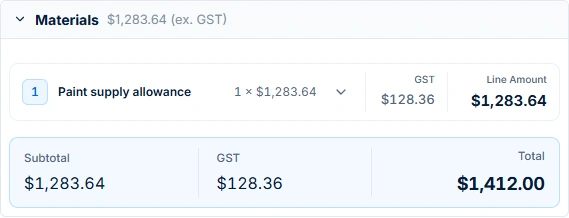
    The same quote contains a $1,283.64 paint supply allowance before GST. It does not show how many litres are required or the measurements behind the price. Review surface dimensions, openings, coats, the selected product’s coverage and reasonable waste assumptions. Price preparation labour and access separately; a material allowance cannot establish their cost.

  3. 03

    Check the approved finish before handing work over

    The demo’s notes say colour specifications are provided separately and furniture is moved and protected. Confirm the current approved specification and who can see it; the note alone does not show the actual document or approval. Carry accepted scope into a job, put usable instructions in its description or tasks, and retain supporting files on Basic or Professional.

  4. 04

    Keep changes and the bill tied to the agreement

    Keep added rooms or preparation work in Professional Variations with the scope, price and approval. Check completed work, previous invoices and the billing basis before preparing the next bill.

AxiomBlue · Same quote · paint supply allowance
The same quote has a Paint supply allowance of $1,283.64 excluding GST and $1,412 including GST.
Keep the paint allowance separate from the quantity estimate. Check measurements, coats and coverage when estimating supply.

The tools behind the working day

Start with the part
you usually have to chase.

01 / Painting quotes and estimates

Price the preparation as clearly as the finish.

Use Add Section and item descriptions to organise rooms, walls, ceilings, trims and other surfaces. Retain the preparation, protection, selected finish, exclusions and price basis that explain the estimate. Review the output as the customer will read it. A named coating and coat count do not establish surface condition, application suitability or the labour required; check the actual job and product instructions.

Explore quoting →

Free includes limited core quoting. Basic adds uploads and capacity; Professional adds custom PDF templates and automation.

A closer look / Quoting

  • Products and services price book
  • Reusable quote assemblies
  • Quote templates
  • Grouped scope and line items
  • GST, discounts and expiry dates
See how it works →

02 / Painting job management

Give the painter the accepted scope and current instructions.

Convert accepted quoted work into a job, then check the customer, work site, scope and billing basis. Keep the current room/surface instructions and unresolved tasks usable from the worker’s account. Basic adds photo and document uploads. Use descriptions and notes for relevant colour references; Professional custom fields can structure business-specific information on supported records, without implying a dedicated colour-approval module.

Explore job management →

Free: one user and limited core work. Basic adds uploads and capacity. Professional adds advanced crews, variations and recurring visits.

A closer look / Job management

  • Job status and priorities
  • Site and customer details
  • Time entries
  • Job materials and costs
  • Photos, notes and tasks
See how it works →

03 / Painting scheduling

Plan preparation, access and return days together.

Use recorded duration, bookings, working hours and travel when reviewing individual scheduling proposals. Professional adds crews, maintained skills and approved leave. Check people, times, warnings and work not placed before applying. Confirm which rooms the customer can release, materials readiness and the coating manufacturer’s instructions separately; a calendar gap is not a drying or recoating recommendation.

Explore crew scheduling →

Free and Basic include individual scheduling. Professional adds crews, skills, leave and recurring series; Free usage limits apply.

A closer look / Crew scheduling

  • Reviewed schedule proposals
  • Job duration, bookings, working hours and travel
  • Crew skills and approved leave on Professional
  • Assignment warnings and unplaced jobs
  • Day rescheduling with preview and undo
See how it works →

04 / Approved extras · Professional

Another room needs its own agreed scope and price.

Keep an added hallway, extra repairs or finish change in the variation workflow with its approval state. Retain the original accepted scope so the change remains inspectable. An extra cost on the original promise is different from a customer-approved addition. Confirm whether the change is complete and due to be billed before including it in the next claim or invoice.

Explore variations & progress billing →

Variation tracking and approvals require Professional. Check the job billing method before preparing a progress claim.

A closer look / Variations & progress billing

  • Contract variations
  • Variation approvals
  • Revised contract value
  • Progress claims against fixed-price work
  • Retention held and release for configured contracts
See how it works →

05 / Painting invoicing

Use the quote total as a reference, then review what is due.

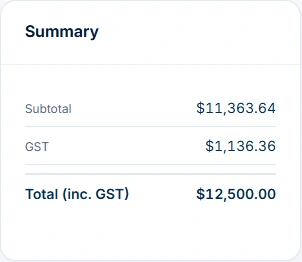
The sample’s $11,363.64 subtotal plus $1,136.36 GST gives $12,500 including GST. It does not show a balance due or money received. For your own work, check the agreement, approved extras, billing method, previous charges and payment records. Use the web claim workflow for fixed-price work and check the contract and previous claims. For completed time-and-materials work, review the invoice preview. Review the draft, recipient and tax treatment before sending.

Explore invoicing →

Core invoicing is available on every plan; Free includes 10 invoices a month. Professional adds automation, accounting connectors and connected Stripe card payments. Setup and processing fees apply.

AxiomBlue · Same quote · total agreed sample scope
PPG-Q001 Summary shows $11,363.64 subtotal, $1,136.36 GST and a $12,500 total including GST.
Review the full quoted scope and GST: 11 line items total $12,500 including GST.

Choose by the work you need to do

Check the fit.
Then check the plan.

Start with the everyday tools. Check the specialist features before choosing what your team needs.

Before you decide

Questions for
painting & decorating businesses.

Can I quote different rooms, surfaces and finishes separately?

Yes. Use quote sections and line descriptions for the agreed rooms, walls, ceilings, trims, preparation and finish requirements. The PPG-Q001 example separates Living & Dining walls and ceiling with different product and finish descriptions. Review the customer-facing scope and exclusions before sending.

Does the demo’s paint supply allowance calculate litres?

The allowance is a priced quote line. Use surface measurements, coats, product coverage and waste assumptions to estimate paint quantities, with preparation labour priced separately.

Which plan supports crews, uploads and approved extras?

Free supports one user and limited core quoting, jobs and individual scheduling. Basic adds uploads and capacity. Professional adds advanced crews, variation approvals and custom fields on supported records. Permissions, setup and usage limits apply.

Can I keep the current colour and finish instructions with the work?

Retain relevant references in descriptions, notes and supporting files, with uploads starting on Basic. Check that the worker can access the current approved specification. The demo note says colour specifications are provided separately; it does not demonstrate the document or an approval. Professional custom fields do not by themselves constitute a dedicated colour-approval workflow.

Does scheduling decide when another coat can be applied?

Scheduling supports recorded duration, availability, bookings and travel; Professional adds crew context. Check actual conditions and the relevant product instructions to decide readiness and recoating. Confirm access and inspect the proposal before applying the assignment.

Does accepting a quote prove the job is profitable or paid?

No. An accepted quote is an agreement record. Review actual delivery costs, approved changes, previous invoices and payments separately. The sample quote total is not job profit, cash collected or an invoice balance.

Considering a switch?

Check the fit before
moving your business.

Use a familiar job to compare the way you work today with the way Axiom Blue handles it.

  1. 1. Follow a job in the demo

    Check the quote, schedule, job record and invoice. Look for the details your team needs.

  2. 2. Check your plan and team cost

    Compare usage limits, paid seats and specialist features. See plans and pricing →

  3. 3. Confirm your move

    Try your own quote on the free plan. Before moving existing records, ask us about your data and setup needs.

Put it to a practical test

Bring the job
you know best.

Use these starting points in the public demo. Then try your own quote with a free account.

Free forever for one person. No credit card. Usage limits apply.

  1. 01

    Open PPG-Q001 and compare its Living & Dining wall and ceiling descriptions.

  2. 02

    Inspect the supply allowance and distinguish it from measured product quantities.

  3. 03

    Review the quote total and separately test your own job, variation and billing handover.