
Put two units at the same address
Create two distinct references and give each unit a different fault or service outcome. Ask someone who did neither job to find which unit needs attention next.
Test what the second technician sees
Open the next assigned job from the field. Check access, equipment identity and earlier findings, then see whether the office can bill the correct visit. Run the same test on the plan you would actually buy.
Give each unit a reference you can check on the next visit
Use one site with two similar split systems. In AxiomBlue, give each unit a stable reference, such as AC-03 and AC-04. Record the matching reference in the job Description. Use the asset register on Basic or Professional where you keep separate equipment records.
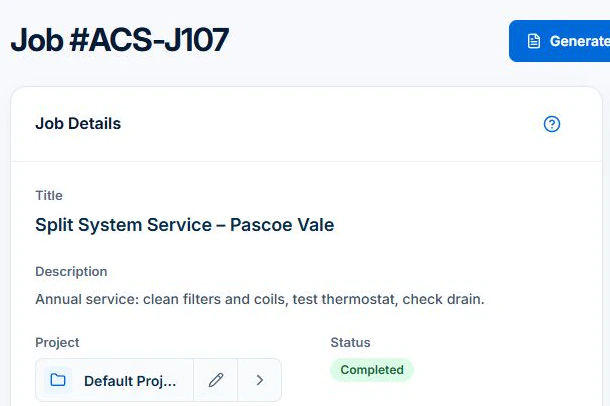
Open the later service job and check that a technician with access can distinguish the units and find the relevant earlier work. Repeat the same test in each shortlisted app. Check the specialist records your business needs and test any recurring maintenance workflow separately. Job Series requires Professional.
Give the test equipment a usable identity
Use sample manufacturer, model, serial number and location details for one unit. Link an installation job and a later service, then ask a second person to find the history. Test two units at one property to expose a system that stores everything under an ambiguous site note.
Separate maintenance visits from the agreement
Create a sample service pattern, then move one visit and leave another unresolved. Check whether the history still distinguishes completed, skipped and future work. Inspect how the billing arrangement uses those states. A recurring invoice and a completed maintenance visit are different records.
Check specialist requirements at their actual scope
Ask to see the exact refrigerant, commissioning or compliance record workflow you need, including access, exports and any external submission. Do not infer comprehensive compliance from an “HVAC” label. Check the technician’s phone view, missing equipment details and a service finding requiring another visit.
Start the operational part of that test with the HVAC job management software overview to follow technician time, HVAC parts and the billing summary, including the missing-cost warning.
Price the roles and required plan, then check the handover
Ask each shortlisted vendor for the plan and total cost for your actual office and field users, workload, billing interval and devices. Include tax basis, optional messaging, payment charges, training and exports. Keep a written result for each test: worked, needs a manual step, or unavailable. A feature-list tick is not a completed test.
AxiomBlue’s Free plan supports one user within usage limits and has no uploads. Basic adds uploads; Professional adds crew skills and leave, recurring job series, variations and project tools. Check the current pricing page for the team total. Try a required Professional process in the demo and confirm access before choosing a plan.
Common questions
Questions about this process
Is recurring billing enough for HVAC maintenance?
No. Check the individual visit, equipment identity and service outcome separately from the billing arrangement. Test how skipped and incomplete visits are handled.
Put it to work
Your practical checklist
- Use two identified units at one property.
- Find installation and service history as a technician.
- Move one recurring visit and inspect billing.
- Verify specialist records and external destinations.
- Confirm the plan and equipment export.
See the records in Axiom Blue
Try the workflow with a familiar job.
Features and usage limits vary by plan. Review the tools relevant to your process before choosing your setup.