
Start the app test at the gate
Give a replacement mower an assigned stop. Ask them to find the property, access instructions, exclusions and services due without calling the regular worker.
Inspect the return from the field
Have the worker record completion or a reason the stop could not proceed. Reconnect the phone and ask the office to explain what happened and what needs review before it bills.
Score the handover
Compare how each app handles assignment, scope, field evidence and office review. Test on the phone and plan the business would actually use.
Start at the gate with the assigned job
Open GreenGrove’s DEMO-GARDEN-004 garden maintenance visit. Check the property and scheduled time, then read the Description and Tasks. Before sending a replacement, put the gate instructions and any exclusions in the job and check the worker can see them.
Use the same stop in every shortlisted app. Ask someone who has never visited the property to find the job and tell you what they’ll do when they arrive.
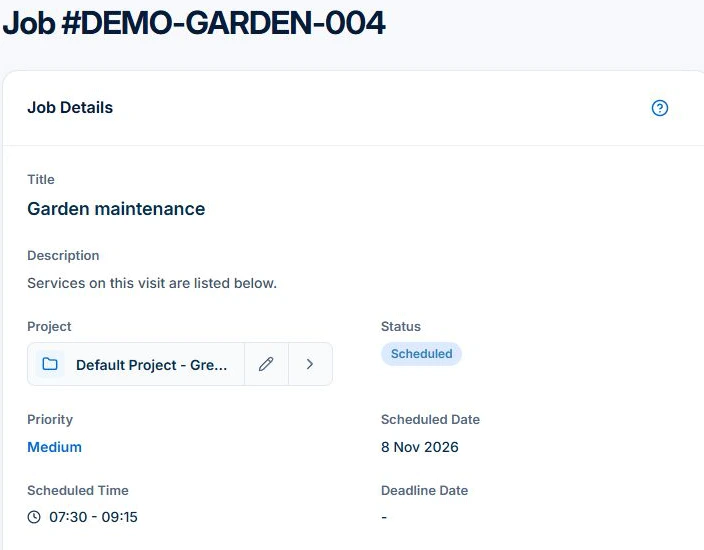
Score the handover in four checks
Mark a check as passed only when the worker can do their part and the office can see the result. Use the same job and the same questions in each app.
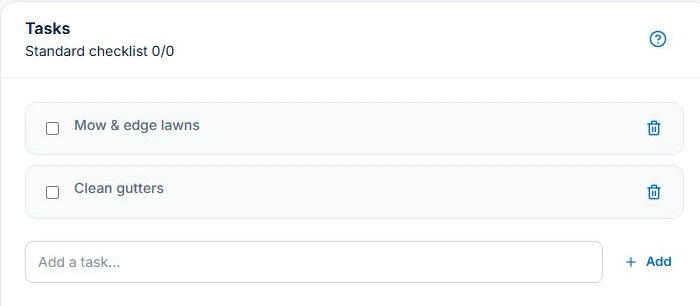
- Find the visit. The worker opens the assigned job and confirms the property, time and access instructions.
- Confirm the scope. The worker reads the Description and Tasks, then records any service they could not complete. The office can see what needs another visit.
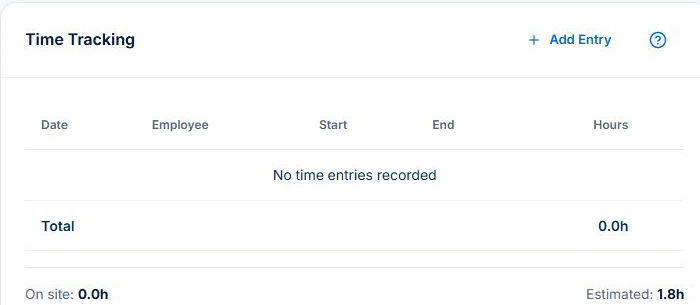
- Record the work. The worker logs time against the job and attaches a relevant photo if their plan and permissions allow it. The office can find the record under the right visit.
- Review the bill. The office opens the same job, checks what was received against the agreement and resolves any uncertain charge or extra work before billing.
Try a change before you buy
For a trial scenario, give the replacement a mowing and edging visit and tell them the side gate is locked. Ask them to record what they could complete and why the rest is still open.
If the customer asks for an extra hedge trim, record the request and agree the price before billing. Where the Professional variation workflow applies, keep the approval with the job. The customer agreement determines the charge for fixed-price work.
Read next Lawn-care invoicing: per visit, monthly billing and extra work →
Check what reaches the office after reconnecting
At a low-signal property, use the native app on the phones your crew carries. Try the specific job actions you rely on and check for pending records. Reconnect and open the job from the office account to verify receipt.
The scheduled GreenGrove example has no recorded time yet. Use Time Tracking to confirm what actually arrived before reviewing the bill. Test sync separately on your own devices.
Test the office side of the round separately
Once the phone handover works, test the plan you’ll use for the full round. For repeat frequencies, rain changes and billing across visits, compare the software using a recurring series and its generated jobs.
Read next Best lawn care software: compare recurrence, rain changes and billing → · Lawn care scheduling software: manage repeat visits →
Common questions
Questions about the crew test
Can I test a replacement worker on Free?
Free is limited to one user. Use paid access for a separate worker login, or inspect the sample visit in the demo.
Does recording more time change the price of a fixed-price visit?
Use recorded time to review delivery. Bill the agreed fixed price and any separately approved extras under the customer agreement.
Put it to work
Your practical checklist
- The replacement finds the assigned property and scope without calling the office.
- The office can see completed work, exceptions and the record received after reconnecting.
- The bill follows the agreement and any approved changes.
See the records in Axiom Blue
Try the handover with one of your regular stops
Open the demo, choose GreenGrove Landscapes in the Business menu, then find DEMO-GARDEN-004 under Jobs. For a team trial, use the plan and permissions you expect the crew and office to have.