
Compare two placements for the same call
Locate the urgent job and inspect the crews already on the map. Compare the proposed start time, extra travel and which scheduled stop follows each option.
Make the promise you can keep
Check access and whether parts are ready. Select a placement only after reviewing the effect on later customers. Keep a parts-dependent repair as a separate return booking when the first visit cannot finish it.
Place one new plumbing job from Dispatch Map
Enter the call-out’s Site Address, Estimated Duration and work instructions, then check its located position on Dispatch Map before comparing placements.
Viewing the map needs schedule access; assigning needs permission to edit the schedule. Free and Basic support individual assignment within plan limits. Professional adds crew management and the separate route-optimisation workflow. The placement ranking compares planned route references, not live vehicle positions.
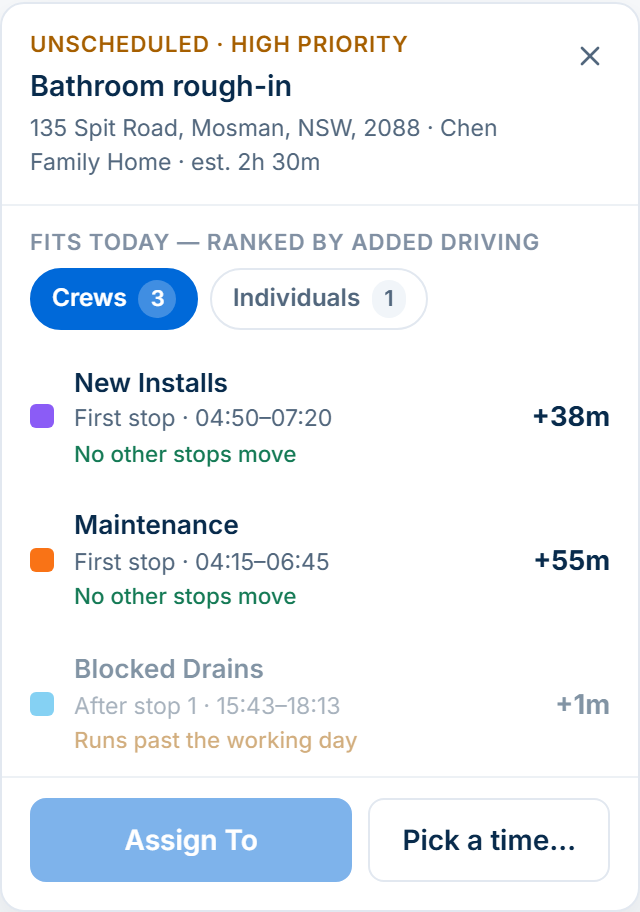
- Open Jobs & Crews → Dispatch Map and select the required date in Day view. Use the Crews & people rail to inspect the planned runs relevant to this call-out.
- In Unscheduled, select the located job card. The placement panel shows Crews and Individuals tabs where candidates are available. Check the proposed start/end, added-driving figure and note for each option.
- Read No other stops move or Later stops shift alongside the proposed time. Check the plumber’s capability, parts, access and customer promises yourself; Fits today is a route/time estimate, not approval of those conditions.
- Select an option only after those checks. If later bookings would need moving, resolve and confirm those changes separately before relying on the placement. Pick a time… opens manual assignment when you need a different arrangement.
- Assign the selected person or crew, then check the saved times in the job or calendar. Review affected bookings and confirm the customer arrangements through your communication process.
See Dispatch Map and crew route planning for the map views and planning tools used in this procedure.
Sources: AxiomBlue calendar and Dispatch Map instructions · Job Details and estimated duration
Added driving is not the time needed for the call-out
The added-driving figure compares the proposed travel into and out of the new stop with the leg it replaces. The work duration still has to fit between those journeys. A small driving increase can therefore have a substantial effect on the next booking.
Illustrative example only: assume a 45-minute call-out and two candidate gaps. In option A, a job ends at 10:00 and the next booking starts at 11:00. The existing drive is 20 minutes. Driving via the call-out takes 10 minutes in and 15 out: 10 + 15 − 20 = 5 added driving minutes.
The call-out would run 10:10–10:55, followed by 15 minutes to the next site. Arrival would be 11:10, ten minutes after the existing 11:00 booking. The +5 driving figure does not mean the call-out takes only five minutes.
In option B, the earlier job also ends at 10:00, but the next starts at 11:30. Assume 15 minutes in, 15 out and a replaced leg of 15 minutes: 15 + 15 − 15 = 15 added driving minutes. Work runs 10:15–11:00 and arrival at the next site is 11:15. This option leaves a 15-minute margin before that booking, subject to your readiness and access checks.
| Check | Worked result |
|---|---|
| A: added driving | +5 min |
| A: next-booking effect | 10 min late |
| B: added driving | +15 min |
| B: time before next booking | 15 min |
Treat a later-stop shift as a decision to resolve
The placement panel can estimate Later stops shift. Treat that as a prompt to inspect the promises already made. The Assign action schedules the selected call-out; it does not apply a chain of moves to the other booked jobs.
If you choose a placement that would delay another stop, review and make the necessary changes in the calendar separately, then recheck the route and customer arrangements. Alternatively, choose a placement that preserves the bookings or use Pick a time… for another plan.
Keep the call-out’s estimate honest. A diagnostic visit and a parts-dependent return are different commitments. If the diagnosis or required part is unresolved, record that uncertainty and arrange the return from the updated job information.
Read next Plumbing job scheduling: balance call-outs and parts-dependent returns → · Plumbing client and site records: preserve diagnosis, parts and return work →
Resolve missing locations and unselectable candidates
An unscheduled job without usable coordinates cannot be ranked into the route. Review its address on the job; the map also provides Review address and, where shown, Retry location. Check that the intended site is located before relying on a placement.
A candidate can be unavailable because it cannot be planned from the available references or would run past the working day. Do not read a disabled row as a suitable option merely because the driving figure looks small. An empty or poorly located run may need a manually chosen time after checking the calendar.
Allow for travel, site access and uncertainty when choosing a placement. Travel estimates may use a distance-based fallback when route data is unavailable.
Use the right workflow for the size of the change
This map procedure answers one question: where could this new job go in the planned day? Auto Schedule is the separate workflow for proposing assignments across a selected set of jobs. Professional route optimisation is another separate action for reviewing a different stop order.
After dispatch, retain the job scope and any changed arrangement where the assigned person can find them. Confirm the actual work, approved additions and previous billing before preparing an invoice. A placement decision is not a completed repair or an agreed extra charge.
Read next Job allocation software for tradies: plan, preview and assign work → · Plumbing invoicing software: call-outs, labour and parts →
Common questions
Questions about dispatching a plumbing call-out
Does the lowest added-driving number identify the best plumber?
No. It describes an estimated route change, not capability, licensing, parts, access or customer availability. Review those conditions and the proposed times before assigning; the map is based on planned route references rather than live vehicle proximity.
Does Assign move the later stops shown in the preview?
No. Assign schedules the selected call-out. A Later stops shift note describes a projected effect; review and make any necessary changes to existing bookings separately, then confirm the arrangements.
Do I need Professional to use the map?
The map, placement ranking and individual assignment are available across plans within their usage limits and schedule permissions. Crew management and route optimisation require Professional. Viewing and assigning can require different access.
Why can a job or candidate not be placed?
The job needs a usable location and the run needs enough time/location information to propose a placement. A candidate can also run past the working day. Review the job and calendar rather than treating an unselectable row as an assignment.
Put it to work
Your practical checklist
- Check Site Address, location, Estimated Duration and work description.
- Choose the date and inspect the existing planned routes.
- Read proposed times and downstream impact as well as added driving.
- Check capability, parts, access and promises outside the ranking.
- Resolve any required booking moves separately.
- Assign deliberately and verify the saved job and calendar.
- Confirm customer arrangements through the appropriate communication process.
See the records in Axiom Blue
Inspect a call-out placement before committing it.
Choose a day and a located unscheduled job in Dispatch Map, then compare candidate times and impact notes before assigning it.
Product instructions
Written by AxiomBlue. Route examples are illustrative; inspect the current travel estimates and placement controls in Dispatch Map.