
Separate who pays from where the crew goes
Keep the paying customer on the account and select the specific property for the quote or job. Two gardens for the same customer can have different access instructions and service agreements.
Test the address at each handover
Preview the quote, open the scheduled job from the worker’s view and check the invoice customer. Correct a wrong site before dispatch rather than sending directions in a second message.
Check the job’s work address against the customer record
Open the customer and check Sites for the property. On the job, select the saved site or enter the work address. The example uses a manually entered work address, and the customer card flags that it differs from the customer address.
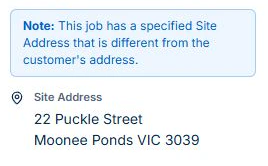
Check the selected site on any quote the job follows. Put project-specific access and work instructions in Job Details or Tasks for the crew. Use the customer record for the contact and job history so the office can find the right property on the next call.
Turn the request into a quote for the correct site
Record the enquiry and next action, then select the customer and property for the quote. Describe the included areas, work and exclusions so the same scope can be used after acceptance. Review customer and site again when converting accepted work to a job.
For the manager’s garden refresh, separate the one-off quoted work from the maintenance visit already agreed. Linked records support that handover; they do not remove the need to inspect the selected address and scope.
Read next Job quoting software for tradies: build, check and hand over a quote → · From website enquiry to booked job: a practical process for tradies →
Give the crew usable instructions for this visit
Keep site context in the relevant web records and put the instructions needed today into job Description and Tasks. Customer Site Notes are a separate web field; inspect the native job view rather than assuming that field appears there.
Write instructions for someone new to the property: work area, access arrangement, included tasks and known restrictions. Use the business’s approved process for sensitive access details. Check the assigned worker’s role, actual phone and receipt of any updated instructions.
Keep repeat work and extras tied to the agreement
Use Professional recurring series for regular maintenance and individual jobs to track each visit. Record moved or skipped work and apply the customer’s agreed billing arrangement.
When the client requests extra pruning or another garden area, agree its scope and price. Professional variations keep the proposal and approval with the job. Review that approval and earlier charges before invoice or contract billing.
Read next Lawn care scheduling software: manage repeat visits → · Record and bill job variations in AxiomBlue →
Test the office handover after the visit
From the completed job, check that time, materials and any paid-plan photos belong to the right property. Confirm the customer and billing basis before preparing the invoice. Inspect the customer’s related records and current balance rather than reconstructing the work from a staff member’s phone.
Now add the manager’s second property or change the assigned worker. Check existing job history, upcoming visit details and what the replacement worker receives. Keep specialist chemical, safety or other statutory records in the appropriate business process; CRM fields alone do not establish compliance.
Check the plan and the total for your team
Core customers, sites, leads, quotes and jobs can be tested within Free limits. Basic adds uploads and paid team access. Professional is needed for recurring maintenance series, crews, variations, reports, automation and accounting sync.
Axiom Blue monthly first-seat prices are $29 AUD on Basic and $59 on Professional, excluding GST. Additional seats use graduated discounts: 10% off for seat two, 20% for seat three, through to 50% off from seat six. Paid plans have no job-volume cap. Check your actual team and billing interval on the pricing page; SMS credits and payment-processing fees are separate.
Free is a one-user core-workflow test: 10 jobs per week, 10 quotes and 10 invoices per month, 25 customers and 25 leads, with no file uploads. Use the demo to inspect Professional capabilities before choosing a plan.
Make it useful today
Print or keep a working copy.
Each resource includes a blank worksheet and an illustrative example. Open it to print, or download an HTML copy to keep. No signup needed.
Common questions
Customer and property handover questions
Is the customer address always the work site?
No. Check the selected Site Address. A property manager’s billing details can differ from the address where the landscaping work occurs.
Should I put sensitive access codes in ordinary job notes?
Use your business’s approved access process and check who can see each record. Put only the instructions appropriate for the assigned team in ordinary customer or job fields.
Does the customer record replace specialist compliance records?
No. Use it to connect the customer and work, then maintain any required technical or statutory records in the appropriate process. Check the applicable requirements and available product fields separately.
Put it to work
Your practical checklist
- Payer and each serviced property are distinguished.
- Quote and job use the correct site and scope.
- Assigned worker can find the day’s instructions.
- Recurring changes and requested extras are reviewed.
- Completed work and invoice reach the correct customer record.
See the records in Axiom Blue
Test the customer-to-property handover
Inspect this workflow in the public demo, or use Free for limited single-user core work. Uploads start on Basic; crew management, recurring series, variations, weekly timesheets and automation require Professional.
Product instructions
Published by Axiom Blue, which is the product described. Regulatory information comes from the NSW EPA, Agriculture Victoria, the OAIC, the ACMA, Before You Dig Australia, Safe Work Australia and NSW Government as cited, checked 25 September 2026. It is general information, not legal advice.