
Decide who actually needs a reminder
Check the due date and balance against receipts and correspondence. A part payment changes what is owing, and a disputed bill needs a person to review it. Check customer email settings and the recorded contact.
Write a message the customer can act on
Identify the invoice, the unpaid amount and the next step. Test the timing and wording with an eligible invoice and one that has already been resolved. Inspect delivery history before escalating a reminder.
Find the unpaid amount before writing the reminder
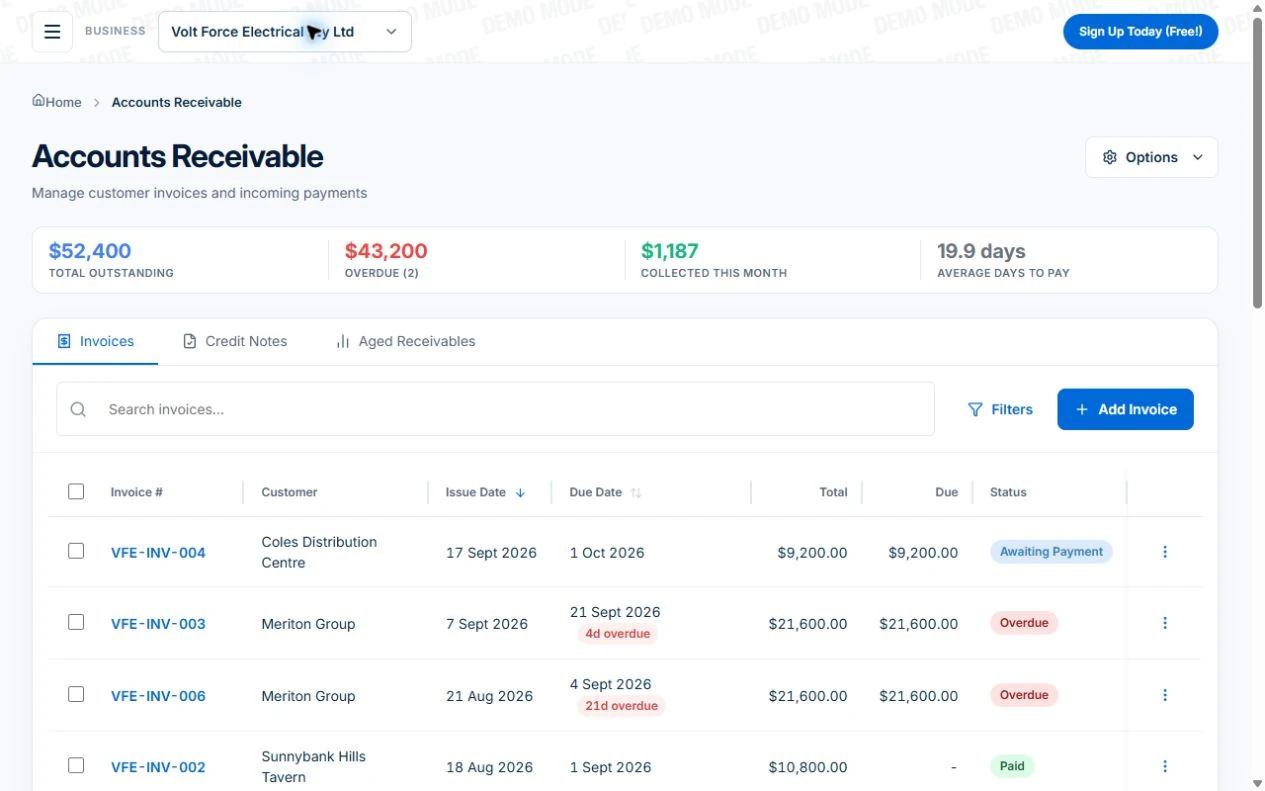
The public electrical demo shows customer invoices with outstanding and overdue balances. Open the relevant invoice and compare its due date, remaining amount and recorded payments. Check the customer record and any agreement or query the office has received.
For an illustrative $600 invoice with a recorded $200 payment, the amount to ask about is $400. Reconcile the receipt first; an unrecorded payment can make a reminder wrong even when the original invoice is correct.
Give the customer enough detail to act
Use the invoice number, the current balance, the due date, payment instructions and a contact for questions. Keep the message factual and appropriate to the customer relationship. Confirm the recipient and document link before sending.
Example wording: “Hi [name], invoice [number] for [work] was due on [date] and has [balance] remaining. You can view the invoice and payment details here: [link]. If you have paid or have a query, please contact [business contact] so we can check. Thanks, [business].”
This is a worked message to adapt, not a legal demand or authority to add fees. Keep marketing offers out of the payment reminder and use your approved contact process.
Configure the Professional chaser around your process
On Professional, inspect “Automatically chase overdue invoices” under invoice settings and its workflow. Review the email wording, whether SMS should also be used, and the delay before the business is notified that the balance remains unpaid. SMS needs business credits.
The preset sends an overdue reminder and alerts the business for follow-up when the invoice remains unpaid. Review timing, recipients and conditions in the workflow editor before activation.
- Check the customer email or phone and the current remaining balance.
- Review reminder wording, invoice link, channel and escalation timing.
- Use controlled test records for unpaid, part-paid and paid invoices.
- Inspect execution history and delivery results, including a missing recipient or insufficient SMS credits.
- Name the person who handles queries, exceptions and any further contact.
Read next Automating job follow-up: start with one process you can verify →
Start from the named template
Use a Professional business account with permission to manage workflows. Open Workflows, browse the templates and choose “Invoice Overdue Payment Chaser”. Inspect the created workflow before enabling it.
Keep the Professional workflow paused while checking records, recipients and actions.
Check the invoice and contact details
Review invoice number, due date, outstanding amount, customer email and payment link. The email uses values from the event that triggered the workflow.
Confirm that the debt and contact method are appropriate. Review disputed invoices, credit notes, payment arrangements and recent receipts with the person responsible for collections.
Budget for SMS and inspect failure paths
The preset also sends SMS to the customer phone from the event. SMS credits are purchased separately; message length and segments affect the credit use. Check the recipient number and final message.
Inspect the connections after email and SMS errors. This preset continues toward the delay after message errors, so a later owner alert is not proof the customer received the reminder.
Check current status after the wait
The status check after seven days reads the invoice’s current status. The preset follows its yes branch for overdue or partial invoices, then notifies owners and tags the invoice.
The owner notification’s amount comes from the original event. Open the invoice for its current balance before calling; partial payments during the wait can make the message amount stale.
Test the outcome before activating
Use invoices and recipients you control. Test paid and partially paid records during the delay, plus missing contact details and failed-message cases. Send actions can contact real recipients and use SMS credits.
Check execution history, the owner alert and invoice tag. Record who will handle replies and disputes; activate only when the sequence matches your collection process.
Test payment changes and the person handover
Record a payment after the invoice becomes overdue, then check which reminders or escalation tasks remain eligible. If accounting sync is used on Professional, inspect whether the payment arrived and cleared the expected amount before relying on it.
A disputed scope, an agreed instalment or a customer reporting payment needs investigation. Review the communication history and the workflow’s actual exclusion or pause controls. Do not assume the preset recognises every off-platform agreement or customer reply.
Make the payment route clear and keep collection separate
Share a no-login invoice link with payment instructions. Professional adds online card payment through connected Stripe; processing fees apply. Check payment status against the invoice balance.
For unresolved debt, follow an appropriate business process and obtain advice for the contract and jurisdiction. The product can keep records for review; it does not decide disputed liability or guarantee collection. Use the Australian Government guidance for next steps.
Sources: business.gov.au: What to do when you have not been paid
Check the plan and the total for your team
Core invoices and receivables are available on Free and paid plans. Automatic overdue workflows, accounting sync and Stripe online card payment require Professional. SMS credits and processing fees need separate allowance.
Axiom Blue monthly first-seat prices are $29 AUD on Basic and $59 on Professional, excluding GST. Additional seats use graduated discounts: 10% off for seat two, 20% for seat three, through to 50% off from seat six. Paid plans have no job-volume cap. Check your actual team and billing interval on the pricing page; SMS credits and payment-processing fees are separate.
Free is a one-user core-workflow test: 10 jobs per week, 10 quotes and 10 invoices per month, 25 customers and 25 leads, with no file uploads. Use the demo to inspect Professional capabilities before choosing a plan.
Common questions
Reminder and exception questions
Will the workflow know about a payment arrangement made by phone?
Only if the relevant information and controls are updated in your process. Check the invoice and workflow settings before further contact; a person should handle disputed amounts and agreed payment arrangements.
Does an SMS failure mean the customer received nothing?
Check each channel’s execution and delivery result. Email and SMS have different recipient and delivery requirements. Review the actual outcome instead of assuming success or failure from one status.
Should a reminder ask for the full invoice amount after part payment?
Use the reconciled remaining balance. Confirm the receipt and allocation first; the original total may no longer be the amount due.
Put it to work
Your practical checklist
- Invoice balance reconciled with payments.
- Recipient, wording and link checked.
- Required Professional access and SMS credits confirmed.
- Paid, part-paid and queried invoices tested.
- A person owns unresolved balances and customer responses.
See the records in Axiom Blue
Inspect the reminder before enabling it
Inspect this workflow in the public demo, or use Free for limited single-user core work. Uploads start on Basic; crew management, recurring series, variations, weekly timesheets and automation require Professional.
Product instructions
Published by Axiom Blue, which is the product described. Payment times, tax, collection and court information comes from Xero, the Payment Times Reporting Regulator, the ATO, business.gov.au, the ACCC and ASIC, the ACMA, the RBA and NSW Government as cited, checked 25 September 2026. It is general information, not legal or tax advice.