
Use a delayed part in the trial
Give each system a first call-out, a recorded diagnosis and a repair that needs a part. Ask another plumber to find the site, unit and next action on their phone.
Test the invoice across both visits
If diagnosis was billed on the first visit, check that it is visible when billing the accepted repair. Record whether the person in the office can explain the remaining charge without phoning either plumber.
Make the call-out record usable by the returning plumber
Start with one familiar repair: a leaking mixer needs diagnosis, customer approval and a replacement part before a second visit. In AxiomBlue, use Job Details and Tasks to keep the scope and outstanding work visible, then use Time Tracking and Materials to retain the delivery record. This mixer scenario is an illustrative test you can repeat.
Core job records and individual scheduling are available on every plan within its limits. Basic adds photo and document uploads; Professional adds crew skills and leave, variations and recurring job series. Test the roles and plan you intend to buy.
- Create the call-out for the correct customer and site. In Description, record the fixture, fault, agreed attendance terms and who can approve the repair. Keep the occupant, approver and invoice recipient distinct where they differ.
- Record the diagnosis and unresolved work. Retain the accepted repair quote and part reference; a note saying “customer asked” is not approval. Use Tasks for the work still to do and attach an identifying photo on Basic or Professional if useful.
- Put the first job reference and accepted scope in the return instructions. Ask the replacement plumber to find the fixture, part and outstanding task from their own account on their actual phone. The test passes when they can explain the work without a separate office briefing.
- After the sample work, inspect the recorded labour and installed quantities in Time Tracking and Materials. Check that each entry belongs to the intended job before moving to billing.
Read next Plumbing client and site records: preserve diagnosis, parts and return work →
Delay the part, then inspect the proposed return booking
When a part is delayed, confirm the new delivery and customer access, then update the return job’s site, duration and assignment requirements.
In AxiomBlue Auto Schedule, select the ready work, configure the proposal and preview the people, times and warnings. Inspect work left unplaced before applying. On Professional, maintained crew membership, skills and approved leave inform the proposal; verify the required licences and actual suitability through your normal process.
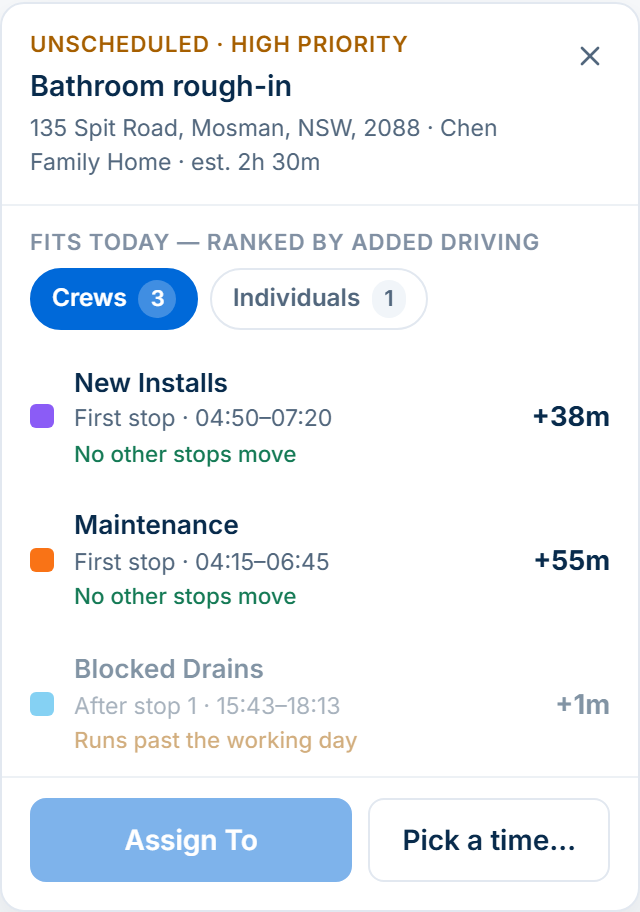
For an urgent call-out between existing stops, Dispatch Map lets you compare proposed placements and their travel impact. The detailed dispatch guide shows that separate decision. In either case, confirm revised customer arrangements and check the affected job records; software does not decide whether a promised appointment can be broken.
Compare proposed start times, added driving and working-hours warnings in Dispatch Map before choosing a placement.
Read next Plumbing dispatch software: fit a call-out into today’s route → · Plumbing job scheduling: balance call-outs and parts-dependent returns →
Prove the two visits produce the agreed bill
Use an illustrative agreement: diagnosis has already been invoiced at $180; the customer then accepts a $420 fixed repair including the replacement and return labour. Both figures exclude GST and are invented test amounts, not plumbing market rates. The remaining repair charge is $420 before applicable GST, not $600 plus the separately recorded hours and part.
Open the accepted quote, original invoice and return job together. In AxiomBlue, use the billing method that matches the agreement: review the draft invoice preview for time-and-materials work or the relevant fixed-price claim. Actual time and material cost can explain delivery cost without increasing a fixed price.
Check the payer, scope, previous charges, billable settings and tax treatment before creating and sending the draft. Do not assume that two related job numbers automatically reconcile earlier billing. If separately approved extra scope is needed, Professional variations retain that change; a request or internal cost overrun is not an approved charge.
Read next Plumbing invoicing software: call-outs, labour and parts →
Use the same pass or fail checks with every shortlisted tool
Keep a short result for each product: demonstrated, manual step required, unavailable or not yet tested. Record the screen or exported example that supports the result. A vendor’s feature label is a starting point for a test, and an untested feature remains unknown.
This is an AxiomBlue-authored evaluation method, not a scored comparison of products we have all tested. A simpler tool may fit a sole operator with straightforward work; a team with return visits, changing crews or approval handovers should demonstrate those cases before deciding.
- Handover: can another authorised worker identify the fixture, approved scope, part and unresolved task from the phone they use?
- Changed day: can you inspect proposed people and times, understand warnings and retain control over applying the change?
- Billing: can you reproduce the agreed remaining charge and explain how the earlier call-out invoice is excluded?
- Exceptions: can you distinguish a requested extra, an approved repair, a booked return and completed work?
- Exit and continuity: ask for the export of the specific customer, job and billing records you need, then open the resulting files. Do not infer a complete migration from one CSV option.
Price the required team and plan after the workflow test
Ask each shortlisted vendor for the total for your office and field users, workload, billing interval and required devices. Check tax basis, optional messaging and payment charges, training, setup and export assistance. Use the same roles and workload for every quote.
Free supports one user and limited core work. Basic adds uploads; Professional adds crew skills and leave, variations and recurring visits. Compare current inclusions and team costs on the pricing page.
Common questions
Questions about choosing plumbing software
What is the most useful plumbing software demo job?
Use a call-out that needs a part and a return visit. Give the return to a different plumber, delay the part and inspect the bill. That tests instructions, readiness, scheduling and previous charges together.
Does recording labour and parts decide what the customer owes?
No. Those records describe delivery and cost. The accepted charging agreement, approved changes and previous invoices determine what should be billed. Review the invoice or fixed-price claim before sending.
Do I need Professional for this AxiomBlue evaluation?
Core job records and individual scheduling are available on every plan within its limits. Uploads need Basic or Professional. Crew skills and leave, variations and recurring job series require Professional; test the features and user permissions your actual workflow needs.
Put it to work
Your practical checklist
- Retain the diagnosis, attendance terms and accepted repair scope.
- Have a different authorised plumber find the part and return instructions on their phone.
- Delay the part, preview the revised booking and inspect warnings before applying.
- Reconcile the first invoice with the agreed return charge.
- Record demonstrated, manual, unavailable and unknown results; price the required team and plan.
See the records in Axiom Blue
Test the handover with your own repair scenario
Explore the plumbing job records, then test the handover, scheduling and billing with your own repair scenario, user roles and plan.
Product instructions
An AxiomBlue-authored evaluation method using an illustrative repair. Apply the same checks to each product you shortlist.