
Quote the work, then carry it into the job
Convert accepted quoted work into a job. Check the customer, separate site address, scope and billing basis before handing it over.
Job management / AxiomBlue
Use the customer, site and agreed work from the quote to prepare the job. The crew gets its instructions and the office can check the work delivered before it prepares the customer’s bill.
One job record to work from, with a clear check before you bill.
Plan fit: Free: one user and limited core work. Basic adds uploads and capacity. Professional adds advanced crews, variations and recurring visits. Compare plans →
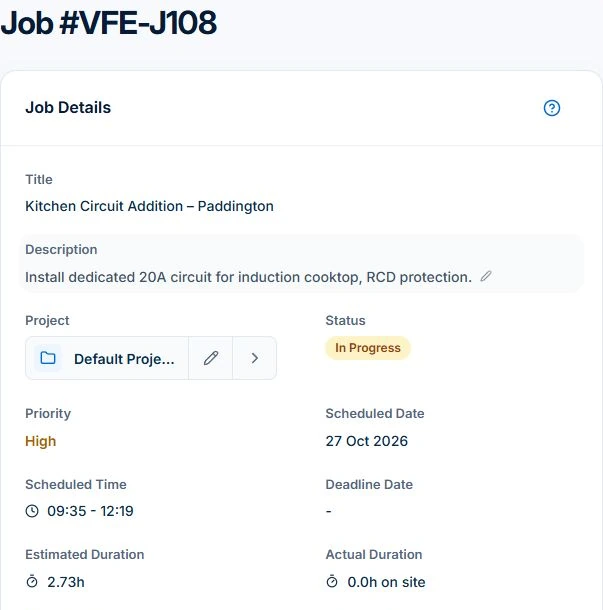
Convert an accepted quote to a pending job. Check the site, agreed work and next available booking, then give the field worker the job record rather than sending the scope a second time.
Record time, materials and outstanding work as the job progresses. Review those entries against the agreement when preparing the bill. Professional adds variation approvals, crew planning and repeat service visits.
Use one familiar repair. Ask the worker to identify what to do, then ask the office to explain what it will charge. The two answers should trace back to the same job.
Convert accepted quoted work into a job. Check the customer, separate site address, scope and billing basis before handing it over.
Record duration and work instructions, then inspect scheduling proposals before applying them. Professional adds crew skills and approved leave; access, materials readiness and customer arrangements still need checking.
Keep time and materials with the job. Completed time-and-materials work opens an invoice preview; Fixed-price claims use the contract, approved changes and earlier claims. Review the draft before issuing it.
Picture it in your business / Example
An installation starts from an accepted quote. If the customer adds another circuit, record its scope, price and approval in Professional Variations, then include the approved change when preparing the bill.
A practical starting point
Inspect the customer, work site, description, duration and billing type. A separate site address can differ from the customer’s office.
Review the assignment, then record received time, materials and task progress. Basic adds photo/document uploads; Professional adds the advanced crew and change workflows.
After delivery, use the billing path that matches the agreement. Check entries, rates, tax and previous charges. Issuing an invoice and receiving payment remain separate events.
Know what’s included
Free: one user and limited core work. Basic adds uploads and capacity. Professional adds advanced crews, variations and recurring visits.
Compare plans, limits and pricing →Check the workflow in detail
Explore the detail
Availability varies with plan, permissions and enabled features. Check plan inclusions.
See how this fits: protect your margin →Before you get started
Have a specific workflow in mind? Talk it through with us.
Australian trades and service businesses that need quotes, job records, schedules and billing connected. Test a familiar job with the actual office and worker roles, devices and required plan before changing your business process.
Yes. Free supports one user and limited core work. Basic adds uploads; compare plans for advanced capabilities and the capacity your team needs.
Yes. Core time-and-materials invoicing is available within the plan limits. Fixed-price claims use the contract, approved variations and earlier claims. Review the applicable billing basis rather than treating every recorded hour as an extra customer charge.
AxiomBlue has web access and native iPhone and Android apps. Test the worker’s actual device, role and supported field actions, then inspect received updates after reconnecting. Sending invoices and taking online payments need a connection.
Use the worked job procedure to inspect the records, the evaluation checklist to test shortlisted tools, and the shortlist guide to decide which requirements a product must cover. Keep your accounting and specialist systems in the assessment.
Keep the work connected
Considering a switch?
Use a familiar job to compare the way you work today with the way Axiom Blue handles it.
Check the quote, schedule, job record and invoice. Look for the details your team needs.
Compare usage limits, paid seats and specialist features. See plans and pricing →
Try your own quote on the free plan. Before moving existing records, ask us about your data and setup needs.
Make the next step a small one
You know where the friction is in your business. Open the demo and see how AxiomBlue handles it. Then start with your own quote on the free plan.
Free forever for one person. No credit card. Usage limits apply.
Try a quote like one you send every week. Check the detail your customer will see.
Explore a job, its crew, time and materials. Look for the information you usually chase.
Compare the features and limits you need. See plans and inclusions →