
Read the service agreement in two parts
One part tells the crew when to attend and what to do. The other says whether the customer pays per visit, per period or under another arrangement. Keep both available when a scheduled job changes.
Reconcile a skipped visit
Check the job outcome and any approved extras. Compare these with the agreement and invoice history before creating a charge or changing the next bill.
Compare the service pattern with one visit’s bill
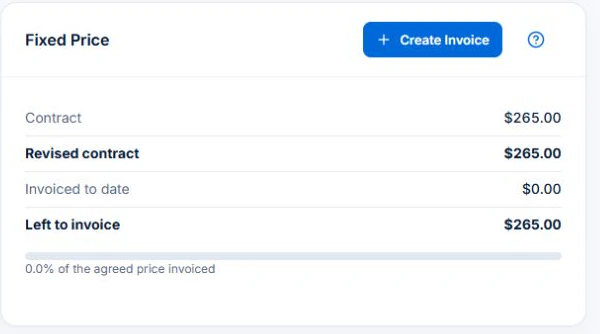
In Job Series, check the service intervals. Open the generated visit and verify the services due, status and work recorded. The sample fixed-price visit has its own Contract, Invoiced to date and Left to invoice values.
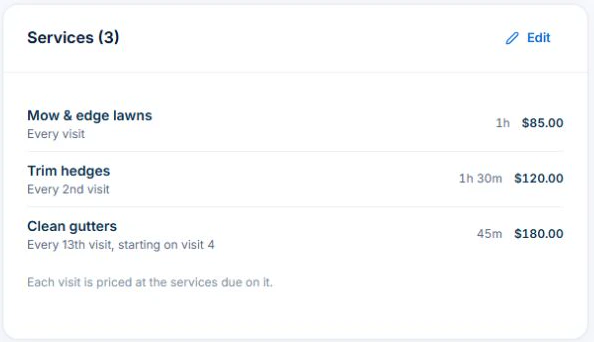
For a periodic invoice, reconcile the covered visits and agreed price before preparing the bill. Automatic series payments require separate customer authorisation and a connected Stripe account. Check the visit and any previous invoice before relying on the billing workflow.
Write down the two schedules
Use the work schedule for visit dates and tasks, and the billing setup for agreed charges. Reconcile visit outcomes with the invoice draft before sending.
A per-visit service might be invoiced after completion. A fixed periodic service charge follows the agreed terms. A monthly bill collecting several completed visits is another arrangement. Decide which one the customer has accepted before setting up recurrence.
Use a simple timeline to check the arrangement
Illustrative example: a property is serviced on the first and third Tuesday, with completed visits reviewed for billing at month end. Each Tuesday needs its own work record. At month end, review those records and the agreed price before preparing the invoice.
If the third-Tuesday visit moves into the next month, its planned date alone does not tell you which invoice should contain it. Review the actual service date and the billing agreement. Keep the reason for any adjustment visible.
| When | Work record | Billing decision |
|---|---|---|
| First Tuesday | Record the completed visit. | Keep its job reference for review. |
| Third Tuesday | Record completion or a reschedule. | Do not infer completion from the plan. |
| Month end | Review the actual visit outcomes. | Apply the agreement and check prior charges. |
Decide who handles exceptions
Assign someone to review a skipped visit, a paused service, changed scope or a customer query. Otherwise a recurring process can continue while everyone assumes another person has dealt with the change.
Keep the work status and billing status distinct. Cancelling a visit is not necessarily the same as ending a recurring charge; changing a charge does not tell the crew what work remains. Confirm both sides when a customer pauses or ends the arrangement.
Read next Recurring job health: find and review lapsed service visits →
Test recurrence with one customer first
Use Professional Job Series to plan visits. Compare completed work with the service agreement before preparing the invoice. Where you have enabled automatic series payments, check the customer authorisation and connected Stripe setup.
Use a sample customer to check an ordinary cycle and a changed visit. Inspect the generated records, timing and customer-facing document before applying the arrangement broadly. Review the first live cycle to confirm it matches the intended work and billing process.
Put it to work
Your practical checklist
- Name the service schedule and the billing schedule.
- Record the agreed charging basis.
- Test a skipped or rescheduled visit.
- Check previous billing before sending the next invoice.
- Review both schedules when the service changes.
See the records in Axiom Blue
Try the workflow with a familiar job.
Features and usage limits vary by plan. Review the tools relevant to your process before choosing your setup.