
Take the context with you
Review the job description and tasks while you are away from the office.
Mobile field work / AxiomBlue
Open the assigned job on your phone to find the address and agreed scope. Record the time and materials as you work so the office has the details it needs to review the job.
Review the job description and tasks while you are away from the office.
Plan fit: Mobile access is included with core plans. Free-plan usage limits apply; photo and document uploads start on Basic. Compare plans →
A practical workflow / Example
The demo web view shows the scope and current status on a job. Use that same record as the office check after a worker updates it in the native app.
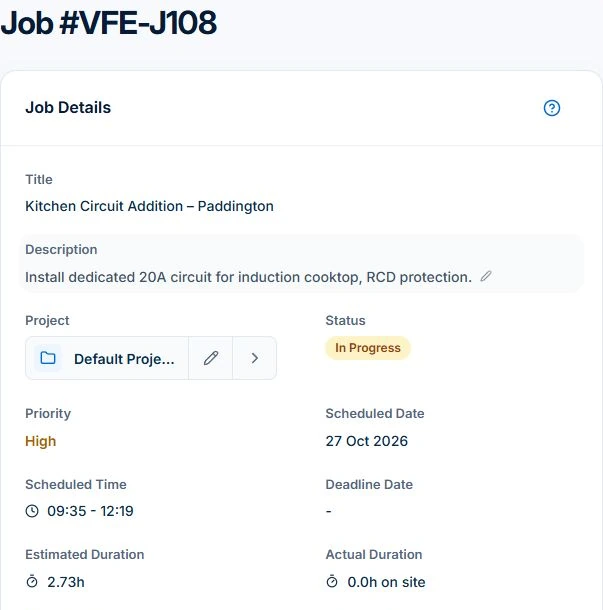
Test on the device the team will use. After reconnecting, open the job from the office to check the saved update. Sending customer paperwork and online payment need a connection.
Open the assigned job on iPhone or Android. Check the customer’s site, description and tasks before starting, particularly when covering for another worker.
Record time and materials against the job. On Basic or Professional, add relevant photos and documents. Reconnect and check the office record before relying on the update for a handover or invoice.
Review the job description and tasks while you are away from the office.
Keep time and material entries connected to the job.
Capture photos on paid plans and check that saved records have synced. The web portal also provides the Site Notes panel.
Picture it in your business / Example
Check the job, record your time and add relevant notes before leaving. The office can work from the record instead of asking you to reconstruct the visit later.
A practical starting point
Use the app for your device and business account.
Check the work and site details.
Add time and supporting detail as the work progresses.
Know what’s included
Mobile access is included with core plans. Free-plan usage limits apply; photo and document uploads start on Basic.
Compare plans, limits and pricing →Check the workflow in detail
Explore the detail
Availability varies with plan, permissions and enabled features. Check plan inclusions.
See how this fits: organise your work →Before you get started
Have a specific workflow in mind? Talk it through with us.
AxiomBlue iOS or Android app → Sign in → Open your work. Available controls depend on your permissions and enabled features.
Mobile access is included with core plans. Free-plan usage limits apply; photo and document uploads start on Basic.
Try a familiar job, check the records and confirm the plan inclusions your team needs.
Keep the work connected
Considering a switch?
Use a familiar job to compare the way you work today with the way Axiom Blue handles it.
Check the quote, schedule, job record and invoice. Look for the details your team needs.
Compare usage limits, paid seats and specialist features. See plans and pricing →
Try your own quote on the free plan. Before moving existing records, ask us about your data and setup needs.
Make the next step a small one
You know where the friction is in your business. Open the demo and see how AxiomBlue handles it. Then start with your own quote on the free plan.
Free forever for one person. No credit card. Usage limits apply.
Try a quote like one you send every week. Check the detail your customer will see.
Explore a job, its crew, time and materials. Look for the information you usually chase.
Compare the features and limits you need. See plans and inclusions →