
Keep the starting point clear
Record the original agreed work and contract value.
Variations & progress billing / AxiomBlue
Record the customer’s requested change and follow its approval. When it is time to bill, check the revised contract, previous claims and remaining balance in the web app.
Record the original agreed work and contract value.
Plan fit: Variation tracking and approvals require Professional. Check the job billing method before preparing a progress claim. Compare plans →
A practical workflow / Example
The construction demo shows the Contract Variations record on a fixed-price job. Check the scope, value and approval state before using it in the claim.
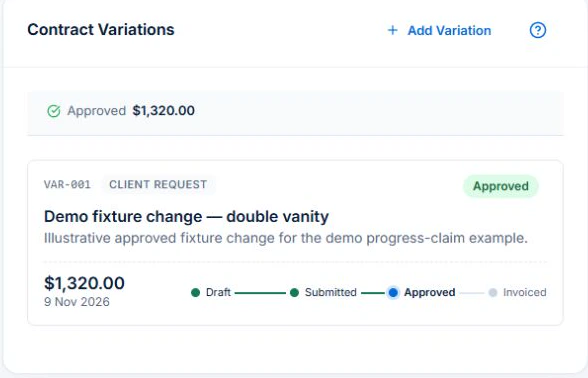
Standard fixed-price claims are available in the web app on all plans, subject to usage limits. You need View Jobs and Create Invoices. Variation tracking and approval require Professional.
Describe the extra work, the price basis and the person who can authorise it. Review the approval on the job before including the change in the contract total.
In the web billing view, compare the revised total with the work ready to claim and earlier invoices. The remaining contract value and the amount due this time can differ.
Use a project with an original price and one amount already invoiced. Add an approved change, then open the next claim. You should be able to explain the revised value and the amount still unbilled separately.
Record the original agreed work and contract value.
Describe the variation and follow its approval before relying on the revised contract.
Fixed-price progress claims follow the contract and approved changes.
Picture it in your business / Example
Record the extra scope as a variation and seek approval. Review the revised contract when preparing the next progress claim instead of reconstructing the agreement from messages.
A practical starting point
Review its contract and billing method.
Add the variation and follow the approval.
Check the revised value and earlier claims before invoicing.
Know what’s included
Variation tracking and approvals require Professional. Check the job billing method before preparing a progress claim.
Compare plans, limits and pricing →Check the workflow in detail
Explore the detail
Availability varies with plan, permissions and enabled features. Check plan inclusions.
See how this fits: protect your margin →Before you get started
Have a specific workflow in mind? Talk it through with us.
Jobs & Crews → All Jobs → Open a job → Contract Variations. Available controls depend on your permissions and enabled features.
Variation tracking and approvals require Professional. Check the job billing method before preparing a progress claim.
Try a familiar job, check the records and confirm the plan inclusions your team needs.
Keep the work connected
Considering a switch?
Use a familiar job to compare the way you work today with the way Axiom Blue handles it.
Check the quote, schedule, job record and invoice. Look for the details your team needs.
Compare usage limits, paid seats and specialist features. See plans and pricing →
Try your own quote on the free plan. Before moving existing records, ask us about your data and setup needs.
Make the next step a small one
You know where the friction is in your business. Open the demo and see how AxiomBlue handles it. Then start with your own quote on the free plan.
Free forever for one person. No credit card. Usage limits apply.
Try a quote like one you send every week. Check the detail your customer will see.
Explore a job, its crew, time and materials. Look for the information you usually chase.
Compare the features and limits you need. See plans and inclusions →