Professional
Workflow Automation Software for Australian Businesses
Stop sending the same reminder, chaser, and notification by hand. AxiomBlue's visual automation builder handles job reminders, overdue payment chasers, and crew notifications automatically, on the Professional plan.
Quick answerWorkflow automation software fires a message or field update automatically whenever a business event happens - a job finishes, an invoice goes overdue, a lead comes in - instead of a person having to remember to do it. AxiomBlue's automation builder is a visual, no-code canvas with event, schedule, and webhook triggers, multi-channel messaging, and conditional logic, available on the Professional plan.
A business in Sydney, Brisbane, or anywhere else in Australia sends the same handful of messages every week: job reminders, quote follow-ups, overdue payment chasers, crew notifications. Doing that by hand does not scale, and it is the first thing that gets skipped on a busy day. AxiomBlue's automation engine handles it instead - build the workflow once, turn it on, and every qualifying event is handled the same way, every time.
- Visual drag-and-drop canvas - no code, no scripting, no formulas
- 30+ ready-made templates across Messaging, Sales, Operations, Service, HR, and Finance
- Event, schedule, and webhook triggers cover almost anything that happens in your business
- Send email, SMS, and in-app notifications from the same workflow
- Filter, Branch, and Switch logic for if/then routing, no coding required
AxiomBlue workflow automation: the key facts
The short, checkable version of what AxiomBlue's automation costs and covers. Everything in the table is expanded on this page.
| Key fact | AxiomBlue |
|---|---|
| Plan | Professional, $59 AUD per seat per month (not on the $29 Basic plan) |
| Free plan | No time limit, no credit card required |
| Builder | Visual drag-and-drop canvas — no code, no formulas |
| Templates | 30+ across Messaging, Sales, Operations, Service, Support, HR, Finance |
| Triggers | Business events, recurring schedules, and incoming webhooks |
| Actions | Email, SMS, in-app notifications, record updates, outbound webhooks |
| Logic | Filter, Branch, and Switch nodes for if/then routing |
| Safety | Test-run mode plus a full execution history log |
How does workflow automation software work?
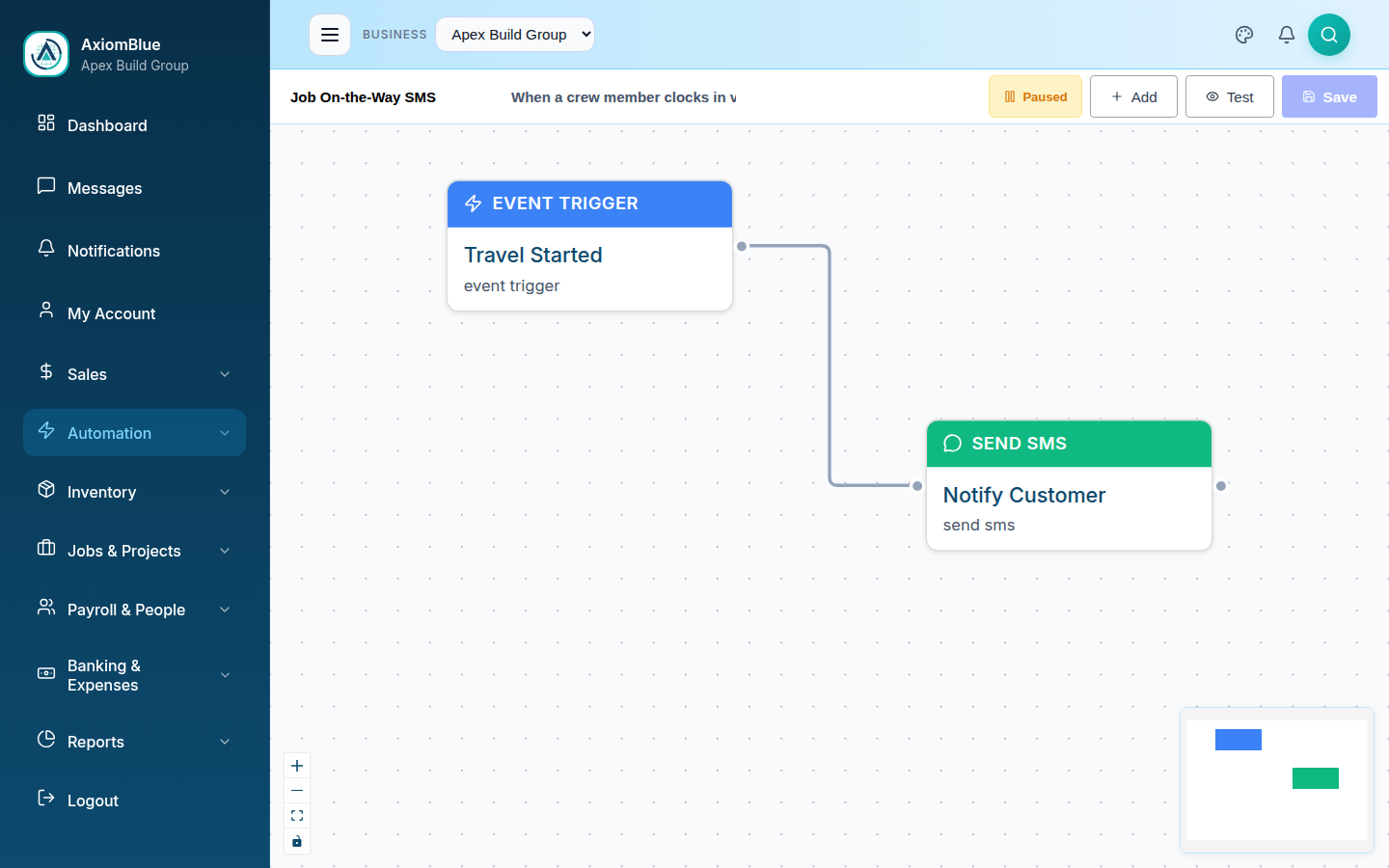
An automation in AxiomBlue starts with a trigger node - the event or schedule that starts the workflow - and then a sequence of action, logic, and delay nodes connected on a canvas. Each node has a configuration panel where you set the condition, the message, or the timing. Save it, flip it from draft to active, and it runs itself from then on. Most businesses have their first automation live within about 15 minutes of opening the builder.
Event, Schedule & Webhook Triggers
Fire a workflow off a business event (job completed, invoice overdue, lead received), a recurring schedule (daily, weekly, monthly), or an incoming webhook from another system.
Multi-Channel Messaging
Email the customer, SMS the technician, and notify the office, all from one trigger event and one workflow, with no extra setup between channels.
Conditional Logic
Filter, Branch, and Switch nodes route the workflow based on your data, so different customers, invoice amounts, or job types can be handled differently, automatically.
Why does an Australian business need workflow automation?
Because the messages that win and collect money - quote follow-ups, overdue payment chasers, job reminders, crew notifications - are exactly the repetitive tasks that get skipped on a busy day, and automation sends them every time without anyone remembering. Every business runs on that repetition; doing it manually for every job, lead, and invoice is death by a thousand small tasks. An automation does not forget, does not get tired, and does not skip a step because the phones are ringing.
Faster response
A lead that comes in at 11pm gets an acknowledgement email before your competitor is even awake. A job marked complete triggers the invoice reminder that afternoon, not next week.
Consistent every time
An automation runs exactly as configured, every single time, so your customer experience does not depend on how busy the office is that day.
Scale without adding headcount
The follow-ups, reminders, and notifications that would otherwise need a full-time admin person are handled automatically as your job volume grows.
What's included in AxiomBlue's workflow automation?
AxiomBlue's workflow automation includes 30+ ready-made templates, a blank-canvas visual builder, entity-update actions, inbound and outbound webhooks, a test-run mode, and a full execution history. It is available on the Professional plan ($59 AUD per seat per month) - alongside two-way Xero sync, bills and accounts payable, and the full CRM pipeline - and is not included on the $29 Basic plan.
30+ Templates
Pre-built workflows across Messaging, Sales, Operations, Service, Support, HR, and Finance, ready to customise instead of building from scratch.
Blank Canvas Builder
Combine any trigger, logic, and action node into a fully custom workflow when a template does not quite fit what you need.
Modify Entity Actions
Update a status, assign an owner, or tag a record automatically as part of a workflow, so your data stays current without manual entry.
Webhooks In & Out
Receive an event from an external platform to start a workflow, or fire an outbound webhook as an action step to push data somewhere else.
Test Run Mode
Simulate a workflow against a real record before it goes live, so you can see exactly what will happen without sending an accidental message to a customer.
Execution History
Every run is logged - when it fired, what it did, and whether each step succeeded - so nothing is a mystery when you go looking for it later.
Do you need technical skills to set up an automation?
No. The canvas is built for business owners and office managers, not developers - drag a node on, connect it to the next one, fill in the configuration panel, and save. There is no code and no formulas. Most of the high-value automations - payment chasers, job reminders, lead follow-ups, crew notifications - are template-based, so you are customising a message and a timing window rather than designing a workflow from nothing. If you can set up a filter in your email client, you can build an AxiomBlue automation.
The trigger library is deep enough to cover most of what happens in a service business, and the multi-channel actions mean one automation can talk to a customer by email, a technician by SMS, and your office by an in-app notification without you configuring three separate tools. For businesses in Brisbane, Melbourne, Perth, or anywhere else in Australia juggling the same repetitive admin every week, this is usually the single biggest time saving in the whole platform.
What can you actually automate? The full guide series
Each of these guides answers one question with a ready-made AxiomBlue automation you can switch on as soon as you sign up:
- How do I follow up quotes automatically? — every quote chased two days later, unless it's already accepted
- How do I get more Google reviews? — an automatic ask the day after every completed job
- How do I stop customer no-shows? — SMS the evening before, plus a no-show recovery flow
- Can invoices generate themselves? — job complete → invoice drafted from time, materials and variations
- How do I respond to leads instantly? — welcome emails, source routing, pipeline alerts
- How do I keep customers in the loop? — on-the-way, running-late and reschedule messages
- Can timesheets fill themselves in? — geofenced clock-on when the crew arrives on site
- How do I get low-stock alerts? — daily checks, auto-deduction on jobs, delivery updates
- How do I track licence expiry? — weekly warnings before certs and tickets lapse
Workflow Automation Software - Common Questions
Workflow automation software fires a message or an action automatically whenever something happens in your business - a job is marked complete, an invoice goes overdue, a lead comes in. AxiomBlue's automation engine is a visual, no-code builder: you connect a trigger to a sequence of actions on a drag-and-drop canvas, save it, and it runs itself from then on.
Workflow automation is included on AxiomBlue's Professional plan ($59 AUD per seat per month). It is not part of the $29 Basic plan. Professional also adds two-way Xero sync, bills and accounts payable, and a full CRM pipeline, so most businesses that want automation are already looking at Professional for the accounting depth as well.
Three trigger types cover most Australian business scenarios. Event triggers fire on a business event - job completed, invoice overdue, lead received, deal won, quote sent, or a status change. Schedule triggers run on a recurring timetable - daily, weekly, or monthly. Webhook triggers receive events from an external system and kick off a workflow inside AxiomBlue.
Yes. A single AxiomBlue automation can email the customer, SMS the assigned technician, send an in-app notification to your office staff, and fire an outbound webhook to another system - all as separate steps in the same workflow, triggered by one event.
No. The canvas is drag, drop, and connect - there is no scripting or formulas required. AxiomBlue includes 30+ pre-built templates across Messaging, Sales, Operations, Service, Support, HR, and Finance, so most businesses start from a template and just adjust the message and timing rather than building from a blank canvas.
Every run is recorded in an execution history log, showing when it fired, what triggered it, and whether each step succeeded or failed. There is also a test run mode that simulates the workflow against a real record before you switch it on, so you are not sending a test SMS to an actual customer while you're setting it up.
Stop Doing It By Hand
Build your first automation from a template in minutes, then let AxiomBlue handle the reminders, chasers, and notifications while you get on with the work. Start free today.
No credit card required • Free plan, no time limit • Cancel anytime