Automation • Professional
How Do I Respond to New Leads Instantly?
The enquiry that comes in at 9pm doesn't wait for morning. AxiomBlue answers it the moment it arrives, routes it to the right person, and tells you every time it moves through the pipeline — three shipped automations, zero code.
Quick answerLead follow-up automation answers every new enquiry the moment it arrives, routes it to the right person, and alerts the owner as it moves through the pipeline — no one has to watch the inbox. AxiomBlue ships this as three ready-made templates (New Lead Welcome Email, Lead Source Routing, and pipeline stage alerts) on the Professional plan, $59 AUD per seat per month, with a free plan that has no time limit.
A lead is at its warmest in the minutes after it is sent — the person is still at their keyboard, still thinking about the problem, and very often still working down a list of businesses to try. Most trade businesses lose leads not because their work is worse but because their reply came second. Automation makes your acknowledgement the fast one, every time, at any hour.
- Welcome email fires the instant a lead is created — nights and weekends included
- Every lead assigned to a named owner by its source, from the first minute
- In-app alert to the owners on every pipeline stage change
- All three workflows editable on a visual canvas — wording, timing, routing
- Leads visible and actionable from the free iPhone and Android apps
| Key facts — lead follow-up automation in AxiomBlue | |
|---|---|
| Instant reply | New Lead Welcome Email — fires the moment a lead is created |
| Routing | Lead Source Routing — a switch on lead source assigns each lead an owner |
| Pipeline visibility | Stage changes send the owners an in-app notification |
| After hours | Event-triggered, so it answers at 9pm exactly as it does at 9am |
| Editing | Visual drag-and-drop canvas — no code; test-run mode before going live |
| On your phone | Leads and customers in the free native iPhone & Android apps, plus any browser |
| Plan | Professional, $59 AUD per seat per month (platform from $29) |
| Free plan | No time limit, no credit card |
How do I respond to new leads instantly?
By making the response a trigger, not a task. In AxiomBlue, the New Lead Welcome Email automation watches for a lead being created; the moment one exists, it sends the enquirer a welcome email — automatically, immediately, and identically at 2pm on a weekday or 9pm on a Sunday. No one has to see the enquiry for the enquirer to hear back from you.
That distinction — trigger versus task — is the entire subject of this page. A task ("reply to new enquiries quickly") depends on someone being free, at a desk, and watching the right inbox; on a busy day it silently becomes "reply to new enquiries eventually". A trigger has no such dependency: the event is the instruction, and the software executes it every time. Lead follow-up is the single best place in a service business to make that swap, because the cost of a slow reply is invisible — the lead who went elsewhere never rings to tell you.
AxiomBlue treats lead follow-up as three connected automations rather than one: the instant acknowledgement (this section), the routing that gives every lead a named owner (below), and the stage-change alerts that keep the pipeline honest (below that). Together they cover the lead's first minute, first owner, and whole journey — and all three are shipped templates on the Professional plan, not workflows you have to invent.
Why does speed to lead matter?
Because a person who fills in an enquiry form is rarely filling in only yours. They have a problem today, a browser full of tabs, and no loyalty yet — the business that responds first gets the conversation, and the conversation is where the job is usually won. You do not need a statistic to see the mechanism: think about the last time you enquired with three businesses and one replied while the others took two days. You remember which one you hired.
Speed matters twice more after the first reply. An instant acknowledgement stops the enquirer from re-sending the same enquiry to more competitors "just in case nobody answers" — it takes them off the market for the hours or days until a human calls. And it sets the tone: a business that responds within a minute of an enquiry reads as a business that will turn up when it says it will. The acknowledgement is doing sales work before anyone has picked up a phone.
The honest caveat: an automated email is an acknowledgement, not a substitute for the human call. Its job is to hold the lead warm and set an expectation — "we've got your enquiry, expect a call by tomorrow morning" — that a person then meets. Automation buys your team the time to respond well; it does not replace them responding.
How does the automation run, step by step?
Three shipped workflows, each a short chain of plain-English steps. Here is what actually executes, in order, when a lead arrives and starts moving:
1. A lead is created
Someone keys in a phone enquiry, or a website form or connected system creates the lead via an incoming webhook. Either way, the lead record now exists — and that is the trigger.
2. The welcome email sends
New Lead Welcome Email fires immediately — no wait step — and the enquirer gets your acknowledgement with your wording, at whatever hour the enquiry arrived.
3. The lead is routed by source
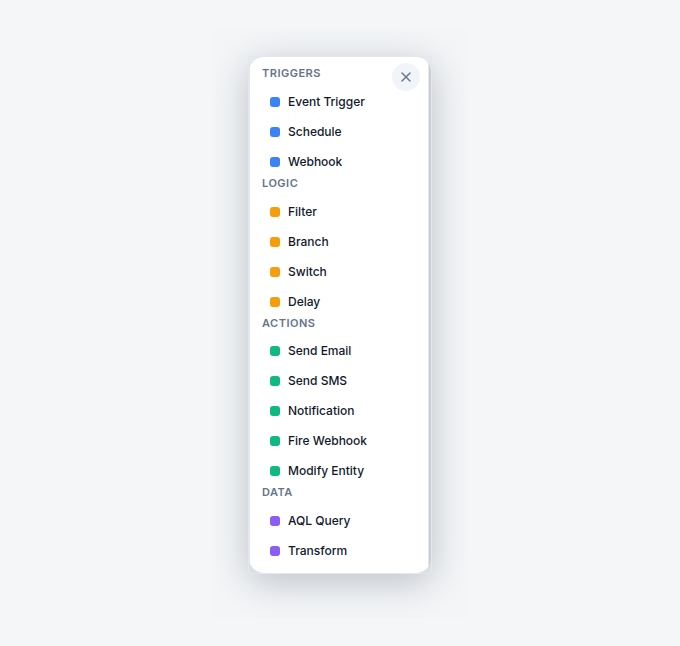
Lead Source Routing runs the same trigger through a switch on the lead's source. Each branch assigns the lead to the right owner — website to one person, referrals to another.
4. Stage changes alert the owners
From then on, every time the lead moves stage in the pipeline, Lead Pipeline Stage Change Notification sends the owners an in-app alert naming the movement.
Note what is automated and what is not: the acknowledgement, the assignment, and the visibility are automatic; the qualifying call, the quote, and the relationship stay human. Every run of every workflow is recorded in the execution history, so "did that lead get answered?" has a checkable answer.
What should the welcome email say?
Three things, briefly: confirm the enquiry arrived, say when a human will be in touch, and ask one useful question. Something like: "Thanks for getting in touch — we've got your enquiry and one of the team will call you by tomorrow morning. If you can, reply with your suburb and a photo of the job, and we'll be able to give you a straight answer faster." That is the whole email. It reads like a person, makes one commitment, and moves the job forward before anyone has spoken.
The commitment is the load-bearing part. "We'll be in touch by tomorrow morning" is a promise your automation makes on your team's behalf — so set it to something you can actually meet, and let the routing template (next section) make sure a named person is on the hook to meet it. An instant email followed by a three-day silence reads worse than no email at all.
Two things to avoid: don't pretend the instant reply is a human ("Hi, Dave here, just saw your message come in!" at 11:47pm fools nobody), and don't stuff it with links and upsells — it is an acknowledgement, not a newsletter. The wording lives in the email node in AxiomBlue's editor, so changing it is a text box, not a project.
How do leads get to the right person?
Through a switch, not a shared pile. AxiomBlue's Lead Source Routing template fires on the same lead-created event and runs the lead through a switch node on its source: one branch for website enquiries, one for referrals, one for phone-ins — whatever split matches how your enquiries actually arrive. Each branch then assigns the lead to its owner, so every lead has a named person responsible for it from its first minute in the system.
Routing is the unglamorous half of speed to lead, and it is where the follow-through usually dies without it. An instant acknowledgement followed by a lead sitting unowned in a general list has only automated the first thirty seconds of the problem. Assignment is what converts "someone should call this person" into "Sarah is calling this person" — and because the assignment happens by rule, it happens identically on the day everyone is flat out.
The branches are yours to define in the editor. Route by source as shipped, or restructure around whatever distinction matters in your business — the switch node does not care what it is switching on. Commercial versus residential, region, service type: if it is on the lead, you can route by it.
How do I know when a lead moves through the pipeline?
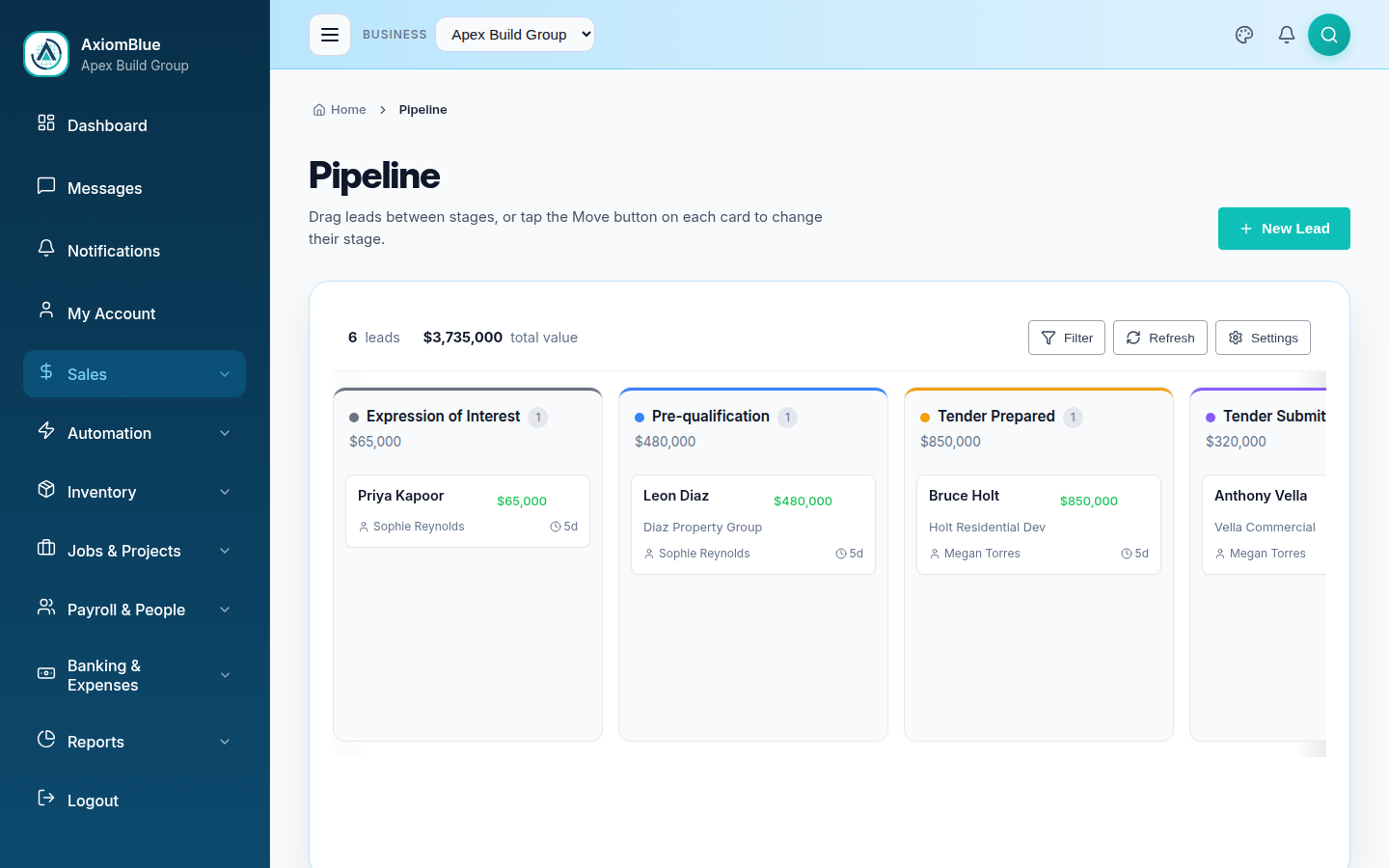
You get told, rather than having to look. AxiomBlue's Lead Pipeline Stage Change Notification template fires whenever a lead changes stage and sends the business owners an in-app notification naming the movement — new to contacted, contacted to quoted, quoted to won. It is an internal alert to your team, not a customer-facing message: the lead hears nothing from this template.
What that buys an owner is passive awareness of pipeline momentum. You feel the week's sales activity as it happens — and, just as usefully, you notice its absence. When the stage-change notifications go quiet for a few days, that silence is information: leads are arriving (the welcome emails tell you that) but nobody is moving them. That is a conversation to have on Wednesday, not a surprise to discover in the month's numbers.
To be precise about the mechanism, because precision is the house style: these are in-app notifications inside AxiomBlue — not push notifications to your lock screen. They sit alongside the rest of your in-app notifications and are waiting whenever you or the team open the platform, on desktop or in the mobile apps.
How does this compare with watching the inbox?
The honest comparison has three columns, because a generic email autoresponder genuinely solves part of this. What it cannot do is anything after the reply — routing, ownership, and pipeline visibility need the automation to live where the leads live.
| Watching the inbox | Email autoresponder | AxiomBlue automation Lead-triggered | |
|---|---|---|---|
| Reply speed on a busy day | Hours, sometimes days | ✓ Instant | ✓ Instant — fires on lead creation |
| Nights and weekends | Waits for Monday | ✓ Covered | ✓ Covered — the trigger never sleeps |
| Assigns the lead an owner | Whoever picks it up, maybe | No — it only sends mail | ✓ Routed by source to a named person |
| Connected to the pipeline | Manually, later, sometimes | No — separate tool, separate data | ✓ Lead, pipeline, and quote in one platform |
| Tells you when leads move or stall | Only if you go looking | No | ✓ In-app alert on every stage change |
| Proof it happened | None | Send logs, in another tab | ✓ Execution history on every run |
Can I change the templates without code?
Yes — all three are starting points on a visual drag-and-drop canvas, not fixed features. Reword the welcome email, add an SMS step beside it, insert a short delay if instant feels too instant for your brand, add or rename routing branches, or point the stage-change alerts at different events. Nodes connect with drag and drop, each one configures in a panel, and there is no scripting anywhere. A test-run mode simulates the workflow against a real record before you switch it on — so your first test welcome email does not go to a real enquirer — and the execution history records every live run afterwards.
What does lead follow-up automation cost?
Automation is part of AxiomBlue's Professional plan at $59 AUD per seat per month, which includes all three lead templates along with the rest of the 30+ template library, the visual builder, and the full CRM pipeline they feed. The platform starts at $29 AUD per seat per month on Basic, without automation. There is a free plan with no time limit and no credit card required — long enough to put the welcome email live and watch it answer a real Saturday-night enquiry while you are watching the footy.
Lead Follow-Up Automation — Common Questions
Lead follow-up automation responds to every new enquiry the moment it arrives, without a person watching the inbox. In AxiomBlue, three shipped templates cover it: New Lead Welcome Email sends an acknowledgement the instant a lead is created, Lead Source Routing assigns the lead to the right owner based on where it came from, and pipeline stage changes send the owners an in-app alert.
Yes. The trigger is the lead being created in AxiomBlue - not a schedule, not a batch. The moment the lead record exists, the workflow fires and the email goes out, whether that is 10am on a Tuesday or 9pm on a Sunday. There is no wait step in the shipped template, though you can add one in the visual editor if you want a deliberate pause.
The shipped New Lead Welcome Email template sends email. AxiomBlue's automation builder also has an SMS action, so you can open the template on the visual canvas and add an SMS step alongside the email - one trigger, both channels, no code. Keep the SMS shorter and save the detail for the email.
AxiomBlue's Lead Source Routing template fires when a lead is created and runs it through a switch on the lead's source. Each branch assigns the lead accordingly - website enquiries to one person, referrals to another, phone-ins to a third. Every lead lands with a named owner from the first minute, so nothing sits unowned in a shared pile.
AxiomBlue's Lead Pipeline Stage Change Notification template fires whenever a lead changes stage and sends the business owners an in-app notification naming the movement. You see momentum - and stalls - as they happen, without opening the pipeline board to check. It is an internal alert to your team; the lead is not contacted by this template.
Yes. AxiomBlue has free native apps for iPhone and Android, and leads and customers are part of the field workflow - so the person a lead is routed to can see it and act on it from their phone. The full platform, including the pipeline board and the automation editor, also runs in any web browser.
Minutes, not days. All three templates ship ready-made in AxiomBlue - you open one, put your own wording in the welcome email, set your routing branches to your actual people, test it with the built-in test-run mode, and switch it on. There is no code, and most businesses have the welcome email live in their first session.
Automation, including all three lead templates, is part of AxiomBlue's Professional plan at $59 AUD per seat per month. The platform starts at $29 AUD per seat per month on the Basic plan, which does not include automation. There is a free plan with no time limit and no credit card, so you have all the time you need to see the welcome email answer a real enquiry.
Answer Your Next Lead in Under a Minute
Put the welcome email live today and every enquiry from tonight onwards gets an instant reply, a named owner, and a place in your pipeline — whether or not anyone is at a desk.
No credit card required • Free plan, no time limit • Cancel anytime