The average trade business sends dozens of the same messages every week — job reminders, quote follow-ups, overdue payment chasers, arrival notifications, completion confirmations. Most of those messages never get sent because there simply isn't enough time. AxiomBlue's automation engine handles all of it automatically. Build a workflow once, turn it on, and every qualifying event is handled without anyone lifting a finger. Whether you're chasing a $200 invoice or following up a $50,000 quote, the message goes out on time, every time.

  • Visual node-based canvas — drag, drop, and connect triggers, logic, and actions
  • 30+ ready-made templates across Messaging, Sales, Operations, Service, HR, and Finance
  • Multi-channel actions: email, SMS, in-app notifications, and webhooks in a single workflow
  • Conditional logic with Filter, Branch, and Switch nodes for if/then routing
  • Full execution history so you can see exactly what fired, when, and why
AxiomBlue visual automation builder showing a drag-and-drop workflow canvas with trigger, logic, and action nodes

How does workflow automation help trade businesses save time?

Trade businesses run on repetition — the same follow-up emails, the same reminder SMS, the same notification to a crew member when a job is ready. Doing that manually for every single job, lead, and invoice is death by a thousand tasks. AxiomBlue automation intercepts every qualifying event and handles the downstream communication instantly, accurately, and without anyone needing to remember to do it. The result is faster response times, fewer things falling through the cracks, and a team that spends less time on admin and more time on the tools.

Instant Event Response

When a lead comes in at 11 pm, an automation sends the acknowledgement email before your competitor does. When a job is marked complete, the invoice reminder goes out the same afternoon. Speed is a competitive advantage — automation gives it to you for free.

🔁

Consistent Execution

Automations don't forget, don't get tired, and don't skip steps on a busy Friday afternoon. Every workflow runs exactly as configured every single time, which means your customer experience is consistent regardless of how hectic the office is.

📈

Scale Without Hiring

Automation lets a lean office team handle twice the volume without doubling headcount. The follow-up sequences, payment reminders, and crew notifications that would require a full-time admin person are handled automatically as your job volume grows.

What can you automate in AxiomBlue?

Almost anything that happens in AxiomBlue can trigger an automation, and almost anything AxiomBlue can do can be an action inside one. The most popular automations in trade businesses combine a business event trigger with a message and a field update — but the platform supports far more complex sequences, including branching logic, time delays, data queries, and external webhook calls to integrate with other tools in your stack.

🎯

Event Triggers

Fire automations when a lead is created, a job status changes, a deal is won, an invoice goes overdue, a quote is sent, or any other business event occurs. Dozens of trigger events cover every stage of your trade business workflow.

🗓️

Schedule Triggers

Run automations on a recurring timetable — daily, weekly, or monthly. Ideal for end-of-month payment summaries, weekly job status reports, or any task that needs to happen on a fixed cadence rather than in response to a specific event.

🔗

Webhook Triggers & Actions

Receive incoming webhooks from external platforms to kick off a workflow inside AxiomBlue, or fire outbound webhooks as an action step to push data to another system. Connects AxiomBlue to virtually any external platform with an API.

✉️

Multi-Channel Messaging

Send emails, SMS messages, and in-app notifications from within the same workflow. A single automation can email the customer, SMS the crew member, and notify the office — all from one trigger event, with no extra configuration.

🔀

Conditional Logic Nodes

Use Filter, Branch, and Switch nodes to route your workflow based on data conditions. Send different messages to residential and commercial customers, escalate overdue invoices differently based on amount, or assign leads based on postcode — all without any code.

✏️

Modify Entity Actions

Update fields on jobs, contacts, deals, or invoices as part of an automation sequence. Automatically set a status, assign an owner, update a custom field, or tag a record — keeping your data current without manual data entry.

How does the visual automation builder work?

The automation canvas is a node-based editor — think flowchart, not spreadsheet. You start with a trigger node (the event or schedule that starts the workflow), then drag action, logic, delay, and data nodes onto the canvas and connect them with lines. Each node has a configuration panel where you set the conditions, message content, field mappings, or timing. Saving the workflow is instant, and you can toggle it between draft and active states without deleting it. There's also a test run mode that simulates the workflow against a real record so you can verify exactly what will happen before you go live — no more sending accidental test emails to customers.

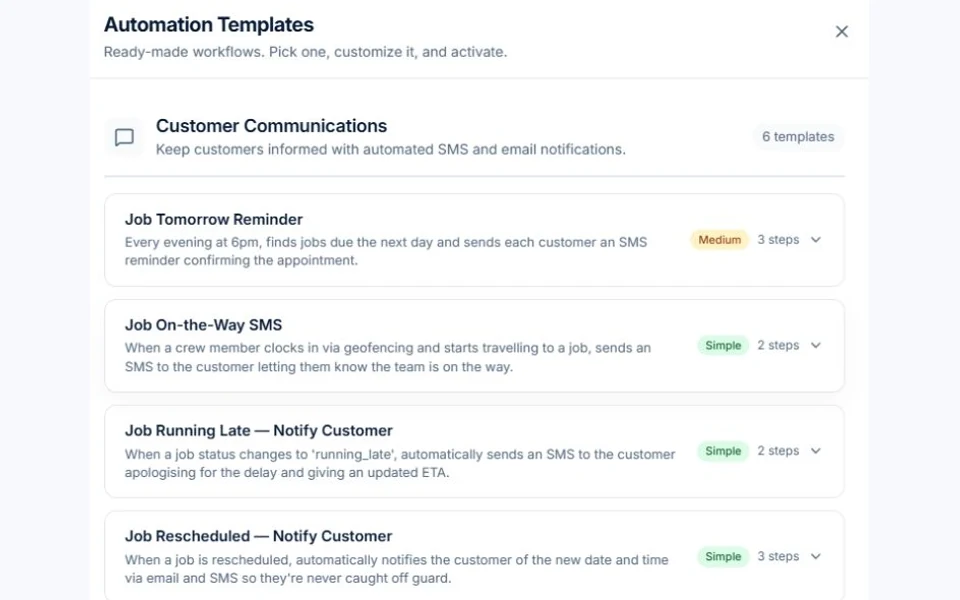
The 30+ pre-built templates are organised by business function: Messaging (appointment reminders, job updates), Sales (lead follow-up sequences, deal nurture), Operations (crew dispatch, job completion alerts), Service (customer satisfaction follow-ups), Support (ticket escalation), HR (employee onboarding and document collection), and Finance (payment reminders, invoice chasers). Load a template, customise the message content and timing to fit your business, and activate it — most trade businesses are running their first automation within 15 minutes of opening the builder for the first time.

Do you need technical skills to set up automations?

No. The visual canvas is designed for business owners and office managers, not developers. There is no code, no scripting, and no formulas — just drag, drop, and configure. The template library means you rarely need to build from scratch, and each template ships with sensible defaults that work out of the box for most trade businesses. You can customise message content using plain-language variable placeholders (like inserting the customer's name or the job address) without writing a single line of logic.

For more advanced use cases — like AQL data queries or transform nodes that reshape data between steps — the builder includes inline documentation and example syntax. These features are there if you want them, but the majority of high-value automations (payment chasers, job reminders, lead follow-ups, crew notifications) are fully accessible without touching them. If you can set up a Gmail filter, you can build an AxiomBlue automation.

Common Questions About Workflow Automation

Workflow automation is available on Pro and Enterprise plans. These plans give you access to the full visual builder, all trigger types, every action node, the complete template library, and execution history logs. Starter plan users can upgrade to Pro at any time to unlock automation features.

Both. AxiomBlue includes 30+ ready-made templates organised by category — Messaging, Sales, Operations, Service, Support, HR, and Finance — so most trade businesses can get started without building anything from scratch. If you need something specific that isn't covered by a template, the blank canvas lets you combine any trigger, logic, and action nodes into a fully custom workflow.

Any business event in AxiomBlue can be an event trigger — job completed, invoice overdue, lead received, deal won, quote sent, status changed, and many more. Schedule triggers fire on a recurring timetable (daily, weekly, or monthly). Webhook triggers receive events from external systems and act on them inside AxiomBlue. Between the three trigger types, virtually every business scenario is covered.

Yes. AxiomBlue automations are multi-channel by design. A single workflow can send an email to the customer, an SMS to the assigned technician, an in-app notification to your office staff, and fire an outbound webhook to an external system — all as separate action nodes within the same automation sequence.

Every automation run is recorded in the execution history log. Each entry shows when the automation fired, which trigger caused it, what actions were taken, and whether each step succeeded or failed. If something goes wrong you can see exactly which node encountered an issue and what the error was. You can also use test run mode before activating an automation to simulate it against a real record and verify the output without sending live messages.

Yes. AxiomBlue includes three logic node types for branching workflows: Filter (if/then — continue only if a condition is met), Branch (split the workflow into two parallel paths based on a condition), and Switch (route the workflow down one of many paths based on a field value). Conditions can reference any data field in AxiomBlue, including custom fields on jobs, contacts, and deals. This means you can send different messages to different customer segments, escalate differently based on invoice value, or route leads based on trade type — all without writing any code.

Ready to Stop Doing Things Manually?

Build your first automation in minutes. Start with a template, customise the message, and let AxiomBlue handle the follow-ups, reminders, and notifications so your team can focus on the work that matters.

Explore Live Demo

No credit card required • 14-day free trial • Cancel anytime