Automation · Professional
How Do I Get More Google Reviews for My Trade Business?
Your happiest customers rarely leave reviews - not because they don't want to, but because nobody asked at the right moment. AxiomBlue asks every one of them for you: a friendly email with your Google review link, one day after every completed job.
Quick answerThe reliable way to get more Google reviews is to ask every customer, at the same moment, automatically. AxiomBlue's Job Completed — Send Customer Review Request template waits 1 day after each job is marked complete, then emails the customer a review request with your Google review link — included on the Professional plan at $59 AUD per seat per month, free plan with no time limit.
Google reviews are how Australian trade businesses get chosen. When someone searches "electrician near me" or "plumber Parramatta", the business with 80 reviews at 4.8 stars gets the call over the one with 9 reviews - before either has said a word. The gap between those two businesses is almost never the quality of the work. It's that one of them asks every customer for a review, every time, and the other asks whenever someone remembers - which, on the tools at 4pm on a Friday, is never.
- Fires automatically when any job is marked complete - the ask is never forgotten
- Waits 1 day, so the request lands after the dust settles but while the work is fresh
- Sends a personal-sounding email with your Google review link front and centre
- Every word of the email is editable in the visual editor - no code
- Asks every customer the same way, keeping you clear of Google's review-gating rules
Automated review requests in AxiomBlue: the key facts
The short, checkable version. Everything in this table is expanded further down the page.
| Key fact | AxiomBlue |
|---|---|
| Template | Job Completed — Send Customer Review Request |
| Trigger | Fires when a job is marked complete |
| Timing | Waits 1 day after completion (editable) |
| Channel | Email, with your Google review link in the body |
| Message | Fully editable subject and body, with name/job variables |
| Google policy | Asks every customer the same way — no review gating |
| Setup | Visual editor, no code — about 10 minutes |
| Plan | Professional, $59 AUD per seat per month; free plan with no time limit |
Why don't happy customers leave reviews on their own?
Because leaving a review is a favour, and favours need a prompt. A customer who's delighted with their new deck will tell their neighbour about you, but sitting down to write a Google review isn't something people think to do unprompted - life moves on the moment your ute leaves the driveway. Research on review behaviour consistently finds the same thing: the single biggest driver of whether a customer reviews you is simply whether they were asked.
The trap for a busy trade business is that asking is nobody's job. The crew's already driving to the next site, the office is invoicing, and "send Mrs Chen a review link" isn't on anyone's list. So the reviews you do get skew towards the loudest voices - which is exactly the wrong sample. Automating the ask fixes both problems at once: every customer gets asked, and the request always arrives at the moment they're most inclined to say yes.
How does the review request automation run, step by step?
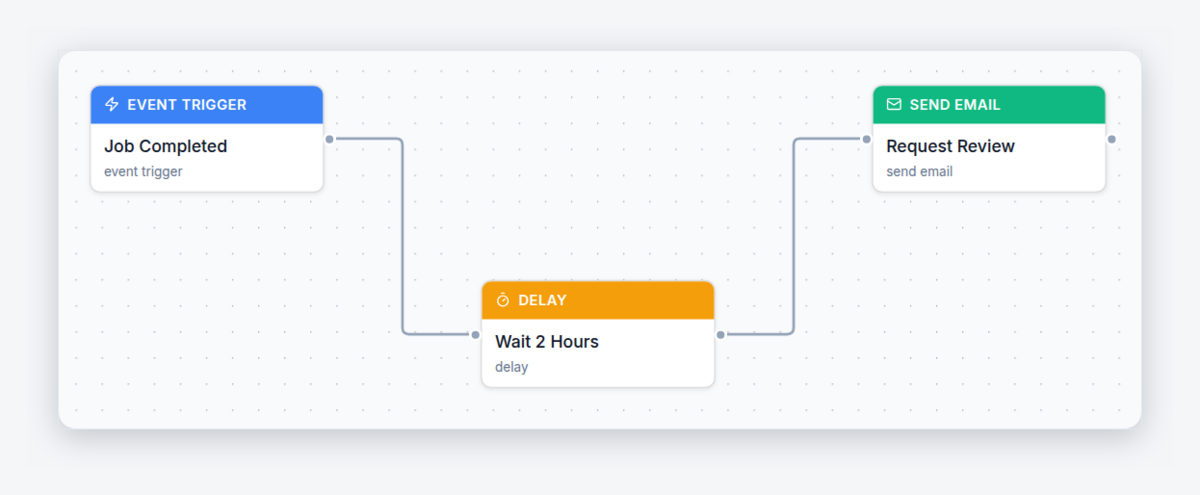
The workflow is deliberately simple - three steps, no branches. Here is exactly what AxiomBlue's Job Completed — Send Customer Review Request template does, in plain words:
- Trigger — a job is marked complete. Whether the crew taps "complete" from the mobile app on the driveway or the office closes it out from a browser, the workflow starts a run for that job and its customer. No lists, no exports - finishing the job is the starting gun.
- Wait — 1 day. The workflow pauses for a day. The customer has lived with the finished work overnight, any invoice conversation has had room to happen, and your business is still fresh in their mind.
- Action — email the review request. The customer receives a short, friendly email - thanks for the work, a review would mean a lot, here's the link - with your Google review link ready to tap. Their name and the job's details fill in automatically from variables.
Then it does the same thing tomorrow, and the day after, for every job your business completes - which is exactly why review counts compound for the businesses that automate this and stall for everyone else. The academy has a full build-along tutorial: automatically request Google reviews after every job.
When is the right moment to ask for a review?
The day after the job - that's why the template's delay defaults to 1 day. Ask on the doorstep and it can feel like the handshake came with an invoice; the customer also hasn't actually lived with the work yet. Ask a fortnight later and the warm glow is gone - your job is now one of a hundred things that happened this month. The day-after window catches people at peak goodwill: the new switchboard works, the bathroom looks great, and the experience is complete in their mind.
The delay is a single field on the workflow's delay node, so you can tune it to your trade. Same-day service work with an emotional payoff - unblocked drain, restored hot water - can handle a shorter gap. Bigger projects where the customer needs time to settle in might suit two or three days. Start at 1 day, watch what comes back, and adjust.
What should a review request email say?
Three things, in three sentences: thank you, why it matters, and the link. Something like "Hi Sarah, thanks for having us out for the switchboard upgrade. We're a small local business and Google reviews genuinely make a difference to us - if you were happy with the work, it'd mean a lot if you left one. Here's the link - it takes about a minute." Warm, specific, easy.
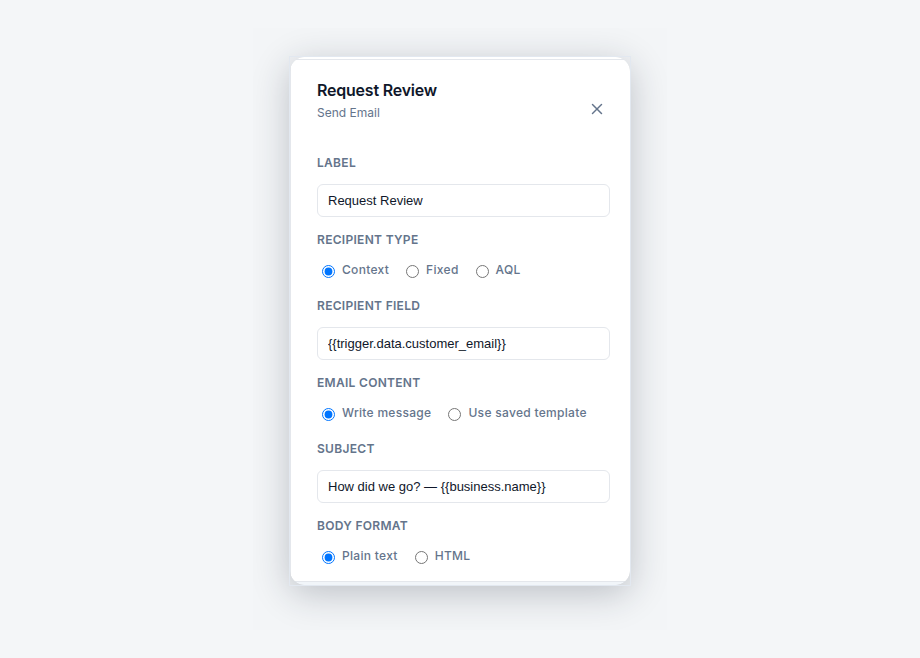
In AxiomBlue the email is a plain-text subject and body on the send-email node. You paste your Google review link straight into the body, and variables drop in the customer's name and job details so every message reads personally without anyone typing it. Two things to avoid: don't grovel ("sorry to bother you"), and don't offer anything in exchange - incentivised reviews breach Google's policies and can get reviews removed.
Is it OK to ask every customer? What about Google's rules?
Asking every customer is not just allowed - it's the compliant way to do it. Google's review policies permit businesses to ask customers for reviews; what they prohibit is paying or incentivising for them, and "review gating" - quietly screening customers first and only sending the review link to the ones you think will say something nice. Gating is tempting, and some review tools are built around it, but it risks having reviews removed and it produces a profile savvy customers don't trust anyway.
AxiomBlue's template asks every customer the same way after every completed job, with no pre-screening step - which keeps you on the right side of the policy by default. And if you're worried about the occasional imperfect job: a wall of five-star reviews with one honest four looks more credible to buyers than a suspiciously perfect record. The maths of asking everyone always beats the maths of asking almost no one.
Asking manually vs AxiomBlue vs a standalone review tool
Three honest ways to build your Google review count, side by side. The row that decides it is the first one: an ask that depends on memory mostly doesn't happen.
| Asking manually | AxiomBlue | Standalone review tool | |
|---|---|---|---|
| How often the ask happens | When someone remembers — a fraction of jobs | Every completed job, automatically | Every job you remember to upload or sync into it |
| Knows when the job finished | Yes, but the ask still relies on memory | Yes — job completion is the trigger | No — needs a CSV, a Zap, or manual entry |
| Timing of the ask | On the doorstep, or weeks late | 1 day after completion, every time | Whenever the data made it in |
| Extra subscription | None | None — part of the job platform you already run | Typically its own monthly fee, per location |
| Google policy risk | Low, if you ask everyone | Low — asks every customer, no gating step | Varies — some are built around review gating |
Can I change how it works?
Yes - every node is editable, with no code. The template opens in AxiomBlue's visual workflow editor as three connected nodes on a canvas: click the delay to change the 1-day wait, click the email to rewrite the message, or add a filter step so only certain job types trigger a request - commercial clients you'd rather ask personally, say, or warranty call-backs you'd rather not ask at all. A test mode lets you run the workflow safely before it touches a real customer, and the execution history logs every send so you can see exactly which customers were asked and when.
The review request is one of 30+ ready-made templates in AxiomBlue - the overview of the whole engine is at workflow automation software for Australian businesses, and the natural companions are the automated quote follow-up at the front of the job and SMS job reminders the evening before it.
What does automated review requesting cost?
Review request automation is included on AxiomBlue's Professional plan at $59 AUD per seat per month - it isn't part of the $29 Basic plan. That price covers the whole automation engine, not just this template, alongside Professional's two-way Xero sync, bills, and CRM pipeline. There's a free plan with no time limit and no credit card required - long enough to complete real jobs and watch the requests go out. Compared with standalone review platforms that charge a separate monthly fee just for this one function, the ask comes bundled with the job management system that already knows when every job finished.
Automated Google Review Requests - Common Questions
Tie the ask to job completion instead of memory. AxiomBlue's Job Completed - Send Customer Review Request template watches for a job being marked complete, waits 1 day, then emails the customer a friendly review request containing your Google review link. Every finished job becomes an ask, automatically, with nobody having to remember.
A 1-day gap lands the request while the work is still fresh but after the dust has settled - the customer has seen the finished result, used the new hot water or switchboard, and the visit reads as a complete, tidy experience. Asking on the doorstep feels pushy; asking a month later gets forgotten. The delay is one editable field in AxiomBlue if you want a different gap.
AxiomBlue's review request template sends an email. Email suits a review ask well: the customer taps your Google review link from the same device they will write the review on, there is room for a warm personal message, and it does not interrupt their day the way a text can. AxiomBlue automations can send SMS for other purposes - like job reminders - but the review template is email.
Thank them, keep it short, and put the link where they cannot miss it. The template's default is a brief note - we hope you're happy with the work, a review helps our small business enormously, here is the link. The subject and body are plain-text fields in AxiomBlue's editor with variables for the customer's name and job details, so you can make it sound exactly like you.
Yes. The template fires on every completed job by default, but the workflow is fully editable in AxiomBlue's visual editor - you can add a filter step so only certain job types, or jobs above a certain value, trigger the request. What you should not do is filter by how happy you think the customer is - selectively asking only satisfied customers (review gating) is against Google's review policies.
Asking is fine - Google's policies allow businesses to ask customers for reviews. What Google prohibits is offering incentives for reviews and review gating: screening customers first and only asking the happy ones. AxiomBlue's template is safely on the right side of that line because it asks every customer the same way after every completed job, with no pre-screening.
Review request automation is included on AxiomBlue's Professional plan at $59 AUD per seat per month - it is not part of the $29 Basic plan. There is a free plan with no time limit and no credit card required, so you can switch the template on, complete some real jobs, and watch the requests go out before paying anything.
No. The template ships ready-made in AxiomBlue: open it in the visual workflow editor, paste your Google review link into the email body, adjust the wording if you like, and switch it on. There is no code and no formulas, and a test mode lets you check the email before a real customer ever receives one. Most businesses are done in about 10 minutes.
Turn Finished Jobs Into Five-Star Reviews
Paste in your Google review link, switch the template on, and every job you complete from tomorrow starts working on your reputation. Start free today.
No credit card required • Free plan, no time limit • Cancel anytime