Most trade businesses are still managing jobs through a mix of spreadsheets, text messages, and memory. AxiomBlue replaces that chaos with a structured job lifecycle — from pending through to invoiced — so nothing falls through the cracks. Your office team always knows where every job stands, and your field staff have everything they need on their phone. The result is fewer callbacks, faster invoicing, and a clear picture of which jobs are actually making you money.

  • Full job status workflow: pending → scheduled → in progress → completed → invoiced
  • Time tracking with GPS location, billable/non-billable split, and break deductions
  • Materials and consumables tracked against each job with cost and markup
  • Job profitability dashboard comparing estimated vs actual costs in real time
  • Branded customer portal — customers view progress, approve quotes, and download documents
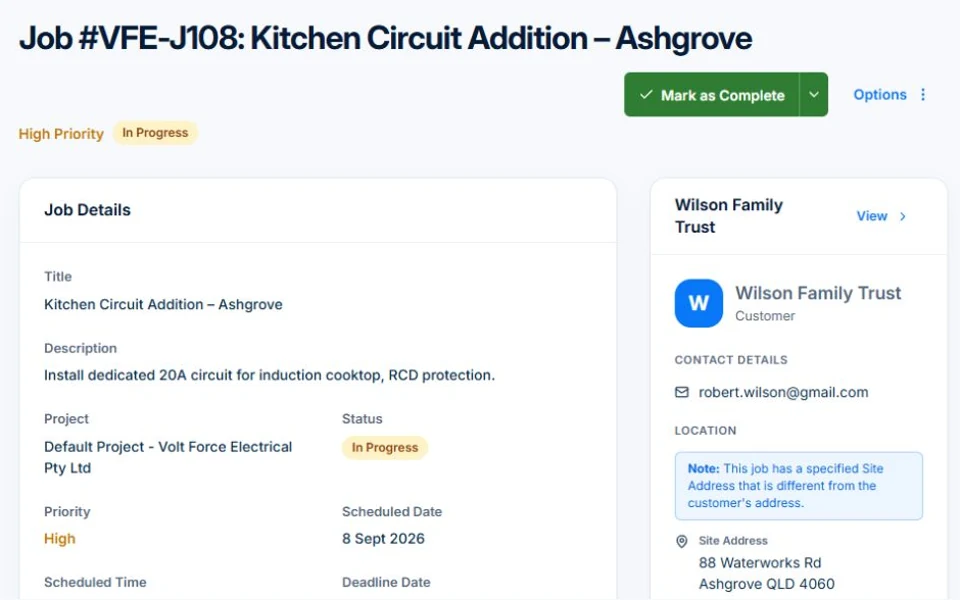
AxiomBlue job detail screen showing time tracking, materials, status, and cost summary

How does job management software work for Australian trade businesses?

AxiomBlue structures every job around a clear lifecycle so your team knows exactly what to do next. Jobs move through defined statuses — pending, scheduled, in progress, paused, completed, and invoiced — and each transition can trigger automatic notifications to crew, customers, or your office team. Instead of chasing updates by phone, everyone sees the same real-time picture.

📋

Job Status Workflow

Move jobs through a clear pipeline from pending to invoiced. Each status change is logged with a timestamp so you have a full audit trail if a customer ever disputes the work or timeline.

📸

Photos, Notes & Documents

Field staff upload site photos and documents directly from their phone. Internal notes stay private to your team while customer-facing documents are visible through the branded portal.

Job Tasks & Sub-Items

Break complex jobs into individual tasks with completion checkboxes. Technicians tick off tasks as they go, giving your office a live view of how far through the job the crew actually are.

What can your team track against each job?

AxiomBlue captures everything that happens on a job — not just hours worked, but materials used, variations raised, signatures obtained, and compliance records issued. That level of detail means you can invoice accurately, defend your costs, and satisfy regulatory requirements without scrambling for paperwork at the end.

⏱️

Time Tracking with GPS

Technicians start and stop timers from their phone and AxiomBlue records the GPS location at check-in and check-out. Billable and non-billable time are tracked separately, and break deductions are applied automatically.

🔧

Materials & Consumables

Link inventory items to a job as they're used, capturing quantity, unit cost, and your markup. Materials costs roll up into the job's profitability report so you always know your true cost of goods.

📝

Variations & Change Orders

Raise variations in the field and send them to the customer for approval via the portal or an on-device signature. Approved variations are tracked separately and can be converted directly to invoice line items.

🏅

Compliance Certificates

Attach electrical safety certificates, plumbing compliance notices, test and tag records, and HVAC refrigerant logs directly to the job. Compliance documents are stored securely and shared with the customer through their portal.

✍️

Digital Signatures

Capture customer signatures on a technician's device at job start, completion, or for variation approvals. Signed records are stored against the job and can be included in the customer-facing summary.

👷

Crew & Subcontractor Assignment

Assign individual technicians, entire crews, or subcontractors to a job with colour-coded identification. Subcontractor time and costs are tracked separately from your own staff for accurate billing on both sides.

How do you see if a job is profitable before it's too late?

AxiomBlue shows you estimated versus actual costs on every job in real time — not after you've already closed it out. As technicians log time and materials, the profitability dashboard updates automatically so you can see exactly where a job is tracking against the quote. If labour hours are blowing out or materials costs are running high, you'll know in time to raise a variation rather than wear the loss at invoice time.

Job templates make it easier to quote accurately on similar work by giving you a baseline built from historical actuals. Recurring job series let you schedule regular maintenance contracts without recreating the job from scratch each time, and the full job history means you can see the cumulative cost and revenue for any customer across every site visit they've ever had.

Can field staff update jobs from their phone on site?

Yes — the AxiomBlue mobile web app is designed for the tools belt, not the office. Technicians can start and stop time, log materials, upload photos, complete tasks, and collect signatures without leaving the job screen. Geofencing support means the system can automatically check crew in when they arrive at a job site and check them out when they leave, reducing the admin overhead on your team and ensuring time entries are accurate even when your crew forgets to tap the button.

Push notifications keep field staff informed when a job is updated, a new task is added, or a variation is approved by the customer. There's no need to call the office — everything flows through the app in both directions. And because AxiomBlue works in a browser, there's nothing to install or update on your crew's phones.

Common Questions About Job Management

Yes. Build a job template once — including tasks, crew, materials, and scheduling rules — and AxiomBlue generates jobs in the series automatically. This is perfect for regular maintenance contracts, monthly inspections, and any repeating service agreement. You can also duplicate individual jobs manually for one-off repeat work.

Yes. AxiomBlue is purpose-built for Australian field service trades including electrical, plumbing, HVAC/refrigeration, general building, and any other trade that runs jobs in the field. Industry-specific features include electrical compliance certificate tracking, plumbing compliance records, and refrigerant usage logs with regulatory reporting for HVAC contractors.

Customers receive a branded portal link unique to their account. They can view the real-time status of their jobs, browse photos and documents uploaded by your team, download invoices and compliance certificates, and approve quotes or variations online. The portal is branded with your business name and removes the need for back-and-forth phone calls about job progress.

Yes. Attach electrical safety certificates, plumbing compliance notices, test and tag records, and HVAC refrigerant logs directly to the job they relate to. Compliance documents are stored securely against the job record and shared with the customer through their portal. Refrigerant tracking includes the usage data required for Australian regulatory reporting.

Variations follow a structured workflow: draft → submitted → approved or rejected → invoiced. Your technician raises the variation in the field, the customer approves it via the portal or on-device signature, and once approved it flows directly into the job's cost tracking. Every variation is time-stamped and auditable so there's no dispute about what was agreed and when.

Yes. Subcontractors can be assigned to jobs alongside your own crew. Their time and materials are tracked separately and AxiomBlue supports separate invoicing workflows so you can manage what your subbies bill you independently from what you charge the end customer. Subcontractor costs roll up into the job profitability report so you always see your true margin.

Ready to Stop Losing Money on Jobs?

See exactly where every job stands, track your true costs in real time, and invoice faster. Start your free trial today — no credit card required.

Explore Live Demo

No credit card required • 14-day free trial • Cancel anytime