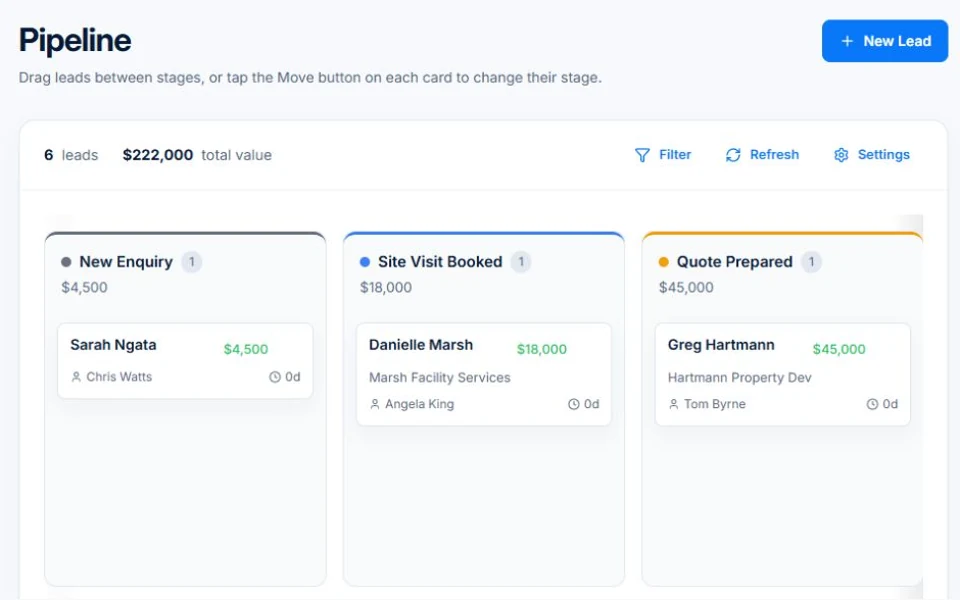
Most trade businesses run their sales process out of memory, sticky notes, and a WhatsApp thread that nobody can find. Leads go cold, follow-ups get forgotten, and it's genuinely impossible to know how much work is in the pipeline at any given moment. AxiomBlue's CRM fixes that with a drag-and-drop kanban board that gives every lead a home, every interaction a record, and every team member a clear picture of what needs to happen next. Built specifically for the way Australian tradies actually sell — fast, relationship-driven, and usually from the back of a ute.

  • Visual kanban pipeline with customisable stages and colours
  • Full activity timeline — emails, calls, meetings, and stage changes
  • Lead source tracking and pipeline value reporting
  • One-click conversion from lead to customer, quote, or job
  • Team assignment and date-range filtering
AxiomBlue CRM Pipeline — drag-and-drop kanban board for trade businesses

What is a CRM and why do trade businesses need one?

A CRM — Customer Relationship Management system — is software that tracks every lead, prospect, and customer interaction in one place. For trade businesses, that means knowing exactly which enquiries you've followed up on, which quotes are still outstanding, which customers haven't heard from you in months, and how much revenue is sitting at each stage of your pipeline. Without a CRM, that information lives in someone's head. When they're on the tools or on leave, it disappears.

📋

Pipeline Board

See every active lead on a single kanban board. Drag cards between stages as deals progress — from New Enquiry through to Won or Lost — and watch your pipeline value update in real time.

👤

Lead Profiles

Each lead stores the customer name, company, contact details, estimated deal value, lead source, and any supporting notes. Everything your team needs is in one place before they pick up the phone.

🔄

Lead Status Workflow

Move leads through a defined status workflow: New → Contacted → Qualified → Proposal → Negotiation → Won, Lost, or Dormant. Terminal states capture loss reasons so you can improve over time.

How does the AxiomBlue sales pipeline work?

The pipeline board is a fully customisable kanban view where each column represents a stage in your sales process. You can rename stages, set custom colours, add new stages, and reorder them to match your workflow exactly. Leads are cards you can drag between columns as they progress. At the top of each column you'll see the total estimated value of all leads sitting there — a real-time snapshot of your pipeline health without opening a single spreadsheet.

🎯

Customisable Stages

Add, rename, reorder, or colour-code every stage to match your sales process. The board reflects how your business actually works, not a generic template.

👥

Team Assignment

Assign leads to individual team members and filter the board by assignee. Each person sees their own work; managers see the whole picture.

📅

Date Filtering & Reporting

Slice pipeline data by 1-month, 3-month, 6-month, or 1-year windows. Report on pipeline value at each stage and understand how deals move through your funnel over time.

How do I track where my best leads come from?

Every lead in AxiomBlue has a Lead Source field — web form, referral, cold call, social media, trade show, Google Ads, and more — plus a Source Detail field for extra context like the name of the person who referred them. The pipeline reporting aggregates this data so you can see which sources generate the most leads, the highest average deal value, and the best close rate.

📊

Lead Source Reporting

See a breakdown of leads and pipeline value by source. Know whether your Google Ads budget is paying off or if referrals are actually driving your best work.

🌐

Multi-Source Lead Capture

Capture leads from your website contact form, manual entry, phone calls, and social platforms. Every lead lands in the same pipeline regardless of where it came from.

💰

Lead Scoring by Value

Estimated deal value is tracked against every lead, so your pipeline report shows not just how many leads came from each source but how much they're worth.

Can I automate follow-ups to leads and prospects?

Yes. AxiomBlue's activity timeline logs every touchpoint automatically — emails sent and received, calls, meetings, stage changes, form submissions, and completed tasks. You can also create follow-up tasks directly linked to a lead, set due dates, and assign them to team members. Nothing falls through the cracks because the system reminds you before it happens rather than after.

For businesses on the Pro or Enterprise plan, AxiomBlue's workflow automation engine takes this further. You can build sequences that send follow-up emails automatically after a set delay, trigger SMS reminders when a lead goes stale, or notify a team member the moment a new enquiry comes in from your website. The automations run in the background while your team focuses on the actual work.

Common Questions About CRM & Sales Pipeline

Yes. You can add, rename, reorder, and colour-code every stage in your pipeline. Whether your process has three steps or eight, the board adapts to the way your business actually sells — not the other way around. Changes take effect immediately and all existing leads stay where they are.

Yes. When you mark a lead as won, you can convert it directly to a quote without re-entering any information. Customer details, contact info, estimated value, and job notes all carry across. The quote is linked back to the original lead so the full sales history is always one click away.

Yes. Every lead has a Lead Source field (web form, referral, cold call, Google Ads, social media, and more) and a Source Detail field for additional context. Pipeline reporting aggregates lead count and estimated value by source so you can see which channels are actually generating revenue — not just traffic.

The activity timeline logs every interaction against a lead in chronological order: emails sent and received, calls, meetings, stage changes, task completions, and web form submissions. It builds automatically — you don't have to write anything up. If someone else picks up the lead, they can read the full history in seconds and know exactly where things stand.

Yes. Each lead can be assigned to any team member in your account. You can filter the pipeline board by assignee so individuals only see their own leads. Managers can toggle to the full team view at any time. Reassigning a lead is a single click and the change is logged in the activity timeline.

When you mark a lead as won, AxiomBlue prompts you to convert it to a customer record with one click. All lead history — the activity timeline, contact details, estimated value, and source information — is preserved and linked to the new customer profile. From there you can create a quote, raise a job, or send an invoice straight away, with zero re-entry.

Stop Losing Leads. Start Closing More Work.

See the AxiomBlue CRM in action on a fully loaded demo — no signup required. When you're ready, your 14-day free trial is one click away.

Explore Live Demo

No credit card required • 14-day free trial • Cancel anytime