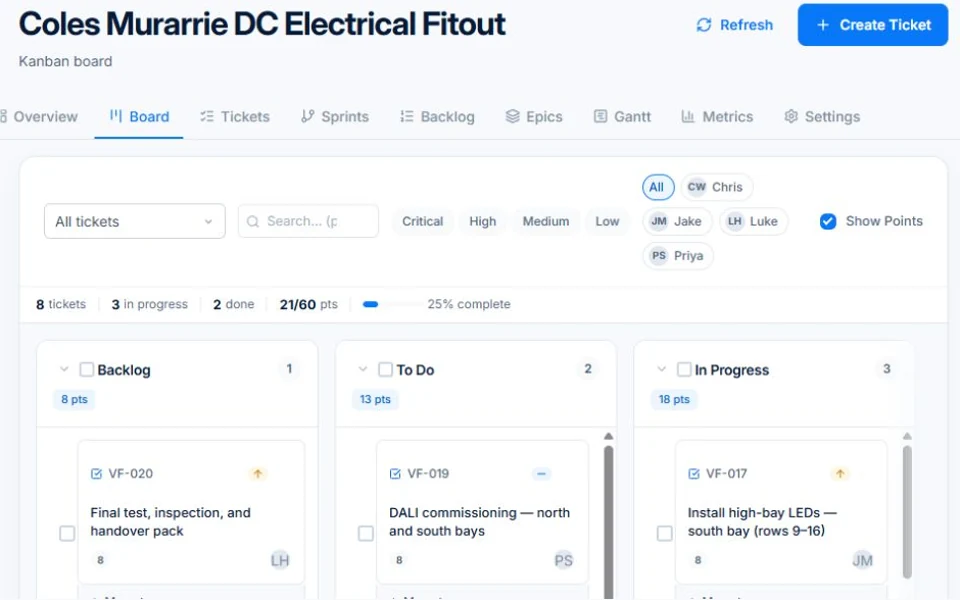
When a job gets complex enough — multiple phases, multiple trades, dependencies between tasks, a client who wants updates — a job card isn't enough. AxiomBlue's project management module gives you a full toolkit: Gantt timelines with dependencies, kanban ticket boards, sprint planning, and a planning wizard that can decompose a project brief into a full task structure automatically.

  • Visual Gantt chart with drag-to-reschedule and dependency tracking
  • Kanban ticket board from backlog through to done
  • Sprint planning with story points, velocity charts, and burndown
  • Epics → features → tickets hierarchy to organise any scale of project
  • AI planning wizard that generates tasks, milestones, and dependencies from a brief
AxiomBlue Gantt Chart — visual project timeline with task dependencies and drag-to-reschedule

How does project management software help trade businesses deliver complex jobs?

Trade projects fail in predictable ways: tasks start before their dependencies are finished, people don't know what they're supposed to be doing next, and the client is left chasing updates. AxiomBlue addresses all three. Dependencies keep your schedule honest, assignees mean every ticket has an owner, and the project view gives clients and stakeholders real-time visibility without any manual reporting effort from your team.

📅

Gantt Chart with Dependencies

Visualise your entire project on a timeline. Define finish-to-start, start-to-start, and other dependency types between tasks. Drag a task to reschedule it and watch knock-on effects cascade automatically.

🗂️

Epics, Features & Tickets

Organise work at the right level. Break a project into epics (major phases), decompose epics into features, and break features into individual tickets. Every level is trackable and reportable.

👤

Assignees & Reporters

Every ticket has an assignee responsible for completing it and a reporter who raised it. Assign tickets to individual team members or crews. Filter the board by person to see anyone's current workload.

⏱️

Time Estimate vs. Time Spent

Set an estimate on each ticket and log time against it as work progresses. See at a glance whether a task is running on time, ahead, or over — before it blows out the whole project budget.

⚠️

Risk Tracking

Log risks at the project level — likelihood, impact, mitigation — and keep them visible throughout the project. Useful for flagging weather dependencies, material lead times, and subcontractor availability risks.

💬

Internal & External Comments

Add comments to any ticket — mark them internal (team only) or external (visible to the client). Keep all discussion in context, attached to the work it relates to, rather than scattered across emails and texts.

What is the difference between kanban boards and Gantt charts in AxiomBlue?

They answer different questions. The Gantt chart tells you when things are happening and whether your schedule is still intact. The kanban board tells you what state each piece of work is in right now. AxiomBlue gives you both, and they're looking at the same tickets — so updating a ticket on the board immediately reflects on the Gantt, and vice versa.

📌

Kanban Ticket Board

Drag tickets through columns: Backlog → To Do → In Progress → In Review → Done. Works well for continuous flow work and for teams who want a simple daily view of what's active. Filter by assignee, label, ticket type, or sprint.

📏

Gantt Timeline View

See all tasks plotted on a horizontal timeline. Collapse and expand epics and features. Drag the start or end date of any task to reschedule it. Dependencies shown as connector lines so the critical path is always visible.

🏷️

Ticket Types & Labels

Classify work as story, task, bug, spike, subtask, milestone, or job. Add free-form labels for further categorisation. Ticket type and labels filter the board and Gantt, so you can focus on what matters at any moment.

How does sprint planning work for trade and construction projects?

Sprints are fixed-length work cycles — typically one to four weeks — where you commit to completing a defined set of tickets. At the start of each sprint, pull tickets from the backlog into the sprint board and set a sprint goal. As work progresses, the burndown chart shows whether you're on track to complete everything before the sprint ends. At close, the velocity chart shows how many story points your team consistently delivers, which makes future planning more accurate over time.

🎯

Sprint Goals & Backlog

Define a clear goal for each sprint and pull the relevant tickets from the backlog. Set sprint start and end dates. The sprint board shows only tickets in the active sprint, keeping the team focused.

📉

Burndown & Burnup Charts

Burndown shows remaining work plotted against time, so you can see immediately if a sprint is falling behind. Burnup shows completed work accumulating toward the sprint target. Both charts update in real time as tickets are closed.

📈

Velocity & Sprint Metrics

Track committed story points vs. completed story points at the end of every sprint. Velocity charts show your team's average throughput over time, so you can plan future sprints with confidence and stop over-committing.

Can AxiomBlue plan a project automatically from a brief?

Yes. The AI planning wizard lets you describe a project in plain language — what you're building, who's involved, key milestones, any constraints — and a team of specialised planning agents does the rest. A strategist agent defines the project scope and phases, an analyst agent breaks phases into features and tickets, a scheduler agent assigns durations and dependencies, a resource agent suggests team members and skills, and a quality agent reviews the output for gaps and conflicts.

The result is a full project structure — epics, features, individual tickets, milestones, and dependencies — ready to review and adjust before you commit. It's not a replacement for your expertise as a builder or contractor; it's a starting point that takes the tedious decomposition work off your plate and gets your project tracking set up in minutes rather than hours. Useful for any complex job where starting from a blank Gantt chart feels daunting.

Common Questions About Project Management

AxiomBlue supports all three. Use Scrum for sprint-based delivery with sprint planning, story points, burndown charts, and velocity tracking. Use Kanban for continuous flow work with a simple board and no sprint cadence. Or run Scrumban — a hybrid that combines the ticket board and backlog of Kanban with the cadence and metrics of Scrum. You choose the approach that fits each project.

Yes. Time estimates and time spent are tracked at the ticket level, so you can see budget burn against individual tasks. Projects link to jobs and invoices in AxiomBlue, meaning actual costs — labour, materials, subcontractor charges — flow through from the field directly into your project financials.

Yes. AxiomBlue supports read-only project view sharing, so clients or subcontractors can see project progress, milestones, and timelines without being able to edit anything. Useful for keeping clients informed without giving them access to your full business data.

Story points are an optional way to estimate the relative effort of a ticket using the Fibonacci sequence (1, 2, 3, 5, 8, 13, 21). They're useful for tracking team velocity and planning sprint capacity over time. If you'd prefer to estimate in hours, you can do that instead — or skip estimates entirely for simpler projects. Nothing in AxiomBlue forces you to use story points.

Yes. Any ticket can have subtasks broken down beneath it, and tickets can be linked with relationship types: blocks, blocked by, relates to, or duplicates. This lets you model real-world dependencies and see at a glance which tickets are waiting on others before work can begin — critical for trade projects where sequencing matters.

Enter a project brief in plain language — what you're building, key milestones, team size, and timeframe. AxiomBlue's planning agents decompose the brief into a full project structure: epics, features, tickets, milestones, dependencies, and suggested assignees. You review and adjust everything before it's committed to the project, so you stay in control of the output.

Ready to Deliver Complex Projects Without the Chaos?

Join Australian trade businesses using AxiomBlue to plan smarter, track progress in real time, and deliver projects on time. Start your free trial today.

Explore Live Demo

No credit card required • 14-day free trial • Cancel anytime