Automation • Professional
Can Invoices Be Created Automatically When a Job Is Finished?
Yes — and the mechanics matter. AxiomBlue builds the invoice from what the job already recorded — time, materials, approved variations — the moment the job is marked complete. This page walks through exactly how the automation runs, and the Friday safety net for anything that slips through.
Quick answerYes — job management software with automation can generate an invoice the moment a job is marked complete, built from the logged time, materials, and approved variations on the job record. AxiomBlue ships this as the Job Completed — Auto-Generate Invoice template on its Professional plan ($59 AUD per seat per month; platform from $29), with a free plan that has no time limit to test it.
Most unbilled work is not disputed work — it is forgotten work. The job finished, the crew moved on, and the invoice joined a mental queue that never quite empties. Automatic invoice generation removes the remembering: marking the job complete is the act of invoicing, because an automation does the rest within moments.
- Fires the moment a job is marked complete — from the office or from a phone on site
- Invoice built from the job record: labour, materials, approved variations, GST applied
- Owners get an in-app notification; the customer gets the invoice by email
- A Friday report catches any completed job that still has no invoice
- Every step editable on a visual canvas — no code
| Key facts — automatic invoice generation in AxiomBlue | |
|---|---|
| Template | Job Completed — Auto-Generate Invoice (shipped, ready to switch on) |
| Trigger | A job is marked complete |
| What the invoice contains | Logged time, price-book materials, approved variations, GST applied |
| Who is told | Owners notified in-app; customer emailed the invoice |
| Safety net | Weekly Unbilled Jobs Report — Friday-afternoon sweep for completed, uninvoiced jobs |
| After payment | Invoice Paid — Thank You Email template closes the loop |
| Accounting | GST automatic; two-way Xero sync; MYOB sync |
| Plan | Professional, $59 AUD per seat per month (platform from $29; free plan with no time limit) |
Can invoices be created automatically when a job is finished?
Yes. In AxiomBlue, the Job Completed — Auto-Generate Invoice automation watches for jobs being marked complete; when one is, it creates the invoice directly from that job's record, notifies the business owners in-app, and emails the customer — all within moments of the status change, with no one touching an invoice screen. It is one of 30+ shipped automation templates on the Professional plan, and there is a step-by-step build walkthrough in the AxiomBlue academy tutorial on auto-generating invoices if you want to see every node configured.
The reason this works — and the reason "automatic invoicing" is not a gimmick — is that AxiomBlue's job and invoice share one record. By the time a job is marked complete, the hours have been clocked (with GPS check-in if crews use it), the materials came off the searchable price book with prices attached, and any extra work was approved by the customer as a variation. The automation is not guessing at line items; it is packaging facts that were captured while the work happened. That is what makes the output an invoice you would actually send, rather than a draft you have to rebuild.
The honest boundary: the automation invoices what the job record holds. If a crew never logs their hours or materials, the invoice generates with what exists. Automatic invoicing rewards the field discipline AxiomBlue's mobile apps are built to make easy — and quietly exposes where that discipline is missing, which most owners consider a feature.
How does the automation run, step by step?
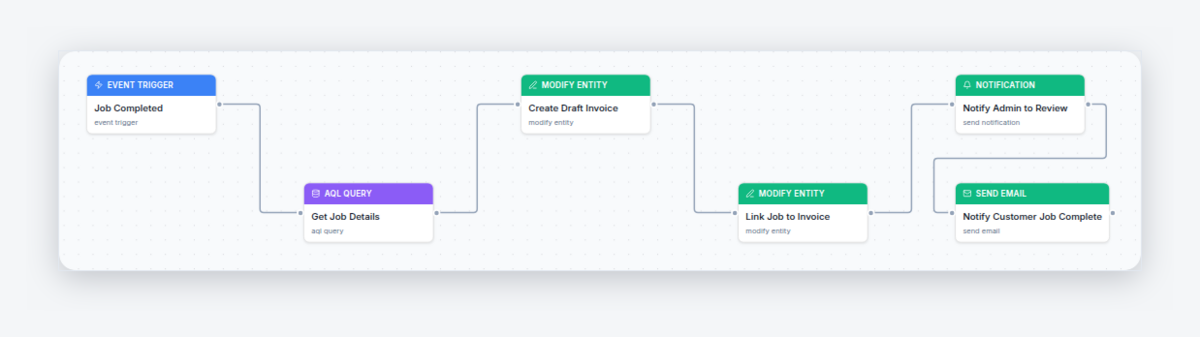
The whole workflow is four plain-English steps on one canvas, and it reads exactly like you would describe it to an apprentice:
1. A job is marked complete
That status change is the trigger. It can come from the office portal or from whoever finished the job, tapping complete in the free iPhone or Android app from the driveway.
2. The invoice is created from the job
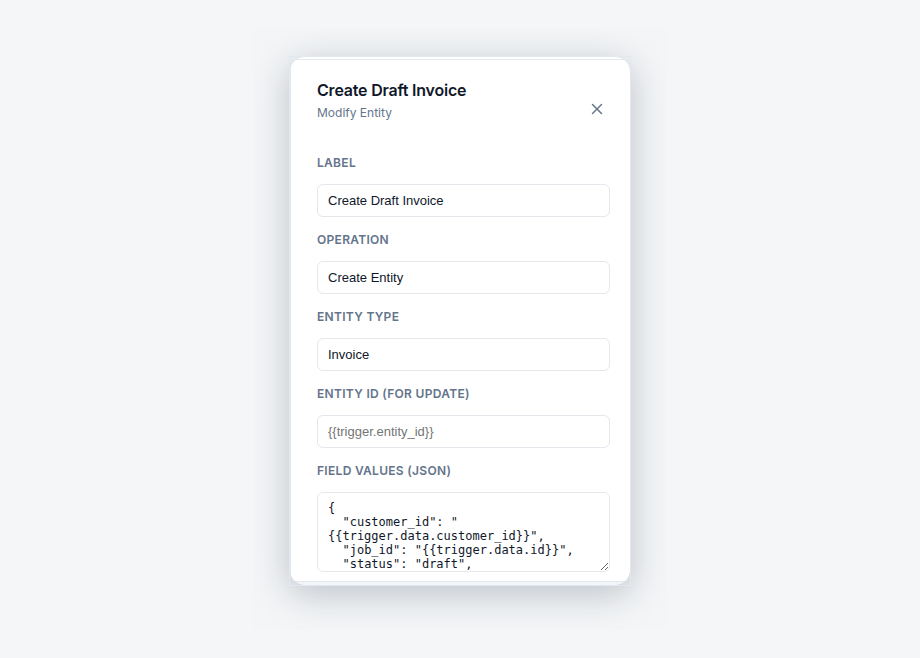
The automation's create-invoice-from-job step builds the invoice off the job record: labour hours, price-book materials, approved variations, GST applied. No typing, no reconstruction.
3. Owners are notified
An in-app notification tells the business owners the invoice exists — so the money side of the business always knows a job just turned into receivables.
4. The customer is emailed
The customer receives the branded invoice by email while the finished job is still fresh — the moment an invoice reads as the natural last step rather than a surprise bill.
Every run is recorded in the automation's execution history — when it fired, which job triggered it, and whether each step succeeded — so "did that job get invoiced?" is a lookup, not an investigation. And because the trigger is the job status itself, the automation fires whether the job was completed at 2pm on a Tuesday or 9pm on a Saturday.
What goes onto an automatically generated invoice?
Everything the job record captured, and nothing it did not: clocked labour, materials logged from the price book with their prices attached, variations the customer approved during the job, and GST applied automatically to the lot. Because the line items come from data recorded at the moment of the work, the invoice is typically more accurate than a hand-written one — the "while you're here" extras that fade from memory between the job and a Friday invoicing batch are already sitting on the record as approved variations.
That accuracy is the underrated half of automatic invoicing. The obvious win is speed — the invoice exists moments after the job ends instead of days later. The quieter win is completeness: nothing gets billed from memory, so nothing gets forgotten out of politeness or haze. The extra power point, the second call-out, the upgraded fittings — if it was captured on the job, it is on the invoice.
The invoice itself behaves like any other AxiomBlue invoice: branded, itemised, GST shown correctly, synced two-way with Xero, and carrying an online payment link so the customer can pay from their phone the moment the email lands.
When should the invoice be generated?
The default — and for most trade businesses the right answer — is immediately on completion, because every day between finishing the work and sending the invoice is a day added to the front of your payment cycle for no reason. The template fires the moment the status changes, so the payment clock starts the day the work finished.
But "immediately" is a default, not a rule. Open the template in the visual editor and the timing is yours: add a delay step if you want a gap between completion and the customer email, or remove the customer-email step entirely so the automation generates the invoice and notifies the owners, and a human reviews and sends. That review-first variant is popular with businesses moving to automation for the first time — you keep the guarantee that every completed job produces an invoice, while keeping a person's eyes on it before it leaves. Once you have watched it get the invoice right for a few weeks, most businesses delete the training wheels.
One configuration worth stating plainly: this is per-workflow, not per-plan. You are not choosing between "fully automatic" and "fully manual" as a product setting — you are editing steps on a canvas, and any mix in between is a valid workflow.
How do you catch jobs that never got invoiced?
With a second automation that assumes the first one is not the whole answer: AxiomBlue's Weekly Unbilled Jobs Report runs on a Friday-afternoon schedule, queries for every job that is completed but has no invoice against it, and sends the owners an in-app report listing them. It is a scheduled sweep, not an event trigger — which is exactly why it catches the cases an event-based automation cannot.
Because there are always cases. A job completed before you switched the automation on. A workflow someone paused while editing it. An invoice that was generated and then deleted during a dispute. An older job closed out with a manual process. Event-driven automation handles the flow going forward; the Friday report audits the stock of everything that exists, every week, and puts the leaks in front of the people who care about them — before the weekend, not at BAS time when the quarter's revenue looks mysteriously light.
Run together, the pair change the failure mode of invoicing. Without them, an unbilled job fails silently and forever. With them, the worst case is that a job stays unbilled for a few days and then appears on a Friday list. That is the difference between a system that relies on memory and a system that audits itself.
What happens after the invoice goes out?
The invoice's afterlife can be automated too, in both directions. On the happy path, AxiomBlue's Invoice Paid — Thank You Email template fires the moment an invoice is paid and sends the customer a thank-you — a thirty-second courtesy no busy office ever does manually, and exactly the note that makes a customer feel like paying promptly was noticed.
On the unhappy path, an overdue invoice can trigger an automated chase: email and SMS to the customer, a wait, a check that it is still unpaid, then escalation to the owners. That workflow has its own full walkthrough in the overdue invoice reminders guide — it is the natural companion to this page, because generating the invoice promptly and chasing it persistently are the two halves of getting paid without spending your evenings on it.
Put end to end, the sequence looks like this: job completed → invoice generated and emailed within moments → paid invoices get a thank-you → overdue invoices get chased automatically → anything uninvoiced surfaces on Friday's report. Every arrow in that chain is a shipped AxiomBlue template, and none of them needs a person to remember anything.
Can it handle milestone or progress billing?
Partly — and it is worth being precise, because this is where automatic-invoicing marketing usually overclaims. AxiomBlue's Project Milestone Reached — Invoice Phase template fires when a project milestone is reached: it pulls the billing detail for that phase, records the phase invoice detail against the project, emails the customer, and notifies the owners. What it does not do is send a finished milestone invoice by itself.
For staged work — a renovation billed at deposit, rough-in, and completion, say — that means the automation does the remembering and the paperwork preparation: the moment a phase is done, the billing detail for that phase is assembled and everyone who needs to act knows. A person then raises and sends the invoice, with the phase detail already recorded rather than reconstructed from the contract. For single-visit service work, the full Job Completed — Auto-Generate Invoice flow at the top of this page remains the complete, end-to-end answer.
If a vendor tells you milestone billing is fully hands-off, ask to see the run history. Progress claims involve contract terms, retention, and judgement calls that belong with a human — the right job for automation is making sure the human is prompted at the right moment with the right numbers, which is exactly what this template does.
How does automatic invoicing compare with doing it by hand?
The honest comparison is not just speed — it is what each approach forgets. Accounting software alone can raise beautiful invoices, but it has no idea a job just finished; the connection between "work done" and "invoice raised" still lives in someone's head.
| Manual batch invoicing | Accounting software alone | AxiomBlue automation Job-triggered | |
|---|---|---|---|
| When the invoice is created | Days later, in a batch | Whenever someone remembers to raise it | ✓ Moments after the job is marked complete |
| Where line items come from | Memory and loose dockets | Typed in by hand | ✓ The job record: time, materials, approved variations |
| Knows a job just finished | Only if someone tells it | No — it never sees the job | ✓ The job status change is the trigger |
| Jobs that slip through unbilled | Found at BAS time, if ever | Invisible — no job list to check against | ✓ Surfaced on the Friday Unbilled Jobs Report |
| Follow-up when unpaid | Awkward phone calls, eventually | Reminder features, manually configured per invoice | ✓ Overdue chaser automation, business-wide |
| Accounting sync | Double entry | Native, but disconnected from jobs | ✓ Two-way Xero sync; MYOB sync |
Can I change how the automation works?
Yes — every template is a starting point on a visual drag-and-drop canvas, not a locked feature. Open Job Completed — Auto-Generate Invoice in the editor and each step is a node you can reword, retime, remove, or add to: change the customer email's wording, insert a delay, drop the auto-send in favour of owner review, or add an SMS step alongside the email. There is no code and no formulas; if you can describe the workflow out loud, you can build it. A test-run mode simulates the workflow against a real record before it goes live, and the execution history shows every run afterwards.
What does automatic invoice generation cost?
Automation is part of AxiomBlue's Professional plan at $59 AUD per seat per month — that includes the whole template library (30+ workflows), the visual builder, and the execution history, alongside two-way Xero sync and the full CRM pipeline. The platform itself starts at $29 AUD per seat per month on Basic, which includes invoicing but not automation. There is a free plan with no time limit and no credit card, so you have as long as you need to switch this template on, complete a week of real jobs, and watch the invoices raise themselves before you pay anything.
Automatic Invoice Generation — Common Questions
Yes. AxiomBlue ships a ready-made automation template called Job Completed - Auto-Generate Invoice. When a job is marked complete, it creates the invoice from the job record - the logged time, materials, and approved variations are already on it - then notifies the business owners in-app and emails the customer. Nobody has to remember to raise it.
Everything already captured on the AxiomBlue job record: clocked labour hours, materials logged from the price book with their prices attached, and any variations the customer approved during the job, with GST applied automatically. The automation is not inventing line items - it is turning facts recorded while the work happened into an invoice.
As shipped, yes - the template creates the invoice, notifies the owners in-app, and emails the customer. If you would rather review every invoice before it leaves the building, open the template in AxiomBlue's visual editor and delete the customer-email step; the automation then generates the invoice and alerts you, and a person does the sending.
AxiomBlue has a second template for exactly that gap: the Weekly Unbilled Jobs Report. Every Friday afternoon it queries for jobs that are completed but have no invoice, and sends the owners an in-app report listing them. Whatever slipped through during a busy week surfaces before the weekend, not at BAS time.
Yes. GST is applied automatically on every AxiomBlue invoice, whether a person created it or an automation did, and invoices sync two-way with Xero (MYOB sync is also available). An automatically generated invoice lands in your accounting file the same way a hand-raised one does.
Partly, and AxiomBlue is honest about the boundary. The Project Milestone Reached - Invoice Phase template fires when a project milestone is reached: it pulls the billing detail for that phase, records it against the project, emails the customer, and notifies the owners. It prepares the phase billing and tells everyone - a person still raises and sends the milestone invoice.
Automation templates, including Job Completed - Auto-Generate Invoice, are part of AxiomBlue's Professional plan at $59 AUD per seat per month. The AxiomBlue platform starts at $29 AUD per seat per month on the Basic plan, which includes invoicing itself but not automation. There is a free plan with no time limit, and no credit card is required to start.
Yes - AxiomBlue has free native apps for iPhone and Android covering the field workflow, including marking jobs complete, which is the event that triggers automatic invoice generation. The full platform also runs in any web browser, so office staff and anyone who prefers not to install an app use the same always-current system.
Stop Leaving Finished Jobs Unbilled
Switch on the template, finish a week of real jobs, and watch every one of them turn into an invoice without you touching a thing. The Friday report will tell you if anything slips - it won't.
No credit card required • Free plan, no time limit • Cancel anytime